
Send a Text From Shortcuts Without Confirmation
By Fwrd · · Updated
To send a text from Shortcuts without confirming it, turn off two things: the automation’s own prompt (Confirm Before Run on iOS 27; on iOS 26, choose Run Immediately), and Show Compose Sheet on the Send Message action. With both off, the message goes out the moment the automation runs.
What you need: an iPhone with the Shortcuts app (it’s already on your phone) and an automation with a trigger Apple lets run on its own, such as Message, Time of Day or Arrive. To use Fwrd as well, you need iOS 26 or later.
Why does Shortcuts ask before sending a message?
Because there are two separate prompts, and each has its own switch. One belongs to the automation, the other to the Send Message action inside it.
- The automation asks to run. Apple’s intro to personal automation says a new automation sends you a notification asking you to run it, unless you edit it to run without asking.
- The action asks to send. Apple’s page on running automations without asking adds that you may also need to set individual actions to run automatically. For Send Message, that’s the compose sheet: with it on, Messages opens the text and waits for you to tap send.
Turning off only one of them is the usual reason a “silent” automation still stops.
| What you see | Where it comes from | What to switch off |
|---|---|---|
| A notification asking you to run the shortcut | The automation | iOS 27: Confirm Before Run. iOS 26: choose Run Immediately |
| Messages opens with the text typed, waiting | Apple’s Send Message action | Show Compose Sheet |
| Mail opens a draft | Apple’s Send Email action | Show Compose Sheet |
| “Which one?” about a contact | A contact with more than one number | Pick one number for the recipient |
How to make Shortcuts send a message automatically
These steps build a Message automation that uses Fwrd to send each matching text to another phone. The same two switches work for any trigger Apple lets run without asking.
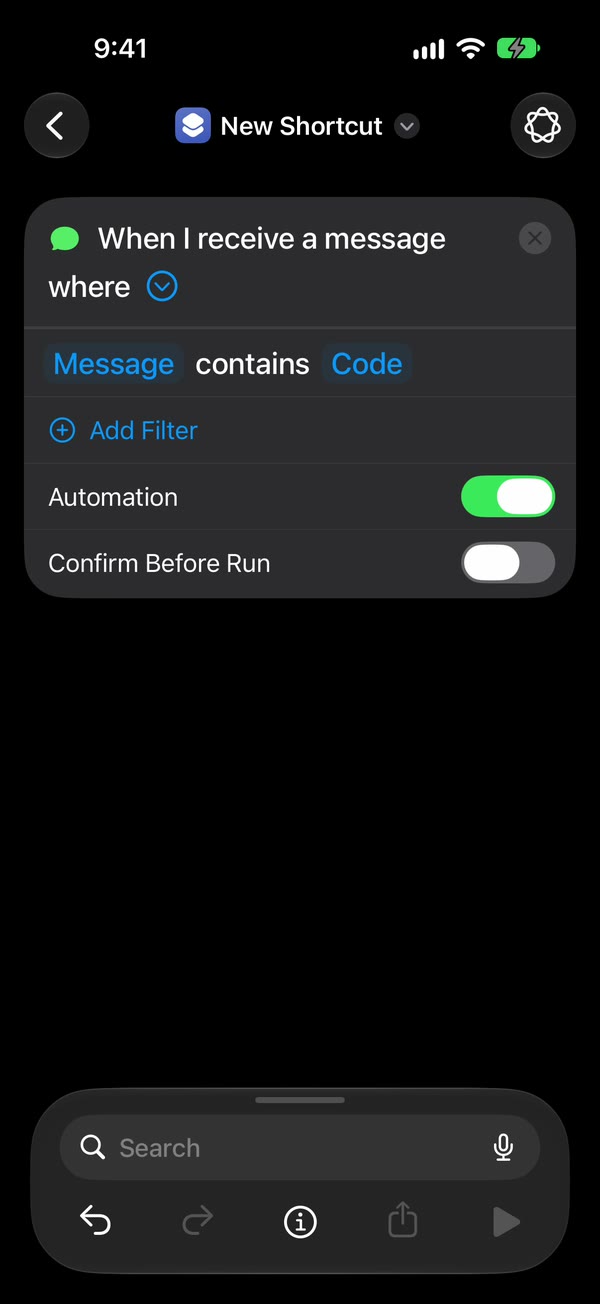
Create the automation. On iOS 27, open Shortcuts, tap Library, then Automation, then +. If you see Describe a shortcut, tap Edit. Tap Automation, then Message. On iOS 26, open the Automation tab, tap +, and choose Message.
Choose which texts trigger it. Choose Message Contains (on iOS 27, change Sender to Message), then type a word your texts contain, such as code. Apple’s Message trigger runs on a sender or on words in the message.
Make it run without asking. On iOS 27, tap the arrow beside the trigger and check that Confirm Before Run is off. Under ⓘ, then Privacy, check that Allow Running When Locked is on. On iOS 26, choose Run Immediately, then tap Next.
Add Fwrd’s action, then Apple’s Send Message. First add Fwrd’s Forward Message to All Destinations with its Message set to Shortcut Input, and an Another Phone destination in Fwrd. Below it, search for Send Message and tap Apple’s, the one with the green Messages icon. Set its Message to Forward Message to All Destinations, and its Recipients to one number.
Turn off the compose sheet. Tap the arrow at the end of Send Message and check that Show Compose Sheet is off. It’s off to begin with on iOS 27.
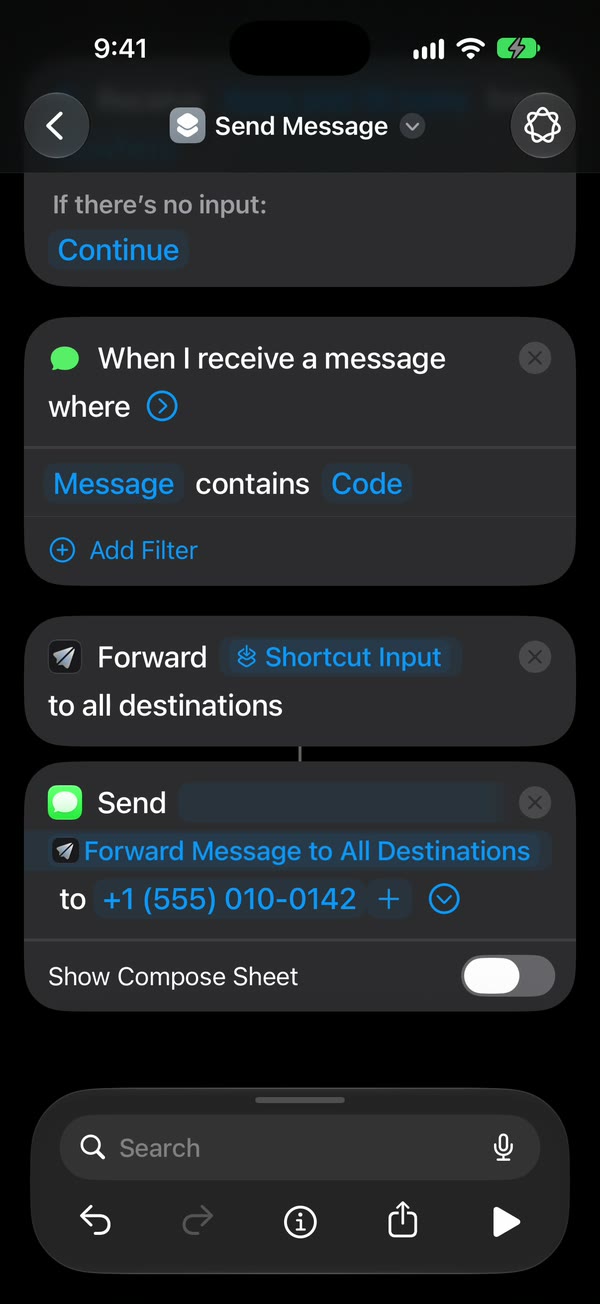
That’s it. Tap back to save (Done on iOS 26). New texts with your word now go to that number on their own, with no tap from you.
The automation guide shows the iOS 26 and iOS 27 screens side by side.
Can Shortcuts send a WhatsApp message without confirmation?
Yes. Add a WhatsApp destination in Fwrd, then WhatsApp’s own Send Message action below Fwrd’s. It has no compose sheet or confirmation switch, so once the automation runs without asking, it sends straight away from your personal WhatsApp account.
Two things trip people up:
- Pick the right action. Search for WhatsApp, tap the WhatsApp app, then choose Send Message. Send Message via WhatsApp is an older action: it opens WhatsApp with the message and leaves it there.
- Pick one number. If the contact has more than one WhatsApp number, tap › next to it and choose one. Otherwise Shortcuts asks “Which one?” every time.
The WhatsApp guide shows every tap.
How does this fit with Fwrd’s other destinations?
Fwrd’s Email, another phone and WhatsApp destinations rely on exactly these switches. Fwrd’s action runs first and hands the text to Apple’s or WhatsApp’s send action, which does the sending. For email, use Send Email, type a subject, and turn Show Compose Sheet off.
Slack, Discord, Telegram, Microsoft Teams and your own webhook work differently. Fwrd posts to those itself, straight from the iPhone, so there’s no send action and no compose sheet to switch off. Every destination can keep only some texts: ones with words you choose, ones that look like a verification code, or ones that arrive at certain hours. A text a filter skips doesn’t use a free forward. For Email, another phone and WhatsApp, put the send action inside an If set to “Forward Message to All Destinations has any value”, then turn on I Added the If in that destination’s Which Texts.
What these switches can’t do
- Not every trigger can run on its own. Apple lists the ones that can, Message, Email, Time of Day, Arrive and Leave among them. On iOS 26, Before I Commute always asks.
- Prompts you add still show. Ask for Input, Show Alert and the Ask Each Time variable show or ask for something while the shortcut runs, as Apple’s guide to using prompts explains.
- One recipient list per action. Send Message goes to the people you set in the action. Add another action for a different person.
- The iPhone does the sending. It has to be on when the automation runs, and online for email, iMessage or WhatsApp. After a restart, unlock it once before Fwrd’s destinations work again.
Questions people ask next
Why does a notification still ask me to run it?
The automation itself is set to ask. On iOS 27, tap the arrow beside the trigger and turn Confirm Before Run off, and check Allow Running When Locked is on under ⓘ, then Privacy. On iOS 26, choose Run Immediately (if you see Notify When Run, turn it off). Apple says Message is among the triggers that can run without asking.
Why does Messages open instead of sending?
Show Compose Sheet is on in the Send Message action. Tap the arrow at the end of the action and turn it off. With it on, Messages shows the text and waits for you to tap send.
Does it work when my iPhone is locked?
Yes, with Fwrd’s routes, as long as the automation runs without asking and no action stops to ask. A compose sheet or a “Which one?” question can’t be answered on a locked screen, so turn those off first. After a restart, unlock the iPhone once.
Does it cost anything?
Fwrd is free for 15 forwards a month, and a text counts once however many places it goes. Fwrd Pro removes the limit for $4.99 a month or $29.99 a year in the US.
Want new texts sent on without a single tap?
Fwrd adds one action to Shortcuts that sends matching new texts to Slack, Discord, Telegram, email and more. Start with 15 free forwards each month.
Free for 15 forwards a month. Pro removes the limits on forwards and filters and adds a Never Forward list, for $4.99/month or $29.99/year, with a 7-day free trial on the yearly plan for eligible customers.
iPhone · iOS 26 or later