
Can an iPhone automatically forward texts?
By Fwrd ·
Yes, an iPhone can automatically forward texts, but there’s no switch for it in Settings. You set it up once in Apple’s Shortcuts app: a Message automation runs whenever a matching text arrives and hands it to an action that sends it on, to another phone or to a Discord, Telegram or Slack chat. iPhone’s built-in Text Message Forwarding is something else: it only shows your texts on your own Mac or iPad.
What you need: an iPhone, the Shortcuts app (it’s already on your phone), and a few minutes. To forward to Discord, Telegram or Slack, you also need Fwrd (iOS 26.2 or later) and a channel or chat to send to.
What iPhone can forward on its own
iPhone has two built-in ways to forward texts. Neither sends them to someone else automatically.
- By hand, one at a time. Touch and hold a text, tap More, tap the Forward button, and pick who gets it.
- Text Message Forwarding. Open Settings, then Apps, then Messages, then Text Message Forwarding. It lets a Mac or iPad signed in to the same Apple Account send and receive your iPhone’s texts. It can’t send them to another person, an Android phone, or a chat app.
If you want texts to land somewhere else without you doing anything, you need a Shortcuts automation.
How to make your iPhone automatically forward texts
These steps use Fwrd to send each text to Discord, Telegram or Slack. The automation itself is the same whatever you forward to.
Add a destination in Fwrd. Open Fwrd, tap +, and choose Discord, Telegram or Slack. Paste the channel’s webhook URL for Discord or Slack, or your bot token and chat ID for Telegram. Tap Send Test Message to check it arrives, then save with the tick.
Create a Message automation. On iOS 27, open Shortcuts, tap Library, then Automation, then +. If you see Describe a shortcut, tap Edit. Tap Automation, then Message. On iOS 26, open the Automation tab, tap +, and choose Message.
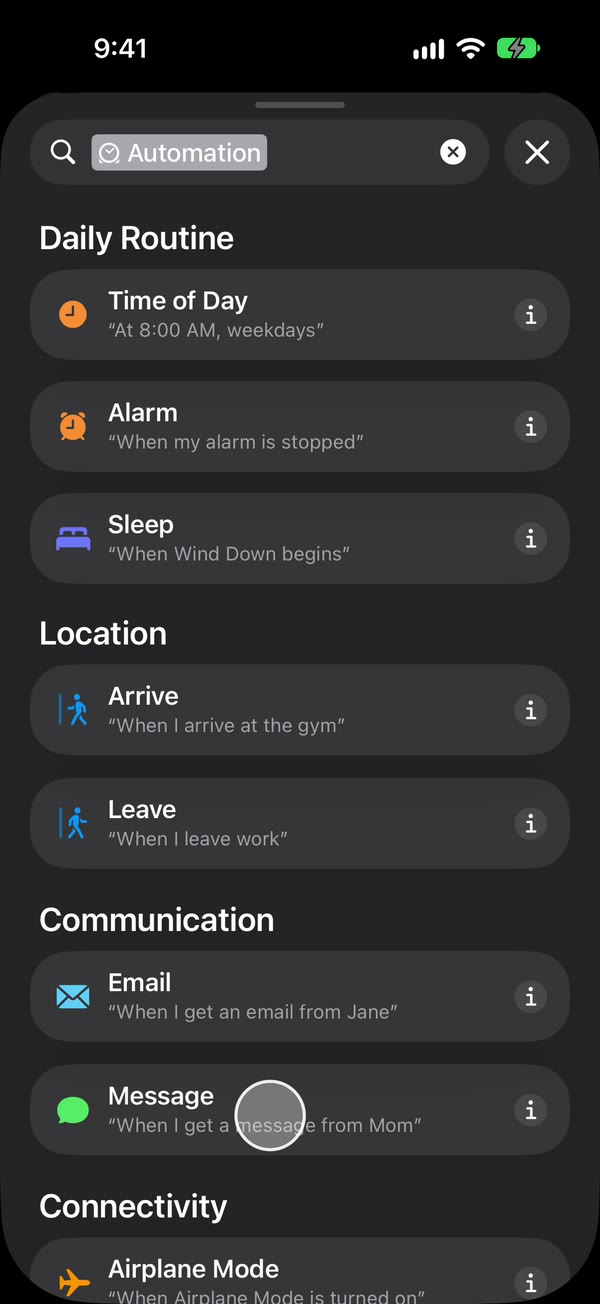
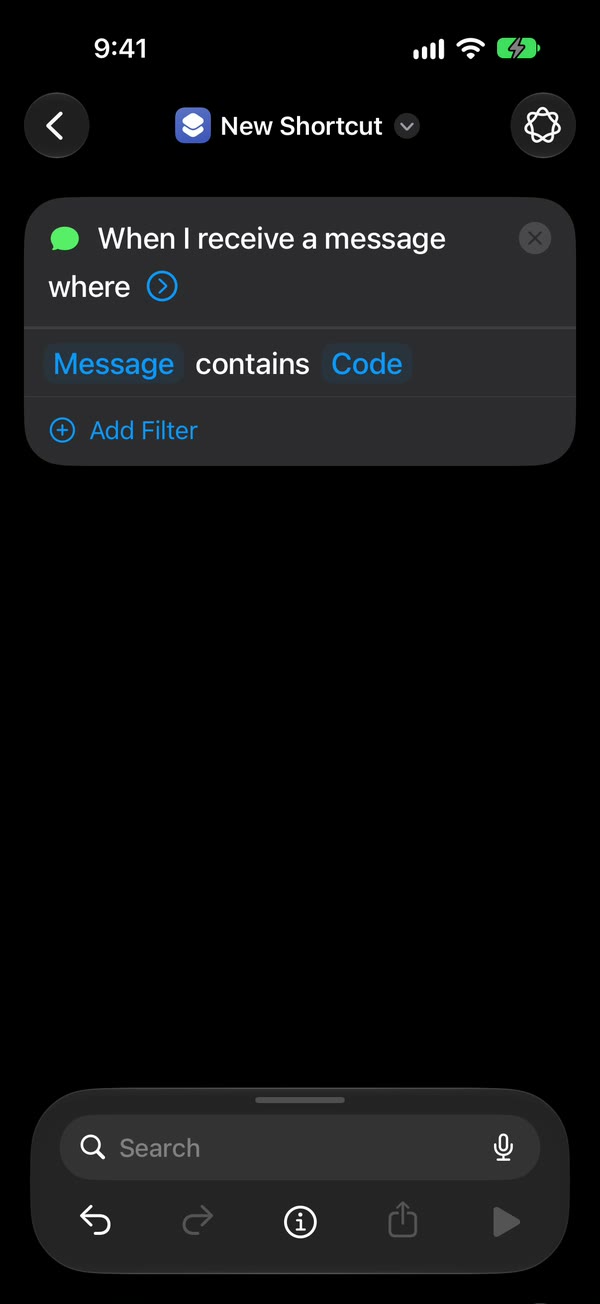
Choose which texts to forward. Choose Message Contains (on iOS 27, change Sender to Message), then type a word your texts contain, such as code. To forward any text with a space in it, type a single space instead.
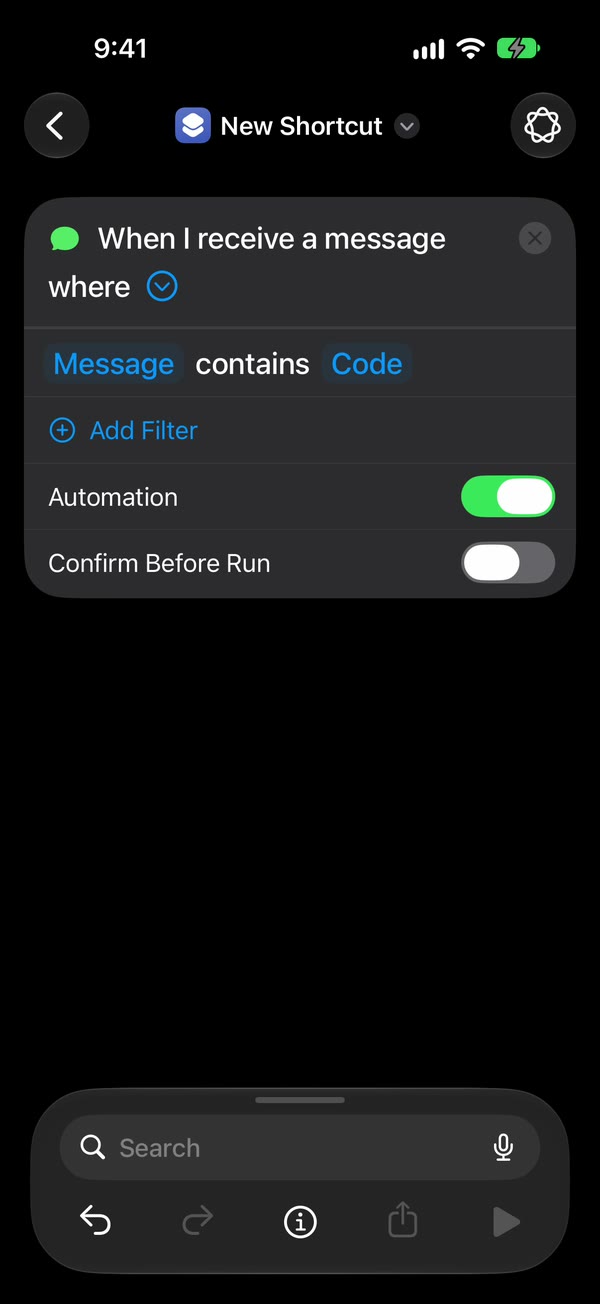
Make it run without asking. On iOS 27, tap the arrow beside the trigger and check that Confirm Before Run is off. On iOS 26, choose Run Immediately and turn off Notify When Run.
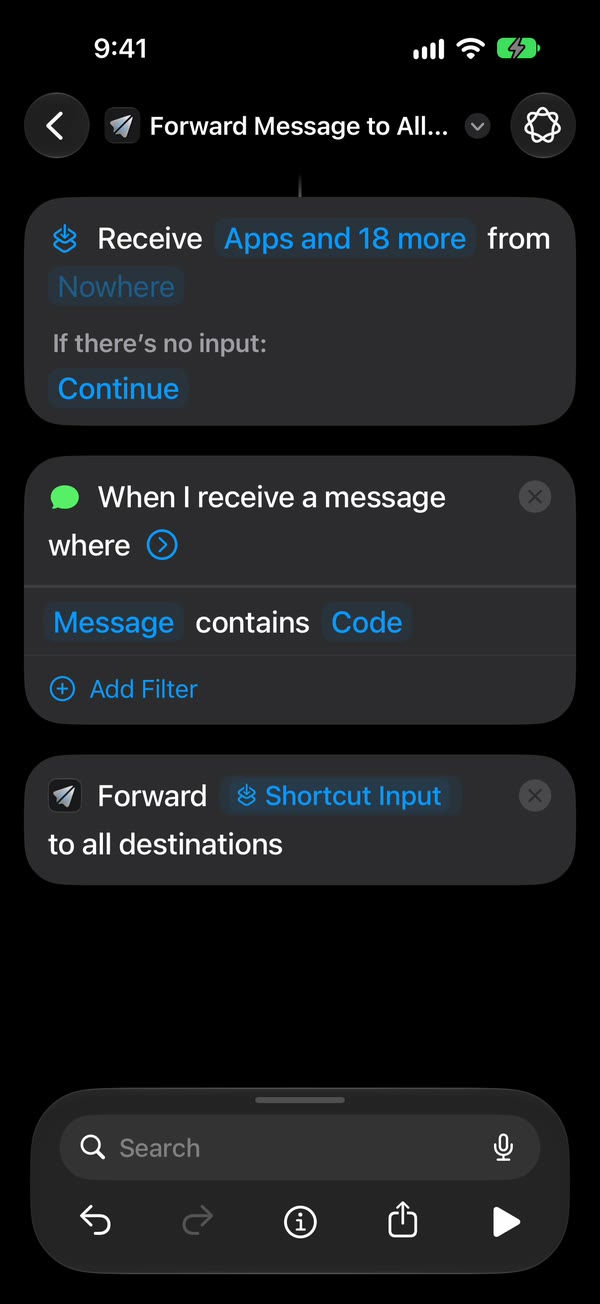
Add Fwrd’s action. Search for Forward and add Fwrd’s Forward Message to All Destinations. Tap its Message field and choose Shortcut Input (on iOS 26, Shortcut Input, then Message).
Test it with a real text. From another phone, send the iPhone a text that matches your word, and check it shows up in your channel. Then lock the iPhone and send another.
The free way: Apple’s own actions
You don’t need an app to forward texts. The same automation can end with one of Apple’s actions instead of Fwrd’s:
- Send Message forwards each text to another phone number, Android included. Tap the arrow on the action and check Show Compose Sheet is off (on iOS 26 it’s called Show When Run), or Messages waits for you to tap send.
- Send Email forwards it to an email address from the Mail account on your iPhone. Type a subject and turn Show Compose Sheet off, or Shortcuts stops and waits for you.
- Get Contents of URL can post a text to a Discord or Slack webhook, if you set the method to POST and build the JSON body yourself.
That works, and it costs nothing. Here’s what Fwrd adds on top:
- One action sends to all your active destinations, in the format Discord, Telegram and Slack each expect.
- Webhook URLs and bot tokens stay in the iPhone’s Keychain instead of sitting in a shortcut.
- If a send times out, or the service is busy or briefly down, Fwrd tries again, up to twice.
- A history on the phone shows each forward and whether it was delivered.
- Send Test Message checks a destination before you rely on it.
The limits to know
- No app can read your texts on its own. iOS doesn’t allow it. The Shortcuts automation is what hands each text over, which is why you set it up yourself, once.
- Shortcuts needs a rule. It acts on texts that contain a word you pick, or that come from people in your Contacts. A single space catches any text with a space in it, so a text with no spaces, like a one-word reply or a bare link, won’t match.
- The phone has to stay on and online. Wi-Fi or mobile data both work, but the iPhone that gets the texts must be on and connected when they arrive.
- After a restart, unlock it once. iPhone keeps saved passwords locked until the first unlock, and Fwrd keeps your destinations behind the same lock, so forwarding waits until then. An iPhone that isn’t unlocked for three days restarts itself, too.
- Text only, and one way. Pictures don’t forward, and you can’t reply through the forward. Replies still come from the iPhone itself.
Questions people ask next
Does it work when my iPhone is locked?
Yes. We’ve tested Discord, Telegram and Slack end to end on a physical iPhone, unlocked and locked. The exception is right after a restart: forwarding starts again once you’ve unlocked the phone one time.
Can I forward texts to an Android phone?
Yes. Add Apple’s Send Message action to the automation with the Android phone’s number, and each matching text goes to it. Text Message Forwarding can’t do this, because it only works with your own Apple devices. You can also forward to a Discord, Telegram or Slack chat and read it on any phone.
Will the forwarded text show who sent it?
No. Fwrd sends the message text exactly as it arrived, without the sender’s name or number. Many code, delivery and bank texts name the service in the text itself, so you can still tell where they came from.
Does it cost anything?
Shortcuts and Apple’s own actions are free. Fwrd is free for 15 forwards a month. Fwrd Pro removes the limit for $3.99 a month or $29.99 a year in the US, with a 7-day free trial on the yearly plan for eligible customers.
Forward your texts with Fwrd
Fwrd sends the texts you choose from your iPhone to Discord, Telegram or Slack. No account, and no Fwrd server in the middle.
Free for 15 forwards a month. Pro removes the limit for $3.99/month or $29.99/year, with a 7-day free trial on the yearly plan for eligible customers.
iPhone · iOS 26.2 or later