
How to Forward All Texts From One iPhone to Another
By Fwrd · · Updated
To forward all texts from one iPhone to another, set up a Shortcuts Message automation on the iPhone that receives them, have it run for any text with a space in it, and end it with Apple’s Send Message to the iPhone you carry. Put Fwrd’s action in the middle and each forward starts with who sent it, instead of looking like a text from your other number. It forwards new texts one way, and the iPhone that does the forwarding has to stay on and online.
What you need: the second iPhone (a work phone, a business line or an old number) on iOS 26 or later, with its SIM and on Wi-Fi or mobile data; the number of the iPhone you carry; and Fwrd on the second iPhone. The iPhone you carry needs nothing new.
Why forward everything instead of a few texts?
Because the point is to leave the second iPhone behind and still miss nothing. Most forwarding setups pick texts by a word such as code. That suits sign-in codes, but a second line you don’t carry gets everything: customers, deliveries, appointment reminders, the odd personal text. A single space as the rule forwards nearly all of it.
If you mean moving your old messages to a new iPhone, that’s a different job: Apple’s Messages in iCloud keeps your messages up to date across your own devices (Apple). This post is about new texts on a phone you keep using.
If the second iPhone belongs to your employer, ask before you forward anything from it. The work phone post covers what to check.
How to forward all texts to the iPhone you carry
Add your main iPhone in Fwrd. On the second iPhone, open Fwrd, tap +, and choose Another Phone. Scroll down to Recipient Reference, enter the number of the iPhone you carry, and save with the tick.
Turn on Include Who Sent It in Fwrd’s Settings. Without it, every forward just shows the second iPhone’s number.
Create a Message automation. On iOS 27, open Shortcuts, tap Library, then Automation, then +. If you see Describe a shortcut, tap Edit. Tap Automation, then Message, and change Sender to Message. On iOS 26, open the Automation tab, tap +, and choose Message.
Type a single space. That forwards any text with a space in it, which is nearly every text. A one-word reply such as “OK” has no space and stays behind.
Let it run without asking. On iOS 27, tap the arrow beside the trigger and check Confirm Before Run is off, then under ⓘ, then Privacy, check Allow Running When Locked is on. On iOS 26, choose Run Immediately, then tap Next and Create New Shortcut.
Add Fwrd’s action. Search for Forward and add Forward Message to All Destinations. Set its Message field to Shortcut Input (on iOS 26, Shortcut Input, then Message), and choose Sender on Fwrd’s action.
Add Apple’s Send Message below it. Set its Message to Forward Message to All Destinations, Fwrd’s output, and its Recipients to your main iPhone’s number. Tap the arrow and check Show Compose Sheet is off, or Messages waits for you to tap send. Tap back to save (Done on iOS 26).
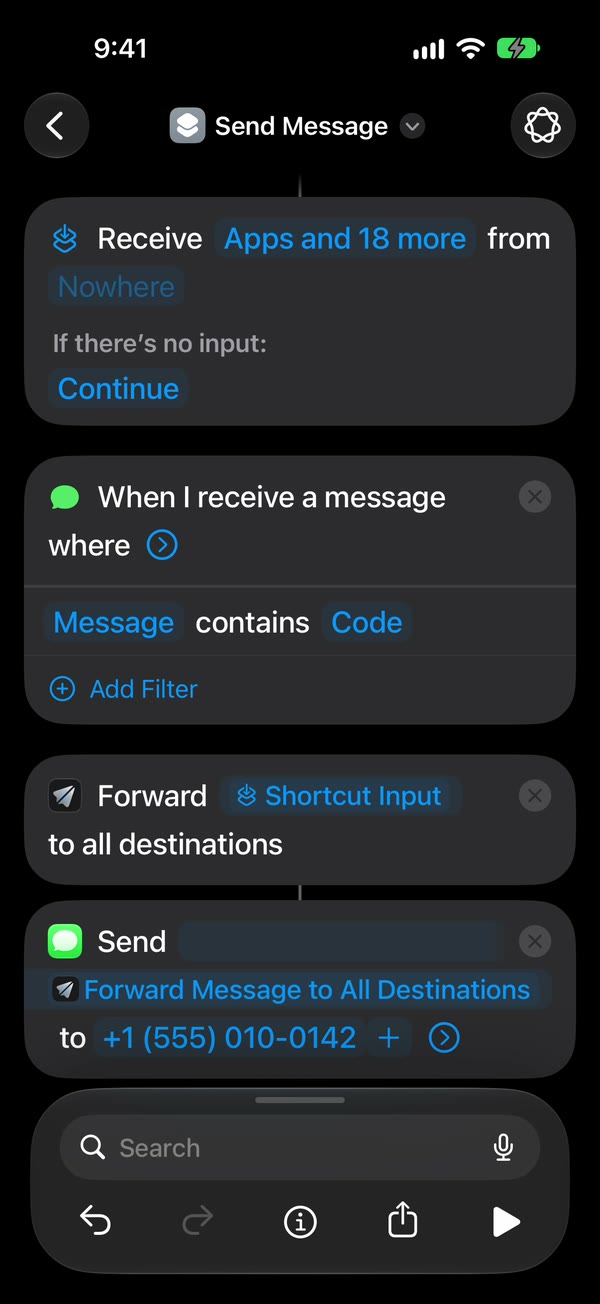
That’s it. Every new text to the second iPhone now reaches the one you carry on its own, with a From: line, whether the second iPhone is unlocked or locked.
The phone guide shows each of these taps on video.
Your Messages app, or a separate inbox?
Sending to your own number is the simplest, but the forwards land in one long conversation with the second iPhone. A chat app keeps them apart.
| Your main iPhone’s number | A Telegram, Slack or Discord chat | |
|---|---|---|
| What sends it | Apple’s Send Message, after Fwrd | Fwrd, straight from the second iPhone |
| Where forwards land | One Messages thread with the second iPhone | Their own chat |
| Filters | Fwrd’s filters too, once Send Message sits inside an If | Fwrd’s filters too, for words, codes or hours |
| Good for | Seeing everything where you already text | Keeping the second line out of your personal texts |
For a chat, add it in Fwrd instead of Another Phone and skip Send Message. Fwrd posts there itself, or to any of its eight destinations at once, and one text counts once however many places it goes.
Keep the second iPhone forwarding
- Leave it on power and Wi-Fi. It can sit in a drawer, but not with a flat battery.
- Unlock it after any restart. Until someone unlocks it once, Fwrd can’t forward. An iPhone that isn’t unlocked for three days restarts itself, so pick it up every couple of days.
- Turn off automatic iOS updates. In Settings, open General, then Software Update, then Automatic Updates. An update restarts the phone.
About the free plan: Fwrd forwards 15 texts a month for free, and forwarding everything from a busy line usually passes that within days. The alert saying so appears on the second iPhone, not the one you carry. Fwrd Pro removes the limit for $4.99 a month or $29.99 a year in the US, with a 7-day free trial on the yearly plan for eligible customers. You buy it on the second iPhone.
What forwarding all texts can’t do
- It can’t reply as the second number. A reply from your main iPhone comes from its own number and goes to the second iPhone, not to the person who texted. Because the rule forwards everything, that reply then comes straight back to you.
- It can’t forward old texts, only new ones, and only their words: pictures stay behind.
- It doesn’t forward calls. Call forwarding is your carrier’s setting; the call forwarding post explains it.
- Fwrd’s filters need one extra step for Another Phone. Put Send Message inside an If set to “Forward Message to All Destinations has any value”, then turn on “I Added the If” in its Which Texts. Until then the automation’s rule decides what goes.
Questions about forwarding all texts to another iPhone
Can an iPhone forward all texts to another iPhone automatically?
Yes. A Shortcuts Message automation set to a single space runs for nearly every new text, and Apple’s Send Message passes each one to the other iPhone without asking. Apple’s own Text Message Forwarding only reaches a Mac, iPad or Apple Vision Pro on the same Apple Account.
What does forwarding all texts cost?
Fwrd is free for 15 forwards a month, and each forward can start with who sent it. Fwrd Pro removes the limit for $4.99 a month or $29.99 a year.
Will I see who sent each forwarded text?
Yes, with Include Who Sent It turned on in Fwrd’s Settings and Sender chosen on Fwrd’s action. Each forward then starts with a From: line naming the sender, above the original text.
Does the iPhone I carry need Fwrd too?
No. Only the second iPhone runs Fwrd and the automation. The iPhone you carry receives ordinary texts from the second iPhone’s number.
Get every text from your other iPhone
Fwrd passes each new text from your second iPhone on to the one you carry, with who sent it when you turn that on. Start with 15 free forwards each month.
Free for 15 forwards a month. Pro removes the limits on forwards and filters and adds a Never Forward list, for $4.99/month or $29.99/year, with a 7-day free trial on the yearly plan for eligible customers.
iPhone · iOS 26 or later