
Can Two iPhones Share the Same Phone Number?
By Fwrd · · Updated
Not in the way most people mean: a number lives on one iPhone at a time. To get the same texts on a second iPhone, forward them with Fwrd and a Shortcuts Message automation, which sends a one-way copy of the texts you choose to that phone’s number or to a chat app. Replies come from the second phone’s own number.
What you need: the iPhone that has the number, the second phone’s number or a chat app on it, and a word the texts you want contain. Fwrd needs iOS 26 or later.
Why can’t two iPhones share a number?
A phone number is tied to one SIM or eSIM, and Apple says a new iPhone’s cellular plan deactivates the previous SIM when it activates (Apple). So the second iPhone can’t simply have the same number. What it can have is a copy of the texts you choose, sent from the first iPhone.
Why not sign both iPhones in to one Apple Account?
If the second iPhone is someone else’s, it shares far more than texts, and Apple advises against it. Apple says that with a shared Apple Account you might get texts and voicemails meant for the other person, your call history includes their calls, and some of your personal data could be open to them (Apple). It also warns that you can’t stop them seeing your conversations (Apple). Apple’s fix is a separate Apple Account for each person, joined with Family Sharing. If both are yours, Apple says Messages in iCloud keeps your messages, SMS included, up to date across them.
Text Message Forwarding (in Settings, then Apps, then Messages) shows your iPhone’s texts on a Mac, iPad or Apple Vision Pro signed in to the same Apple Account (Apple). Another iPhone isn’t on that list. If the second device is your own iPad or Mac, it can show your texts and reply from your number.
What does each option give the second iPhone?
Only forwarding puts your texts on a second iPhone without sharing an account.
| Option | What the second iPhone gets | The catch |
|---|---|---|
| One shared Apple Account | Messages synced through iCloud, per Apple | Apple warns against it for two people |
| Text Message Forwarding | Nothing: Mac, iPad and Vision Pro only | Same Apple Account |
| Forwarding with Fwrd | A copy of the texts you choose | One way, from the first iPhone’s number |
How to get your texts on a second iPhone
Set this up on your own iPhone, for texts you mean to share. These steps use Fwrd’s Another Phone destination.
Add the second phone in Fwrd. Open Fwrd, tap +, and choose Another Phone. Scroll down to Recipient Reference, enter the second iPhone’s number, and save with the tick.
Create a Message automation on the first iPhone. On iOS 27, open Shortcuts, tap Library, then Automation, then +. If you see Describe a shortcut, tap Edit. Tap Automation, then Message. On iOS 26, open the Automation tab, tap +, and choose Message.
Choose which texts to share. Choose Message Contains (on iOS 27, change Sender to Message) and type a word only those texts contain, such as code. A single space shares any text with a space in it, which is nearly everything.
Make it run without asking. On iOS 27, tap the arrow beside the trigger and check that Confirm Before Run is off. Under ⓘ, then Privacy, check that Allow Running When Locked is on. On iOS 26, choose Run Immediately, then tap Next and Create New Shortcut.
Add Fwrd’s action. Search for Forward and add Fwrd’s Forward Message to All Destinations. Tap its Message field and choose Shortcut Input (on iOS 26, Shortcut Input, then Message).
Add Apple’s Send Message below it. Set its Message to Forward Message to All Destinations, Fwrd’s output, and its Recipients to the second iPhone’s number. Tap the arrow and check that Show Compose Sheet is off, or Messages waits for you to tap send. Tap back to save (Done on iOS 26).
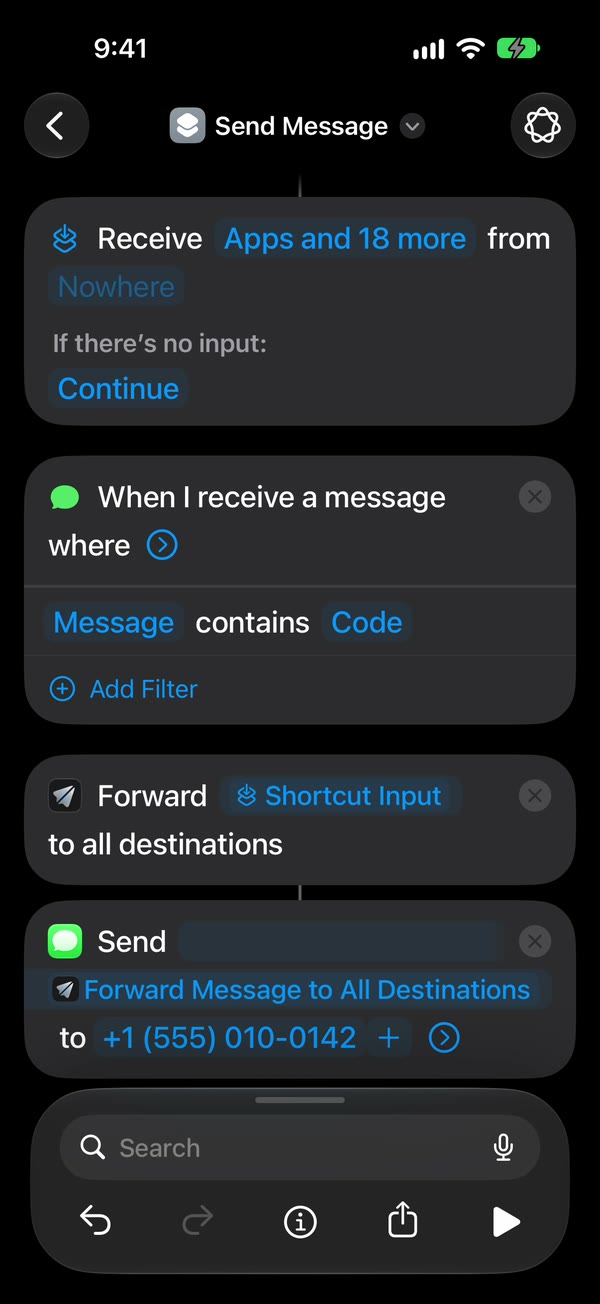
That’s it. New texts with your word now go to the second iPhone on their own, with the first iPhone unlocked or locked.
To show who sent each text, turn on Include Who Sent It in Fwrd’s Settings and choose Sender on Fwrd’s action. The phone guide shows every tap on video, and the another phone page has the details. The second phone doesn’t have to be an iPhone: the same steps forward texts to an Android phone.
Rather read them in a Telegram or Slack chat on the second phone? Add that chat in Fwrd and skip Send Message. Fwrd posts there itself, with no Fwrd account, and a filter can keep only texts with words you choose, verification codes, or texts at certain hours.
What forwarding can’t do
- It doesn’t share the number. The second iPhone gets copies from the first iPhone’s number. It can’t send texts as that number.
- Replies come from the second phone’s own number. They go to the first iPhone, not to the person who texted, and a single-space rule forwards them straight back.
- Another phone’s filter needs an If around Send Message; until then it gets every text.
- It only forwards new texts, and only their words: pictures stay behind.
- The first iPhone has to stay on and connected. After a restart, unlock it once.
Questions about two iPhones and one number
Can I keep my number working on my old iPhone after switching?
No. Your new iPhone’s cellular plan deactivates the previous SIM when it activates, so the old iPhone loses your number. To read your texts there too, have Fwrd forward them from the new iPhone to a chat app you open on both, such as Telegram.
Will the second iPhone get my iMessages too?
Yes. The Message automation runs for messages that arrive in the Messages app, iMessages included. Either way only the words travel, and each copy comes from the first iPhone.
Can I reply from the second iPhone as my number?
No. A reply from the second iPhone comes from its own number and goes to the first iPhone, not to the original sender. To reply as your number, use the first iPhone, or your own Mac or iPad with Text Message Forwarding.
What does forwarding to a second iPhone cost?
Fwrd is free for 15 forwards a month, and one text counts once however many places it goes. Fwrd Pro removes the limit for $4.99 a month or $29.99 a year in the US. Your plan’s usual texting rates can apply to what Send Message sends.
Get your texts on a second iPhone
Fwrd sends selected new texts from your iPhone to another phone, Telegram, Slack and more, with who sent them if you like. Start with 15 free forwards each month.
Free for 15 forwards a month. Pro removes the limits on forwards and filters and adds a Never Forward list, for $4.99/month or $29.99/year, with a 7-day free trial on the yearly plan for eligible customers.
iPhone · iOS 26 or later