
Where Is the Automation Tab in Shortcuts on iOS 27?
By Fwrd ·
There’s no Automation tab in Shortcuts on iOS 27. Automations are now saved as shortcuts: open Shortcuts, tap Library, then Automation, to see them all, and tap + to make a new one.
What you need: an iPhone on iOS 27 and the Shortcuts app, which is already on your phone. On iOS 26 the Automation tab is still there.
Where did the Automation tab go?
It became a list inside Library. After the update, Shortcuts tells you your automations “are now saved as shortcuts” and that you make a new one with the Add button. Each automation is now a shortcut whose first step is its trigger, such as a time of day or “When I receive a message…”.
Apple’s iOS 27 page on how to add automations (read November 1, 2026) describes the same model: you add a trigger to a shortcut with Edit, then Automation, and you see every shortcut that has one under Automation.
How to find your automations
Open Shortcuts and tap Library.
Tap Automation. It’s a row in Library, not a tab.
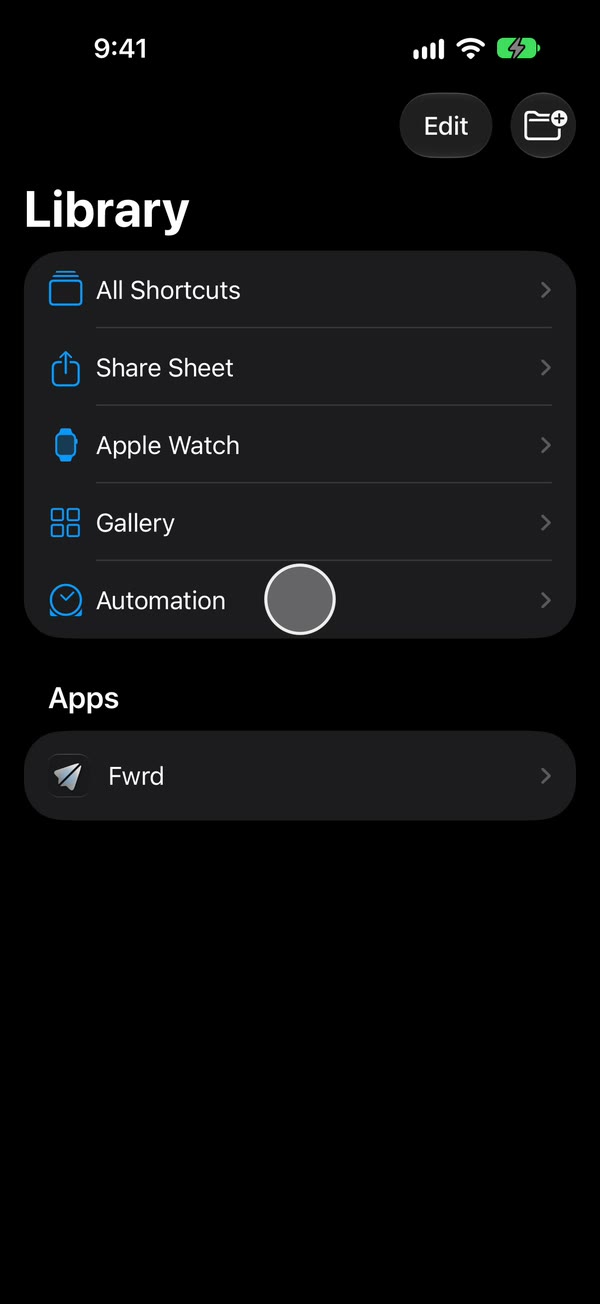
Read the list. Every shortcut with a trigger is here, each with a switch that turns it on or off. Apple’s guide says you can also filter the list to the ones turned on or turned off.
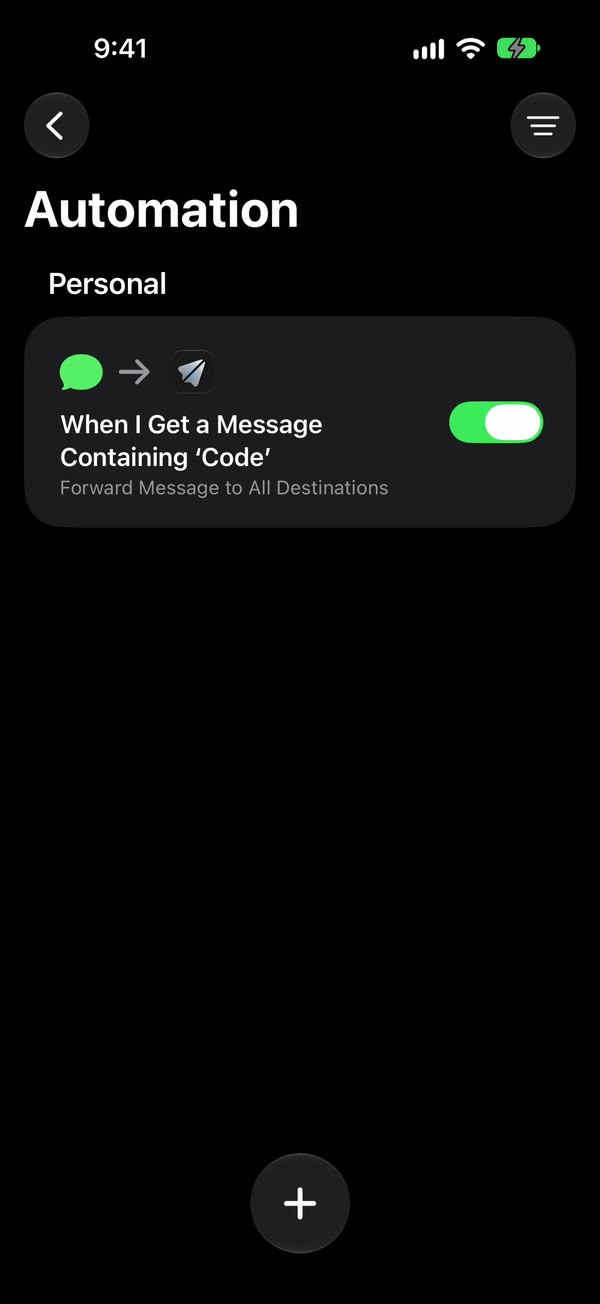
Tap an automation to open it. If you see a summary instead of the steps, tap Edit.
How to make a new automation on iOS 27
Start it. In Library, then Automation, tap +.
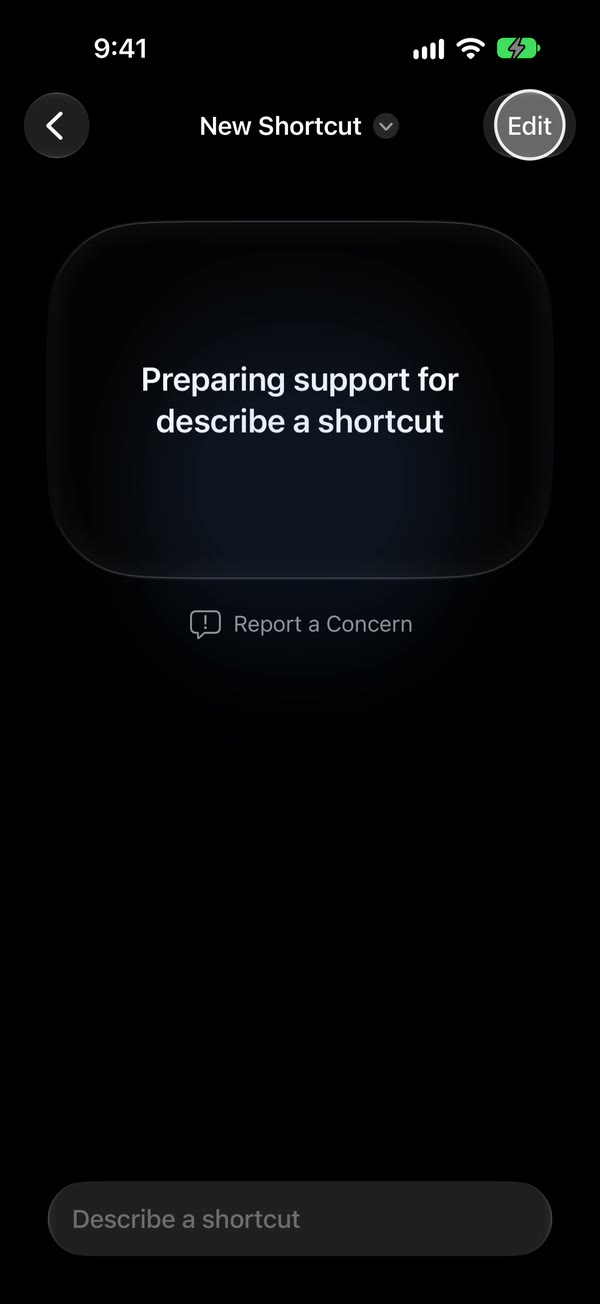
Get to the editor. A new shortcut may open on a Describe a shortcut screen, sometimes with “Preparing support for describe a shortcut”. Tap Edit to build it yourself.
Open the triggers. The editor first shows a list of actions. Tap Automation above it, next to Scripting and Controls, and the triggers appear, grouped by kind. Message is under Communication.
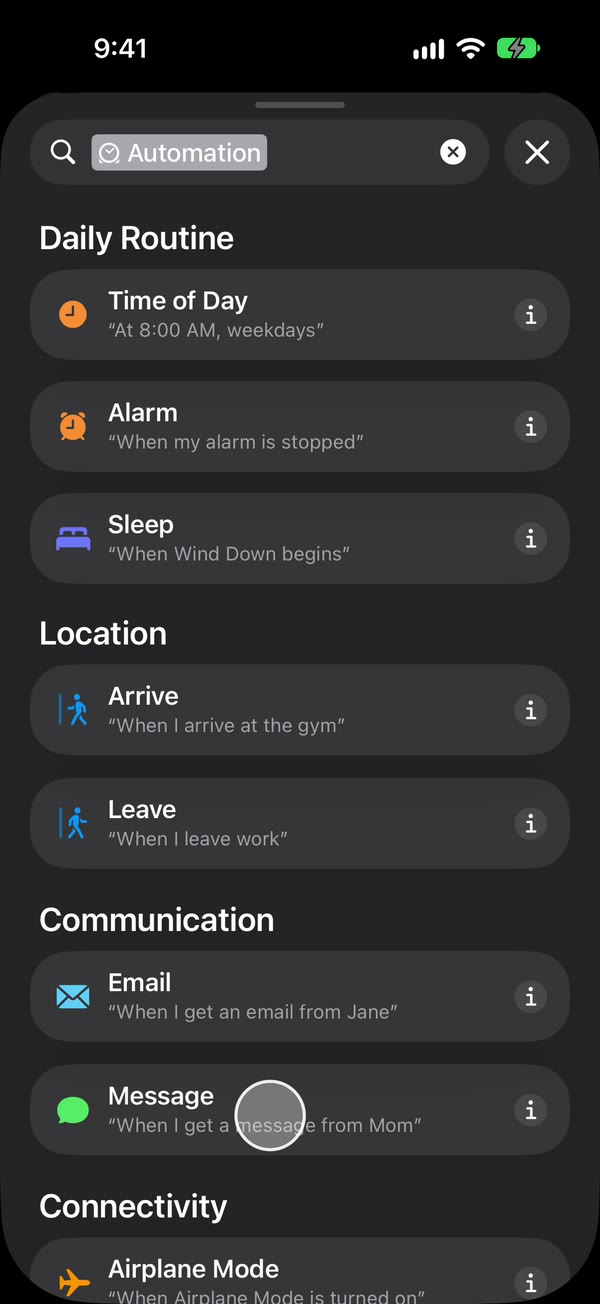
Pick a trigger and set it up. It becomes the shortcut’s first step.
Add the actions that should happen, then tap back to save.
It’s easy to miss: on iOS 27 the triggers only show after you tap Automation inside the editor.
How to switch an automation off or stop it asking
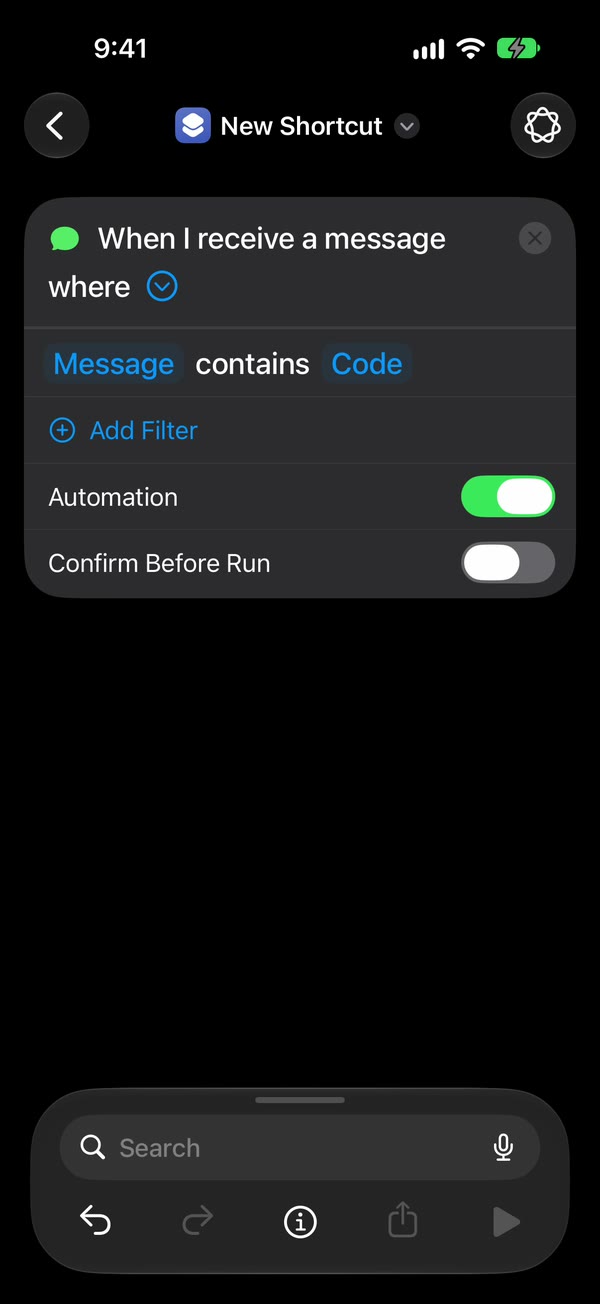
Both switches are under the arrow beside the trigger:
- Automation turns the trigger on or off. Off keeps the shortcut but stops it running by itself. It’s the same switch as the one in Library, then Automation.
- Confirm Before Run decides whether it asks first. Off means it runs without asking. Then tap ⓘ at the bottom, then Privacy, and check that Allow Running When Locked is on.
Run Immediately vs Run After Confirmation explains what asking first means, and which to choose.
To stop a shortcut being an automation at all, Apple says to open it, choose its trigger and remove it. The shortcut stays in your library and runs only when you start it.
What happened to the automations I already had?
They’re still there, saved as shortcuts, under Library, then Automation, with their triggers as first steps. If one you had on iOS 26 stopped working after the update, open it and check that Confirm Before Run is off and Allow Running When Locked is on. Shortcuts automation not running? goes through every other cause.
What the new automation list doesn’t do
- Follow you to your other devices, switched on. Apple’s intro to automation shortcuts (read November 1, 2026) says automation shortcuts are specific to a device. They back up to iCloud and sync to your other devices with the automation turned off, so switch on the ones you want on each one. Shared shortcut automation turned off? shows where that switch is, for synced and shared shortcuts alike.
- Describe a shortcut in every language. Where it can’t, Shortcuts says “Describe a shortcut doesn’t support this language.” Tap Edit and build the shortcut by hand.
- Run while the iPhone is off. The iPhone runs the automation, so it has to be on when the trigger happens.
iOS 26 and iOS 27 side by side
| iOS 26 | iOS 27 | |
|---|---|---|
| Where automations are | The Automation tab | Library, then Automation |
| Make a new one | +, or New Automation for your first | +, then Edit, then Automation |
| The trigger | Its own screen, before the actions | The shortcut’s first step |
| Run without asking | Run Immediately | Confirm Before Run off |
| Turn one off | Don’t Run | The Automation switch |
Setting one up for your texts?
If you came looking for the Automation tab to act on texts as they arrive, the trigger you want is Message, under Communication. It can match a word the text contains, such as code, or a sender.
Fwrd adds the step that sends those texts on. It posts matching new texts to Slack, Discord, Telegram, Microsoft Teams or your own webhook itself, straight from the iPhone, and hands them to Apple’s or WhatsApp’s send action for email, another phone or WhatsApp. There’s no account, and it needs iOS 26 or later. The automation guide shows every tap, and iOS 27 text message forwarding covers what changed for forwarding.
Questions people ask next
Did iOS 27 delete my automations?
No. iOS 27 saves them as shortcuts. Open Shortcuts, tap Library, then Automation, and they’re listed there with their switches.
Why does a new automation open on Describe a shortcut?
That screen starts a shortcut from a description instead of from steps. To pick a trigger yourself, tap Edit, then Automation. Edit works even while it says Preparing support for describe a shortcut.
Why are my automations switched off on my other iPhone or iPad?
Apple says automation shortcuts are specific to a device. They back up to iCloud and arrive on your other devices with the automation turned off. Switch on the ones you want in Library, then Automation, on that device.
How do I stop an automation asking before it runs?
Tap the arrow beside its trigger and turn Confirm Before Run off. Then tap ⓘ, then Privacy, and check that Allow Running When Locked is on.
Making a Message automation?
Add Fwrd’s action to it, and matching new texts go to Slack, email, Discord, Telegram and more, with no account. Start with 15 free forwards each month.
Free for 15 forwards a month. Pro removes the limits on forwards and filters and adds a Never Forward list, for $4.99/month or $29.99/year, with a free trial on the yearly plan for eligible customers.
iPhone · iOS 26 or later