
Shortcuts Automation Not Running? Fixes for iOS 26 and 27
By Fwrd ·
If a Shortcuts automation isn’t running on your iPhone, the likeliest causes are that it’s switched off, set to ask before it runs, or the text doesn’t match its rule. On iOS 27, tap the arrow beside the trigger and check that Automation is on and Confirm Before Run is off, then under ⓘ, then Privacy, that Allow Running When Locked is on. On iOS 26, open the automation and choose Run Immediately.
What you need: the iPhone the automation lives on and the Shortcuts app. The steps cover Message automations, the kind that run when a text arrives, and most of them apply to other triggers too.
Why isn’t my Shortcuts automation running?
Each symptom points to one cause. Find yours in the table, then use the steps for your iOS version below.
| What happens | Why | Fix |
|---|---|---|
| Nothing at all, no notification | The automation is switched off | iOS 27: turn on its switch. iOS 26: choose Run Immediately |
| A notification asks you to run it | It’s set to ask first | iOS 27: Confirm Before Run off, Allow Running When Locked on. iOS 26: Run Immediately |
| Some texts run it, others don’t | The text doesn’t match the rule | Match on Message, with a word those texts contain |
| It starts, then waits | An action is waiting for a tap | Turn off Show Compose Sheet and any prompts |
| It stopped after a restart | An app in it waits for the first unlock | Unlock the iPhone once |
| It runs twice | Two automations match the same text | Keep one |
How to fix an automation on iOS 27
On iOS 27, automations are saved as shortcuts, and the trigger is the first step.
Open the list. Open Shortcuts and go to Library, then Automation. Each automation has a switch on the right. Turn it on.
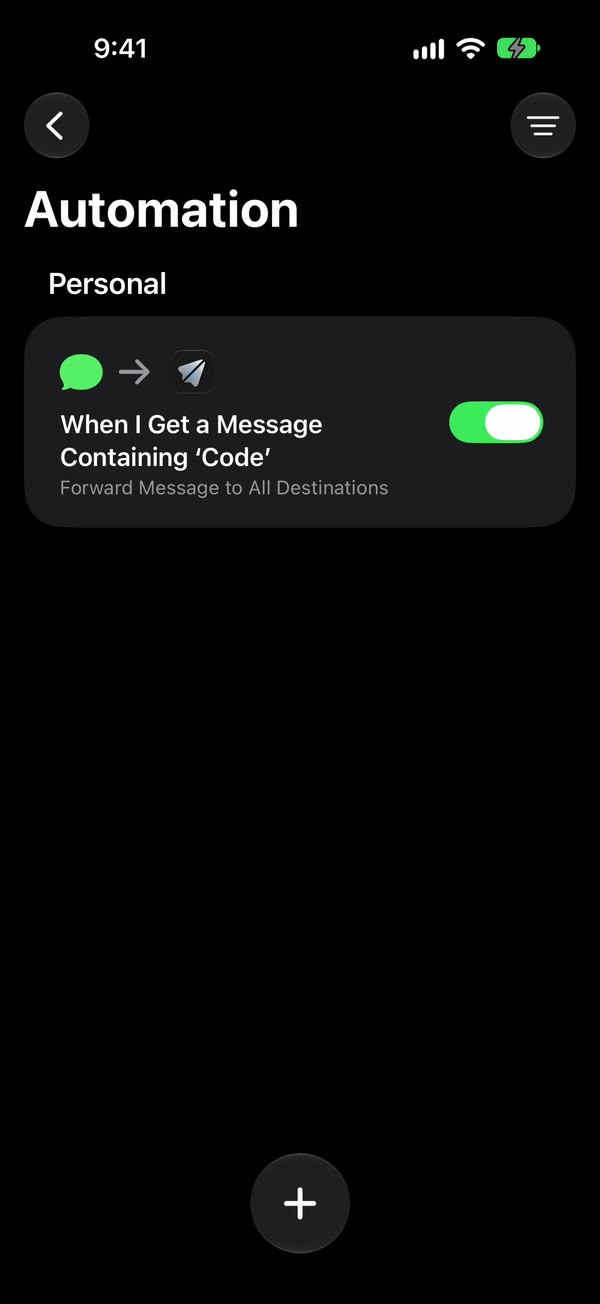
Open the automation. Tap it. If it opens on a description instead of the steps, tap Edit.
Open the trigger. Tap the arrow beside “When I receive a message where…”. Check that Automation is on and Confirm Before Run is off. Touching and holding the automation in the list shows the same two switches.
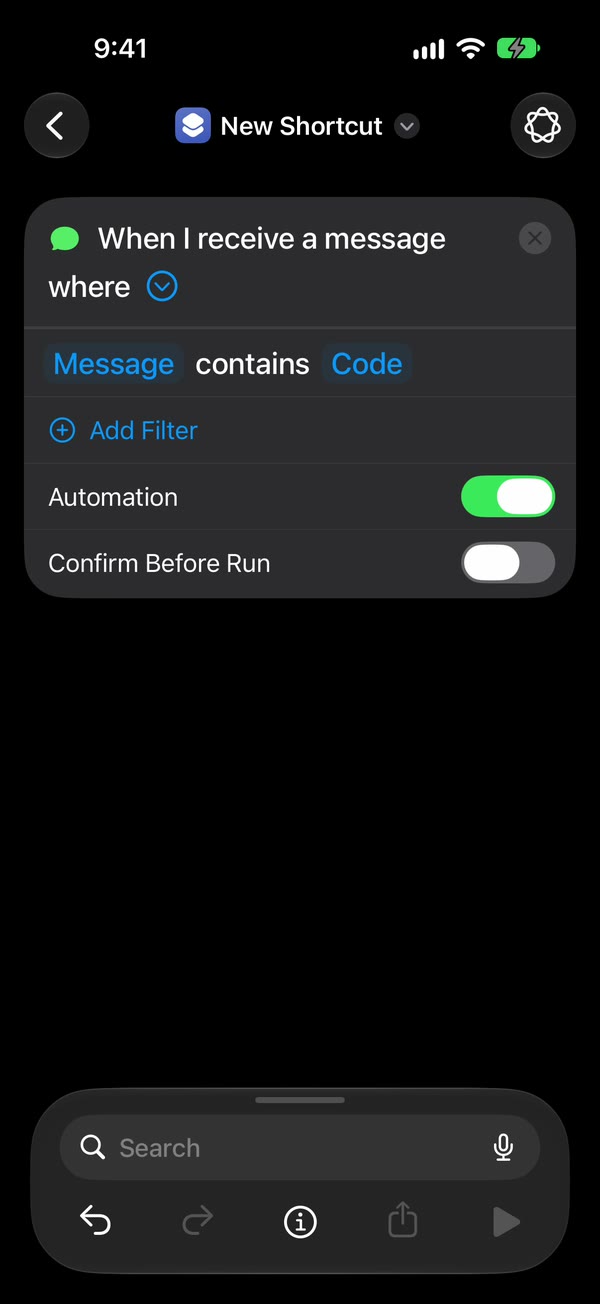
Check Privacy. Tap ⓘ at the bottom, then Privacy, and check that Allow Running When Locked is on. It’s on to begin with, and Apple’s guide names it as the switch that lets an automation run without asking.
Check the rule. For codes and alerts, the filter should read Message contains, followed by a word those texts share, such as code. Sender only offers your Contacts, so it misses short numbers.
Check each action. Anything that opens a screen or asks a question stops the run, especially on a locked iPhone. On Send Message and Send Email, tap the arrow and turn Show Compose Sheet off.
Save it. Tap back. The automation stays listed under Automation, switched on.
How to fix an automation on iOS 26
On iOS 26, automations have their own tab, and the run setting sits under the trigger.
Open the tab. Open Shortcuts and tap Automation at the bottom.
Open the automation. Tap it to see its trigger and options.
Choose Run Immediately. Run After Confirmation sends a notification asking you to run it each time, and Don’t Run pauses the automation. iOS 26.5 has no Notify When Run switch; if an earlier build shows one, turn it off.
Check the rule. Tap Message Contains and type a word your texts share. The Sender option has the same Contacts-only limit as on iOS 27.
Check each action for a compose sheet or a prompt, as above, then tap Done.
The automation guide has both versions step by step, with pictures of the iOS 27 screens.
Why did my automation stop after a restart?
Usually because an app in it can’t reach its saved details yet. iPhone keeps saved passwords locked until you unlock it once after a restart, and apps that store logins the same way, Fwrd included, can’t send until then. Unlock it once and the automation carries on.
Three things can restart an iPhone without you: an iOS update, a flat battery, and three days without an unlock, after which it restarts itself. For a phone left on a charger, someone needs to unlock it every couple of days.
If your automations seem to be gone after updating to iOS 27, open Library → Automation. iOS 27 saves them there as shortcuts. Check that each one’s switch is on, Confirm Before Run is off and Allow Running When Locked is on.
Why does my automation ask before running?
It’s set to confirm first. That’s Confirm Before Run on iOS 27 and Run After Confirmation on iOS 26. A separate prompt can also come from an action inside it, like Send Message’s compose sheet. Sending a text from Shortcuts without confirmation covers both switches.
If your automation forwards texts with Fwrd
Fwrd adds one action to a Message automation and sends each matching text to Slack, Discord, Telegram, Microsoft Teams, your own webhook, email, another phone or WhatsApp. Fwrd has no account, and texts are processed on the iPhone.
When forwarding stops, open Activity in Fwrd. For Slack, Discord, Telegram, Teams and webhooks:
- The text isn’t listed: the automation didn’t run, so the fix is in Shortcuts, as above, or that destination’s filter left it out.
- It’s listed as Failed: open it to see why. The destination may have turned it down, or the month’s 15 free forwards are used up.
Email, another phone and WhatsApp are sent by Apple’s or WhatsApp’s own action, so they don’t appear in Activity. The troubleshooting guide lists every Fwrd-specific problem and its fix.
What an automation can’t do
- Run while the iPhone is off. It reacts to texts as they arrive, on that iPhone.
- Catch up on old texts. New texts only. It can’t go back through Messages.
- Match every text. Shortcuts needs a rule. A single space catches any text with a space in it, which leaves out one-word replies, a lone emoji or a bare link.
- Run every trigger without asking. Apple lets Message, Email, Time of Day, Arrive and Leave run on their own. On iOS 26, Before I Commute always asks.
Questions people ask
Does a Shortcuts automation run when the iPhone is locked?
Yes, when it’s set to run without asking and no action stops to ask for something. A compose sheet or a “Which one?” question can’t be answered on a locked screen. After a restart, unlock the iPhone once.
How do I pause an automation without deleting it?
On iOS 27, turn off its switch in Library → Automation. On iOS 26, open it and choose Don’t Run. Choose Run Immediately to start it again.
Why does my automation run twice?
Two automations match the same text, or one automation has the same action in it twice. Keep one. With Fwrd, one automation with a single space and a filter on each chat or webhook destination avoids the overlap.
Where is the Automation tab on iOS 27?
There isn’t one. iOS 27 saves automations as shortcuts, so they’re under Library, then Automation, and you make a new one with +.
Send matching texts to your chat apps
Add Fwrd’s action to your Message automation to send new texts to Slack, Discord, Telegram, email and more, with no account. Start with 15 free forwards each month.
Free for 15 forwards a month. Pro removes the limits on forwards and filters and adds a Never Forward list, for $4.99/month or $29.99/year, with a 7-day free trial on the yearly plan for eligible customers.
iPhone · iOS 26 or later