
Run Immediately vs Run After Confirmation in Shortcuts
By Fwrd ·
Run After Confirmation makes your iPhone show a notification each time the automation is triggered, and nothing happens until you tap it. Run Immediately runs the automation the moment it’s triggered, without asking. On iOS 27 the same choice is one switch, Confirm Before Run: off means it runs without asking.
What you need: an iPhone with the Shortcuts app (it’s already on your phone) and an automation, or a trigger you want to set one up for. To forward texts with it as well, you need Fwrd and iOS 26 or later.
What’s the difference between Run Immediately and Run After Confirmation?
It’s who starts the automation. With Run After Confirmation, the trigger only asks: you get a notification, and the actions run if you tap it. Ignore it, or be asleep, and they don’t run. With Run Immediately, the trigger starts the actions itself.
Apple’s guide to automation shortcuts (read November 1, 2026) describes both: when the event happens “you’ll receive a notification asking you to run the automation,” unless you set it to run without asking. Its Add automations page adds that an automation set to run without asking won’t notify you when it’s triggered.
| Run After Confirmation | Run Immediately | |
|---|---|---|
| When the trigger happens | A notification asks you to run it | The actions start on their own |
| If you don’t tap | Nothing runs | Nothing to tap |
| While you’re asleep or away from the phone | Waits for you | Runs |
| iOS 27 switch | Confirm Before Run on | Confirm Before Run off |
| Good for | Things you want a say in each time | Things that must happen without you |
On iOS 26 there’s a third choice, Don’t Run. It keeps the automation but stops it running, so you can switch it back later instead of building it again. On iOS 27, that’s the Automation switch beside Confirm Before Run.
Which one should you choose?
Pick Run Immediately when the automation is only useful if it happens while you’re not looking:
- forwarding texts or verification codes somewhere else;
- turning on Low Power Mode at a battery level;
- starting a playlist when the iPhone connects to CarPlay;
- setting a Focus at a time of day.
Pick Run After Confirmation when you want to decide each time. Texting someone “I’m home” when you arrive is a good example: some days you’ll want it sent, some days you won’t.
Where to find the setting on iOS 26 and iOS 27
On iOS 26, the choice is on the trigger’s own screen while you set it up. For a Message automation that’s below Sender and Message Contains: tap Run Immediately or Run After Confirmation, then Next. To change it later, open the Automation tab, tap the automation, and choose Run Immediately, Run After Confirmation or Don’t Run. If you see Notify When Run, turn it off as well.
On iOS 27, automations are shortcuts, so the setting moved onto the trigger step:
Open the automation. Open Shortcuts, tap Library, then Automation, and tap the one you want. Tap Edit if you see a summary instead of the steps.
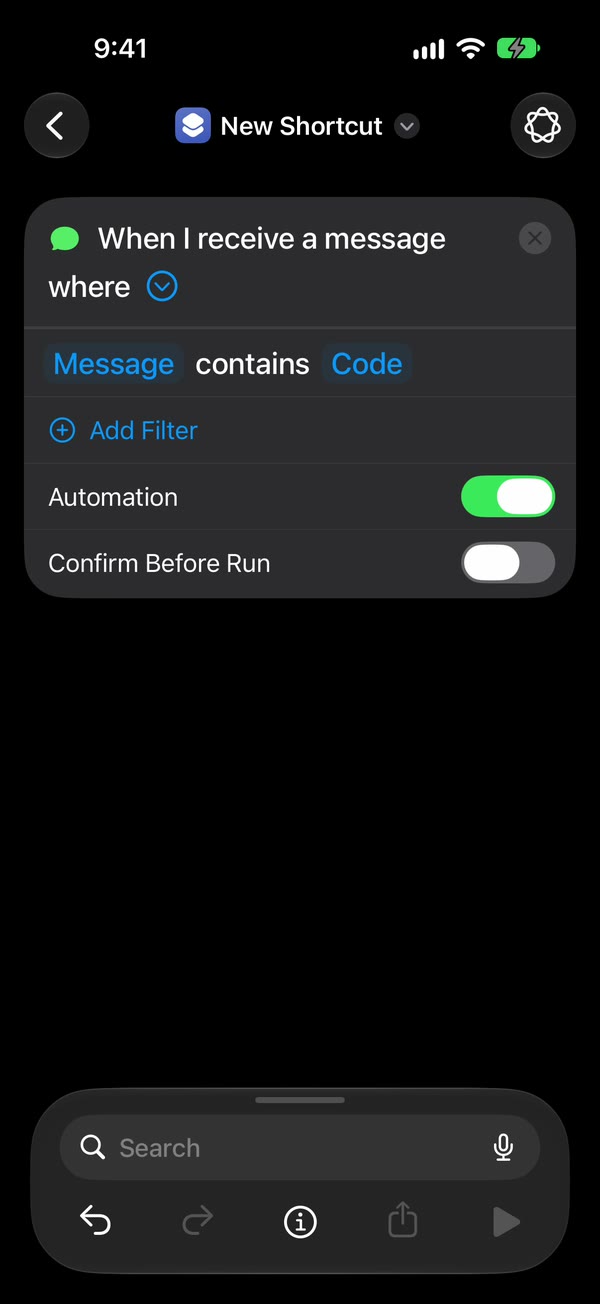
Open the trigger. Tap the arrow beside the trigger, the first step.
Set the two switches. Leave Automation on. Turn Confirm Before Run off to run without asking, or on to be asked each time.
Check the locked-phone switch. Tap ⓘ at the bottom, then Privacy, and check that Allow Running When Locked is on. Apple points to this switch for automations that run without asking.
Save. Tap back.
On iOS 27 you can also touch and hold an automation in Library, then Automation, to reach the same two switches. Where is the Automation tab in Shortcuts? covers the rest of what moved.
What Run Immediately can’t do
- Run every trigger. Apple’s list of triggers that can run without asking includes Time of Day, Alarm, Sleep, Arrive, Leave, CarPlay, Email, Message, Wi-Fi, Bluetooth, NFC, App, Do Not Disturb, Low Power Mode, Battery Level and Charger. Its iOS 26 guide says Before I Commute always asks.
- Skip actions that ask on their own. Apple notes you may also need to set individual actions to run automatically. Send Message and Send Email have Show Compose Sheet, which opens the text and waits for you to tap send, and Send Email with a blank Subject stops to ask for one every time. Ask for Input, Show Alert and Choose from Menu always wait for an answer. A WhatsApp contact with two numbers makes WhatsApp’s Send Message ask “Which one?” unless you pick one.
- Run on a phone that’s off. The iPhone does the work, so it has to be on. After a restart, unlock it once before Fwrd’s destinations work again.
Send a text from Shortcuts without confirmation walks through each of those switches.
Which setting does text forwarding need?
Run Immediately, or Confirm Before Run off on iOS 27. A forwarding automation that asks first only forwards the texts you happen to tap, which defeats the point.
Fwrd is built for this. Its action goes in a Message automation that runs without asking, and it posts matching new texts to Slack, Discord, Telegram, Microsoft Teams or your own webhook itself, straight from the iPhone. For email or another phone, Apple’s Send Email or Send Message runs after Fwrd’s, so turn its Show Compose Sheet off too. For WhatsApp, WhatsApp’s own Send Message does the sending. There’s no account to make, and Fwrd needs iOS 26 or later. The automation guide shows every tap on iOS 26 and iOS 27.
Questions people ask next
Does Run Immediately work when my iPhone is locked?
Yes, for a Message automation with Fwrd: new texts go out with the iPhone unlocked or locked, as long as the automation runs without asking and no action stops to ask. On iOS 27, keep Allow Running When Locked on under ⓘ, then Privacy. After a restart, unlock the iPhone once.
Why don’t I see Run Immediately on iOS 27?
iOS 27 saves automations as shortcuts, and the choice became the Confirm Before Run switch on the trigger. Tap the arrow beside the trigger to find it. Off is the same as Run Immediately.
Why do I still get a notification asking me to run it?
The automation is still set to ask. On iOS 26, open it in the Automation tab and choose Run Immediately. On iOS 27, tap the arrow beside the trigger and turn Confirm Before Run off.
Does Fwrd cost anything?
As of November 2026, Fwrd is free for 15 forwards a month, and a text counts once however many places it goes. Fwrd Pro removes the limit for $4.99 a month or $29.99 a year in the US.
Want new texts forwarded without a tap?
Add Fwrd’s action to a Message automation that runs without asking, and matching new texts go to Slack, email, Discord and more. Start with 15 free forwards each month.
Free for 15 forwards a month. Pro removes the limits on forwards and filters and adds a Never Forward list, for $4.99/month or $29.99/year, with a free trial on the yearly plan for eligible customers.
iPhone · iOS 26 or later