
Track Spending From Bank Texts on iPhone
By Fwrd · · Updated
You can track spending from bank texts on an iPhone with a Shortcuts Message automation that hands each new bank alert to Fwrd, which posts it to a Zapier, Make or n8n webhook that adds a row to a Google Sheet. The same alerts can also reach a family Telegram or Slack chat, filtered so only spending texts get through.
What you need: the iPhone that gets your bank’s texts, the Shortcuts app (it comes with the phone), iOS 26 or later for Fwrd, and a Zapier, Make or n8n account for the sheet.
Can an iPhone track spending from bank texts?
Yes, but no app can read your texts by itself; iOS doesn’t allow it. A Shortcuts automation you set up once hands each new bank text to an action, and that action decides where it goes.
There are two ways to use that:
| Option | What you get | Best fit when |
|---|---|---|
| Fwrd to a webhook, then a sheet | The raw text of every alert, one row each, in a sheet you own | You want your own columns, formulas or charts |
| Fwrd to a family chat | Each spending alert posted where the household sees it | You share a card or a budget with someone |
Fwrd passes on the alerts themselves, in your own sheet or chat, from any bank, and you decide the columns, formulas and charts.
How to log bank texts in a Google Sheet
Fwrd sends each bank alert to a Zapier, Make or n8n webhook, and that tool adds a row to your Google Sheet. The webhook guide covers the destination in full, and the automation guide shows every Shortcuts screen.
Pick the word. Open a few of your bank’s alerts and find a word every spending alert has, such as debited, spent or purchase. Bank alerts usually come from short numbers that aren’t in your Contacts, so match a word, not a sender.
Create the webhook. In Zapier, start a Zap with Webhooks by Zapier and choose Catch Hook. In Make, add a Custom webhook. In n8n, add a Webhook node set to POST, use its production URL, and publish the workflow. Copy the URL.
Add the webhook in Fwrd. Open Fwrd, tap +, choose Webhook, and paste the URL. Tap Send Test Message so your tool learns the fields, then save with the tick.
Create a Message automation. On iOS 27, open Shortcuts, tap Library, then Automation, then +. If you see Describe a shortcut, tap Edit. Tap Automation, then Message, change Sender to Message, and type your word. On iOS 26, open the Automation tab, tap +, choose Message, and type your word under Message Contains.
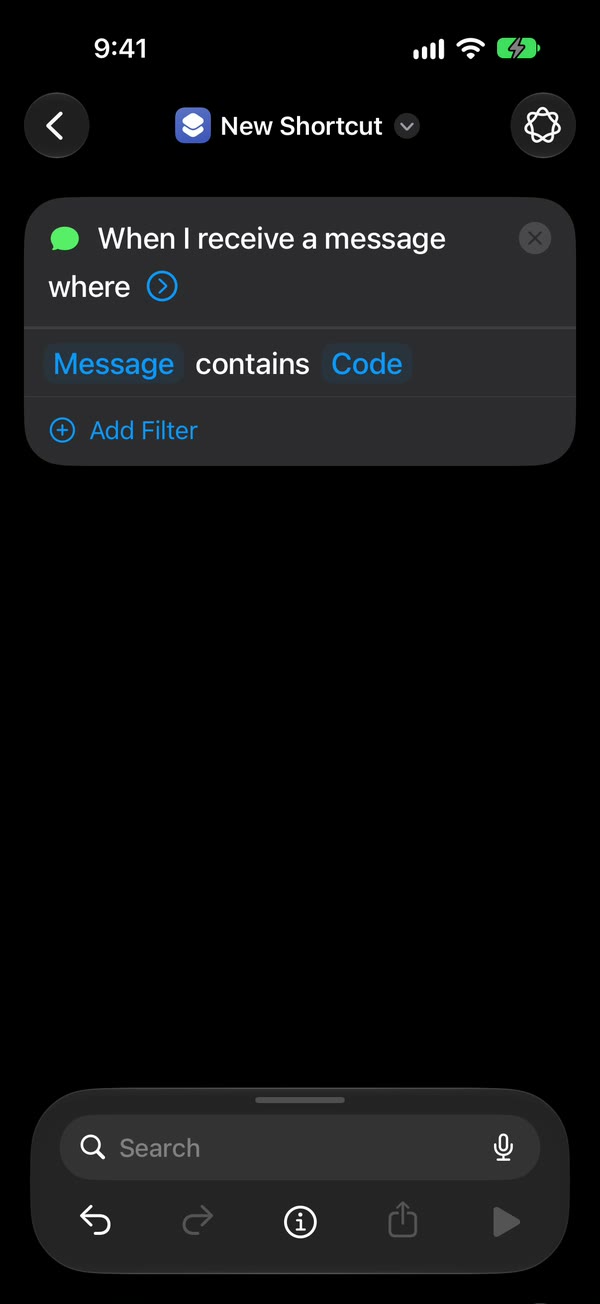
Make it run without asking. On iOS 27, tap the arrow beside the trigger and check that Confirm Before Run is off. Under ⓘ, then Privacy, check that Allow Running When Locked is on. On iOS 26, choose Run Immediately, then tap Next and Create New Shortcut.
Add Fwrd’s action. Search for Forward and add Forward Message to All Destinations. Set its Message to Shortcut Input (on iOS 26, Shortcut Input, then Message). Tap back to save (Done on iOS 26).
Build the row. In your tool, add a Google Sheets step that creates a row from the content field. Fwrd sends the text as it arrived, as JSON with content and text fields, and doesn’t send the date or time, so fill a date column with your tool’s current time. A text-parsing step can pull the amount into its own column.
That’s it. New bank alerts with your word now land in your sheet on their own, with the iPhone unlocked or locked.
The Zapier, Make and n8n page has tips for each tool, and the webhook page lists exactly what your endpoint receives.
How do you share spending alerts with family?
Add a Telegram or Slack destination in Fwrd, and every alert the automation hands over is posted there too, still counting as one forward. Telegram needs your own bot, made with BotFather and added to the family group, plus the group’s chat ID; the Telegram page shows how to find it.
To keep everything else out, open the destination in Fwrd, choose Only Some Texts under Which Texts, and add your words to Contains Any Of: debited, spent, purchase. A word list counts as one condition, so it works on the free plan. Try a Text shows whether a sample alert would go through.
How do you keep codes and promos out?
Pick spending words, not your bank’s name, because one-time passcodes and offers mention the bank too. If your bank’s passcode texts also say purchase, use a word they don’t share, or, with Fwrd Pro, add Doesn’t Contain with OTP or code. The free plan allows one condition per destination; Fwrd Pro has no limit.
These filters work on every destination. Email, Another Phone and WhatsApp need one extra step: put the send action inside an If in the shortcut, then turn on I Added the If in Which Texts.
What this setup can’t do
- The free plan covers 15 alerts a month. After that, new alerts stop reaching your sheet until next month, unless you have Fwrd Pro.
- It only catches new texts. Alerts that arrived before you set it up aren’t sent, so a sheet starts from today.
- It doesn’t sort spending into categories. Fwrd passes on the text exactly as it arrived; categories and totals are up to your sheet or tool.
- Fwrd’s action reaches every destination you’ve switched on. If Fwrd already posts codes to a team chat, give that destination a filter, or your bank alerts land there too.
- The iPhone has to be on and online. After a restart, unlock it once before forwarding starts again.
- Card details leave the phone. Bank texts often include card digits, balances and merchant names. Fwrd processes them on the iPhone with no Fwrd server in between, but each copy then lives in Telegram, Slack, your automation tool and your sheet, under their rules. Send them only to a destination you control.
Questions about tracking spending from bank texts
Can an app read my bank texts automatically on iPhone?
No. iOS doesn’t let any app read your texts. A Shortcuts Message automation you set up once hands each matching text to an action, such as Fwrd’s, which is how trackers built on Shortcuts work too.
Will it add my old bank texts to the sheet?
No. The automation runs when a new text arrives, so only alerts that come in after you set it up are sent. Older alerts stay in Messages.
Is it safe to forward bank alert texts?
It depends on where they go. Bank texts carry card digits and balances, so send them only to a sheet, chat or webhook you control. Fwrd needs no account, and the text goes straight from the iPhone to your destination.
Does it cost anything?
Fwrd is free for 15 forwards a month, and a text counts once however many places it goes. Fwrd Pro removes the limit for $4.99 a month or $29.99 a year in the US. Zapier, Make and n8n have their own plans.
Put your bank alerts where you track money
Fwrd adds one action to Shortcuts that sends matching new texts to a webhook for your sheet, a family Telegram chat and more, each with its own filter. Start with 15 free forwards each month.
Free for 15 forwards a month. Pro removes the limits on forwards and filters and adds a Never Forward list, for $4.99/month or $29.99/year, with a 7-day free trial on the yearly plan for eligible customers.
iPhone · iOS 26 or later