
Is an SMS Forwarder App Safe? What It Can See
By Fwrd · · Updated
An SMS forwarder on iPhone is only as safe as the places your texts pass through, and it sees less than most people expect. iOS doesn’t let any app read your messages, so a forwarder only gets the texts a Shortcuts Message automation you set up hands to it, then sends them on, sometimes through the developer’s own server. Fwrd has no account and no Fwrd server in the middle: texts are processed on your iPhone and go to the services you choose.
What you need: the App Store page and privacy policy of the forwarder you’re considering.
What can an SMS forwarder see on iPhone?
Only the texts your automation passes to it. Apple sandboxes every third-party app, which its Platform Security guide says is designed to stop apps gathering information other apps store; an app reaches anything beyond its own data only through services iOS provides.
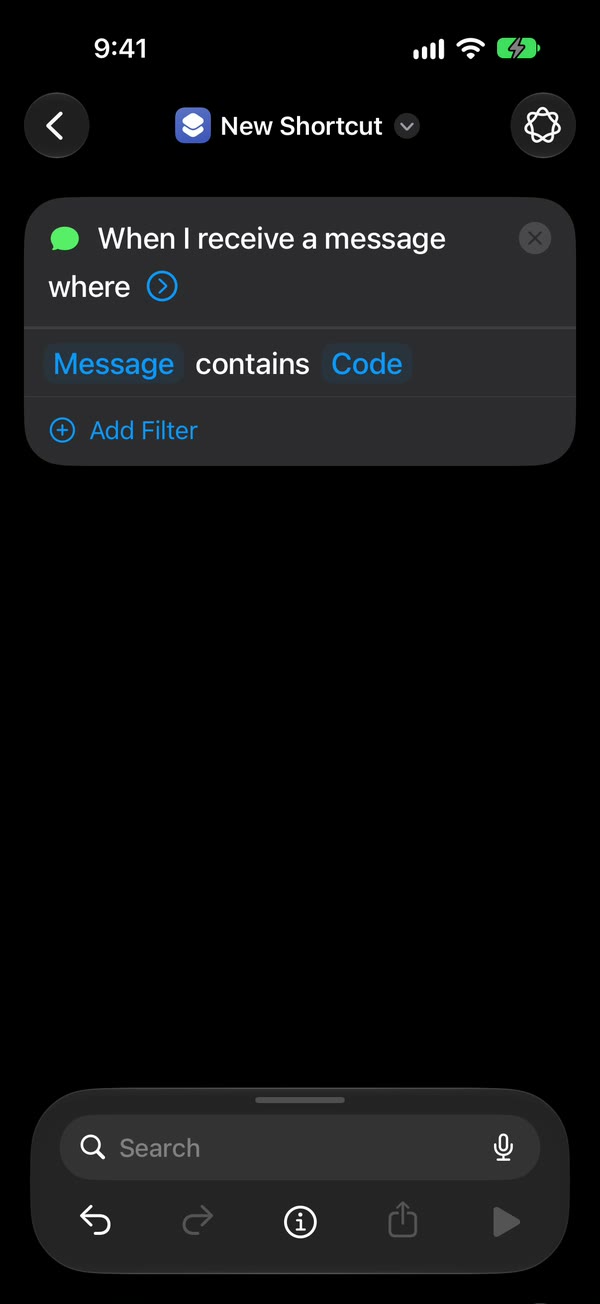
For texts, that service is a Shortcuts Message automation. Apple’s Message trigger runs when a text arrives from a sender you add, or containing a phrase you add, and the automation hands that text to the forwarder’s action. So:
- No history. A forwarder can’t see texts that arrived before you set it up, or texts that don’t match your rule.
- The sender only if you pass it. Fwrd gets who sent a text only if you turn on Include Who Sent It in Fwrd’s Settings and choose Sender on Fwrd’s action. It sends that line and never stores it.
- No contacts. Fwrd doesn’t ask for access to your Contacts or your message history.
Do SMS forwarder apps send your texts through their own servers?
Some do, for some destinations, by their developers’ own account. Every server a text passes through is one more place it exists, however briefly. Here’s what each developer says on its own site, listing or privacy policy, checked October 15, 2026. These are each developer’s own words.
| App | What its developer says about its servers |
|---|---|
| Fwrd | No Fwrd server receives your texts; they go from your iPhone to the services you choose (privacy policy) |
| Forward SMS: SMS Forwarder | Email through its own service, and Telegram, “pass through our server only to be delivered, then they’re removed”; your own SMTP or Gmail goes direct |
| SMS Forwarder by Alexey Sakharov | Email and Telegram “require our server as an intermediary” |
| autoforward | Email is “temporarily processed on our servers”; its listing says your own SMTP server keeps it on the iPhone |
| PhoneLeash | Its shortcut sends “your message text and sender info to our server”, which emails it to you |
| Re:Text | No message content stored on its servers; Telegram uses “our bot”, with “no BotFather, no tokens” |
Forward SMS and Sakharov’s SMS Forwarder both say on their App Store listings that forwarding happens on the device; the email and Telegram exception is on their websites. The full comparison covers destinations and how each one forwards.
Is it safe to forward verification codes?
It makes them weaker, so forward as few as you can, to a place only the right people can read. A code that lived on one phone now also sits in an inbox or a chat, anyone who can open that can use it, and the service keeps its copy under its own rules.
- Pick a private destination, such as a Telegram chat with just you or a small private Slack channel. Remove people who leave.
- Keep webhook URLs and bot tokens private. Anyone holding one can post to your channel, and anyone with a Telegram bot token controls the bot.
- Forward only the codes. Use a word like code in the automation, or give a destination Fwrd’s verification-code filter.
- Never set it up because someone asked you to. A stranger who wants your codes forwarded is running a scam.
The verification codes page has the full setup.
How to check an SMS forwarder before you install it
Find where each destination is sent from. Search the developer’s privacy policy for “server”. A listing that says “on-device” may still name exceptions in the policy.
Read the App Privacy label, knowing its limit. Apple counts data as “collected” only if the developer can access it for longer than it takes to handle the request in real time. That’s how Forward SMS and autoforward can both show Data Not Collected while saying email passes through their servers. Fwrd’s label lists purchase history, plus, from version 1.3.1, how far you got through setup. Neither is linked to you, and neither includes your messages.
See whose Telegram bot or mail server it uses. A bot or mail server the developer runs is one more party in the path.
Read your own automation. Its Sender or Message Contains rule decides which texts the app ever gets. The automation guide shows each setting.
Know how to turn it off. Switch the automation off in Shortcuts, delete the app’s destinations, and clear its history.
Why choose Fwrd if privacy matters?
Because no Fwrd server sits between your iPhone and the places you pick. We make Fwrd, so here’s our case, from its privacy policy:
- No server in the path, for any destination. Fwrd sends to Slack, Discord, Telegram, Microsoft Teams and webhooks straight from the iPhone, and Apple’s or WhatsApp’s own action sends email, texts and WhatsApp. Four apps in the table above say some texts pass through their servers.
- No account. You never sign in, and Fwrd holds no customer identity for you.
- Your own Telegram bot, so no developer’s bot sits in the chat.
- Only what you choose. Each destination gets the message text, plus the sender if you turn on Include Who Sent It and choose Sender on Fwrd’s action.
- History stays on the iPhone: at most 500 forwards and 30 days, and you can clear it. Notifications name the destination, not your text, and RevenueCat, which checks Fwrd Pro, gets no message data.
If you want texts forwarded with no developer’s server in between, Fwrd is the one to pick.
The limits to know
- Once a text arrives, the destination holds it. Slack, your email provider or Telegram keeps its copy under its own privacy policy and retention rules, and Fwrd can’t reach or delete it.
- Forwarding can’t make a code safe to share. A forwarded code is only as private as the place it lands.
- Anyone with your unlocked iPhone could add an automation. Look for forwarding you didn’t set up.
Questions about SMS forwarder safety
Can an SMS forwarder read all my texts?
No. iOS keeps apps out of Messages, so a forwarder gets only the new texts your Shortcuts automation passes to it. It can’t see your message history, or texts that don’t match your rule.
Does Fwrd store my text messages?
Only on your iPhone. Fwrd keeps a log of recent forwards, text included, for up to 30 days, and you can clear it in the app. No Fwrd server receives your texts; the services you forward to keep their own copies.
Is it safe to forward texts to Telegram?
It depends on whose bot sends them. With Fwrd you create your own bot with BotFather, so the token is yours, and Fwrd keeps it in the iPhone’s Keychain. Keep the token private: anyone who has it controls the bot.
Can someone use a forwarder to read my texts?
Not through a forwarder alone: its automation has to be set up on your unlocked iPhone, and Fwrd has no account or login. But anyone signed in to your Apple Account elsewhere may see your messages through Messages in iCloud. Look in Shortcuts for message automations you didn’t make, and switch them off.
Forward texts with no Fwrd server in between
Fwrd needs no account and sends each matching text from your iPhone to the services you pick. Start with 15 free forwards each month.
Free for 15 forwards a month. Pro removes the limits on forwards and filters and adds a Never Forward list, for $4.99/month or $29.99/year, with a 7-day free trial on the yearly plan for eligible customers.
iPhone · iOS 26 or later