
How to Receive Hong Kong SMS Codes Abroad
By Fwrd ·
To receive Hong Kong SMS codes while you live in the UK, Canada, Australia or Taiwan, keep your registered Hong Kong SIM active in a spare iPhone at home in Hong Kong, and let Fwrd forward each code text to Telegram or any of its eight destinations (for email, another phone and WhatsApp, it hands the text to your shortcut’s send step). Since late 2025, the HKMA has had banks move most app users’ logins and transfers off SMS. Fwrd forwards what still comes by text, such as HSBC verification codes, eMPF sign-in codes and #SIMREG notices.
What you need: your Hong Kong SIM, real-name registered and topped up; a spare iPhone on iOS 26 or later; a place for it in Hong Kong with power and Wi-Fi, such as a relative’s home, with someone who can unlock it every two or three days and after a restart; Fwrd; and an app you read abroad.
Can a Hong Kong SIM receive SMS overseas?
Sometimes. Whether a roaming Hong Kong SIM gets texts abroad, and what that costs, is up to your network and plan. OFCA also says its sender scheme, where banks and government send texts from IDs starting with “#”, covers Hong Kong numbers used within Hong Kong only (OFCA, read November 3, 2026). A SIM in a spare iPhone in Hong Kong is inside it and needs no roaming.
Which Hong Kong codes still come by SMS?
Fewer than before, but sign-in, reset and account codes still often do.
- The HKMA asked banks to approve app users’ logins and high-risk transactions on a bound device by default, not by SMS OTP, by Q4 2025. SMS stays allowed for customers without the app or who choose it (HKMA, read November 3, 2026). Online card payments moved the same way in late 2024 (HKMA, read November 3, 2026).
- HSBC uses SMS verification codes to verify a new browser and reset your Online Banking password (HSBC, read November 3, 2026).
- The eMPF Platform sends its sign-in code to your registered mobile number or email (eMPF, read November 3, 2026).
- The SFC gave internet brokers until 8 July 2027 to stop relying on OTPs for logins, so broker codes may still come by text until then (SFC, read November 3, 2026).
How do I receive Hong Kong bank SMS codes in the UK?
Leave your Hong Kong SIM in a spare iPhone at home, and forward its code texts to an app you read in the UK, Canada, Australia or Taiwan. Bank texts reach the SIM on its home network, and Fwrd forwards each one.
How to set up forwarding of Hong Kong SMS overseas
Pick where the codes should go. Telegram, WhatsApp and email work anywhere you have internet. Another Phone texts the phone you carry; check what your plan charges to text abroad. For Telegram, the Telegram post shows how to make the bot.
Add it in Fwrd on the spare iPhone. Open Fwrd, tap +, choose the destination, and fill in its details in the Configuration field. Tap Send Test Message, then save with the tick.
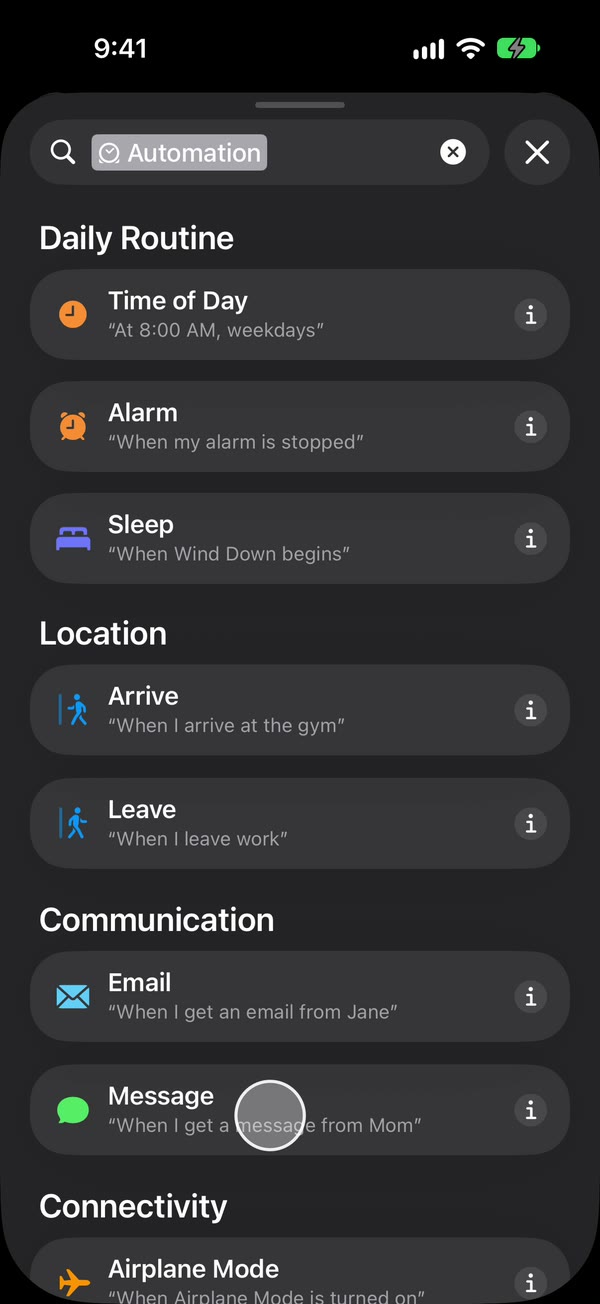
Create a Message automation. On iOS 27, open Shortcuts, tap Library, then Automation, then +. If you see Describe a shortcut, tap Edit. Tap Automation, then Message, and change Sender to Message. On iOS 26, open the Automation tab, tap +, and choose Message.
Type code, then make it run without asking. Type code, or another word your code texts contain. Hong Kong codes often come from # sender IDs the Sender picker can’t offer, so match on the words in the text. Then, on iOS 27, tap the arrow beside the trigger and check Confirm Before Run is off, and under ⓘ, then Privacy, check Allow Running When Locked is on. On iOS 26, choose Run Immediately, then tap Next and Create New Shortcut.
Add Fwrd’s action. Search for Forward, add Forward Message to All Destinations, and set its Message field to Shortcut Input. For another phone, email or WhatsApp, add Apple’s Send Message, Apple’s Send Email or WhatsApp’s Send Message below it, set its message to Fwrd’s output, and pick the recipient. Give Send Email a subject and turn off Show Compose Sheet. Tap back to save (Done on iOS 26).
That’s it. New code texts to your Hong Kong number now reach you abroad on their own, with the spare iPhone unlocked or locked.
To catch every text, including #SIMREG notices, type a single space as the automation’s word instead. To see who sent each one, turn on Include Who Sent It in Fwrd’s Settings and choose Sender on Fwrd’s action. The automation guide shows every tap.
How do I keep a Hong Kong prepaid SIM valid from abroad?
Top it up online before it expires, keep it registered, and answer any #SIMREG text in time.
- Keep it registered in your name. OFCA says every prepaid SIM needs real-name registration before activation, up to 10 per person on each network (OFCA, read November 3, 2026).
- Answer #SIMREG. Networks run sample checks by texting from #SIMREG. Miss the deadline and the prepaid SIM is deregistered for good (OFCA, read November 3, 2026).
- Top up before it expires. csl’s terms say an expired prepaid SIM loses its number (csl, read November 3, 2026). SmarTone takes online recharges by credit card from overseas (SmarTone, read November 3, 2026), and 3 Hong Kong recharges online (3HK, read November 3, 2026). On China Mobile Hong Kong, follow its own rules.
- Someone unlocks it every few days. An iPhone that isn’t unlocked for three days restarts itself, and after any restart Fwrd can’t forward until someone unlocks it once.
- Turn off automatic iOS updates and the SIM PIN. An update restarts the phone, and a SIM PIN keeps it off the network after a restart until someone types it.
The codes are yours. Forward them only to a chat or inbox only you can read, never to a family group chat. OFCA warns never to disclose OTPs to unknown senders, and some banks forbid sharing them, so check yours.
Fwrd is free for 15 forwards a month as of November 2026. Fwrd Pro removes the limit; set it up before you leave.
What forwarding can’t do
- It can’t keep the SIM alive. If it expires or a #SIMREG check goes unanswered, nothing arrives.
- It can’t reply from your Hong Kong number. Replies still come from the spare iPhone.
- It can’t forward codes that stay in your bank’s app. Those approvals happen in the app on the phone you carry.
- It can’t move your banking app to a new phone. The HKMA expects facial recognition or similar, not SMS, for new device binding (HKMA, read November 3, 2026), and HSBC sets up its app on one device only (HSBC, read November 3, 2026).
- It isn’t banking advice. What your bank allows from abroad is up to your bank.
Questions about Hong Kong SMS codes abroad
Does this work with a China Mobile Hong Kong SIM?
Yes. Any Hong Kong SIM that receives texts in Hong Kong works, on csl, China Mobile Hong Kong, SmarTone or 3. Keep it topped up under that network’s rules.
What should I do if a #SIMREG text reaches me?
Follow its instructions before the deadline. OFCA says you must provide your identity document again, or the prepaid SIM is deregistered and can’t be used afterwards.
What happens if the spare iPhone restarts?
Forwarding stops until someone unlocks it once. That happens after updates, power cuts, and on its own after three days without an unlock.
Get your Hong Kong number’s codes wherever you live
Leave your Hong Kong SIM in a spare iPhone, and Fwrd forwards each new OTP text to Telegram or any of its eight destinations; for email, another phone and WhatsApp it hands the text to your shortcut’s send step. Start with 15 free forwards each month.
Free for 15 forwards a month. Pro removes the limits on forwards and filters and adds a Never Forward list, with a free trial on the yearly plan for eligible customers.
iPhone · iOS 26 or later