
How to automatically forward iPhone SMS to Telegram
By Fwrd ·
To forward SMS to Telegram from your iPhone automatically, create a Telegram bot with BotFather, send it one message, and give its token and your chat ID to Fwrd. Then add a Message automation in Apple’s Shortcuts app, and each matching text arrives in your chat with the bot, sent straight from your iPhone. You only set it up once, and you can read the texts on any device signed in to Telegram.
What you need: a Telegram account and an iPhone on iOS 26.2 or later with Fwrd. You can do every step on the iPhone.
Forward SMS to Telegram on iPhone: the steps
Create a bot. In Telegram, search for @BotFather (it has a blue tick), open the chat, and send /newbot. Give the bot any name, then a username of 5 to 32 letters, numbers or underscores that ends in “bot”, such as my_texts_bot.
Copy the bot token. BotFather replies with a token: a number, a colon, then a long string. Anyone who has it controls your bot, so keep it private.
Start the chat yourself. A bot can’t message you first. Tap the t.me link BotFather sent, tap Start, and send the bot any message, such as hello.
Find your chat ID. In a browser, open
https://api.telegram.org/bot<YOUR_TOKEN>/getUpdateswith your token in place of<YOUR_TOKEN>, straight after the word bot. Find"chat":{"id":and copy the number after it. For your own chat it’s a positive number.Add Telegram in Fwrd. Open Fwrd, tap +, and choose Telegram. Paste the token into Bot token and the number into Chat ID, then tap Send Test Message. A message from your bot should appear in Telegram. Save with the tick.
Create the Message automation. On iOS 27, open Shortcuts, tap Library, then Automation, then +. If you see Describe a shortcut, tap Edit. Tap Automation, then Message, change Sender to Message, and type a word your texts contain, such as code. On iOS 26, open the Automation tab, tap +, choose Message, and fill in Message Contains. To forward any text with a space in it, type a single space as the word.
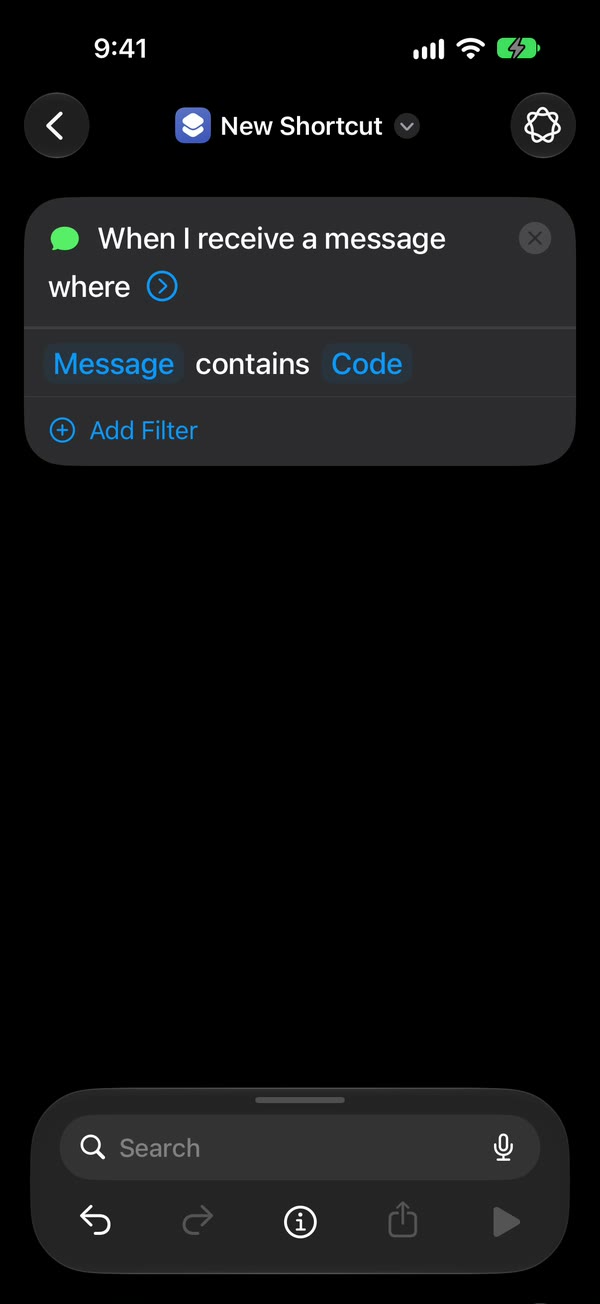
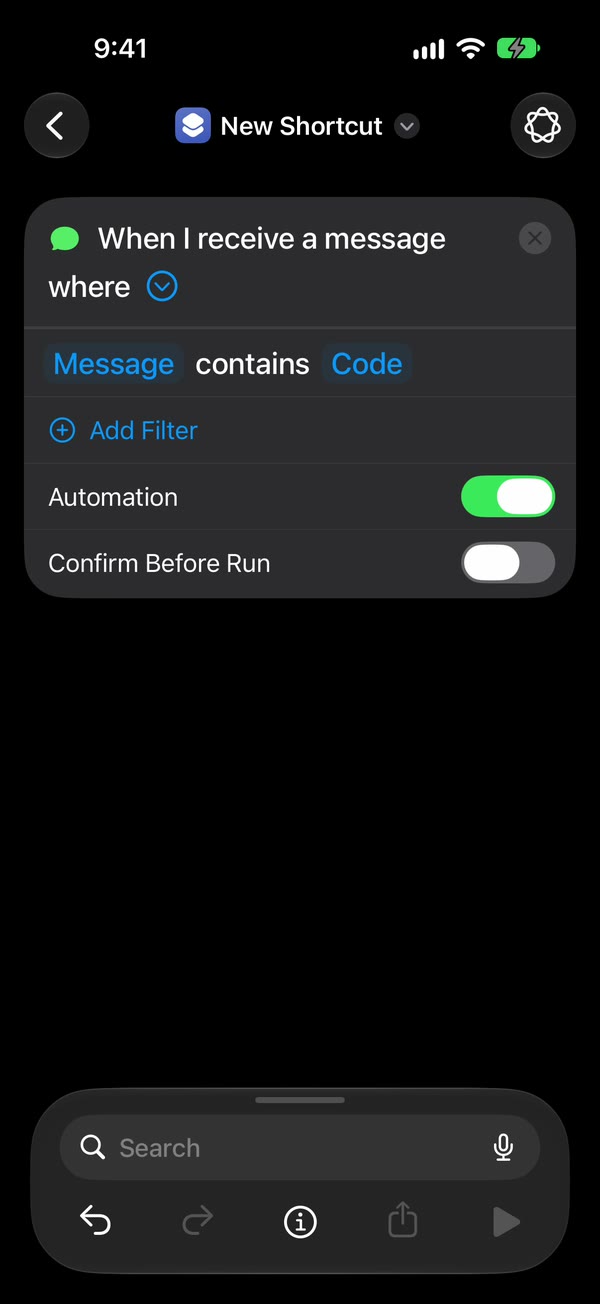
Let it run without asking. On iOS 27, tap the arrow beside the trigger and check that Confirm Before Run is off. On iOS 26, choose Run Immediately and turn off Notify When Run.
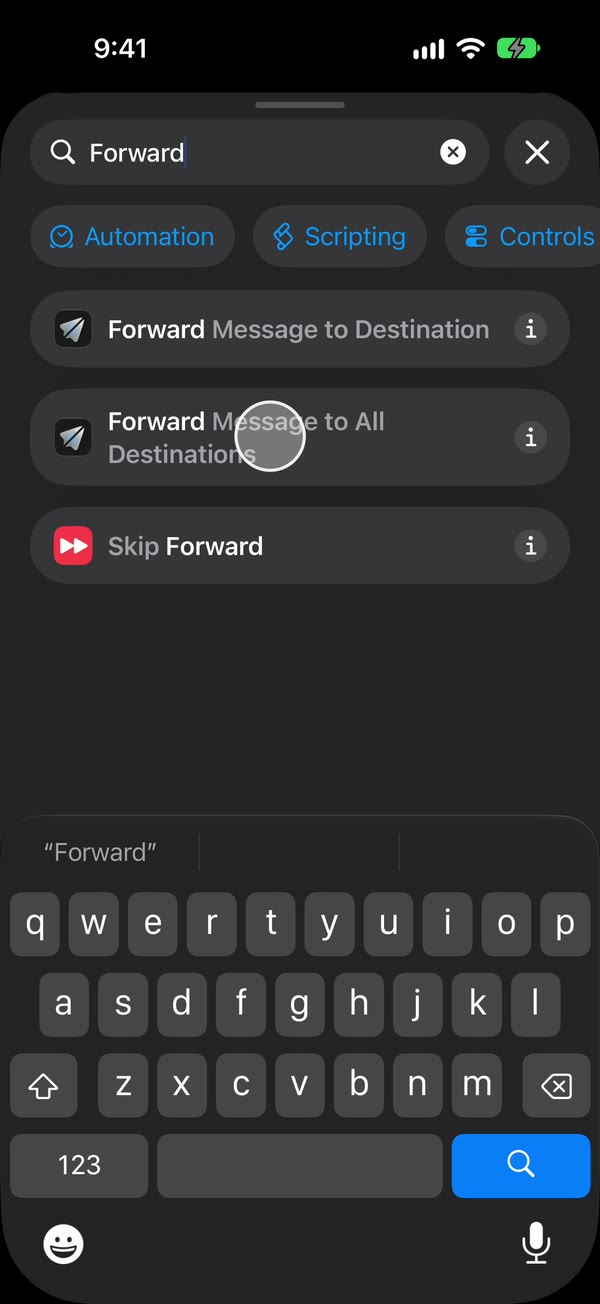
Add Fwrd’s action, then test. Search for Forward, add Fwrd’s Forward Message to All Destinations, and set its Message field to Shortcut Input (on iOS 26, Shortcut Input, then Message). Text the iPhone from another phone, once unlocked and once locked, and check that both arrive in Telegram.
The Telegram setup guide shows every step on video.
Doing it without Fwrd
Telegram’s bot API is free, and Shortcuts can call it directly. End the automation with Apple’s Get Contents of URL action instead of Fwrd’s: point it at your bot’s sendMessage address, set the method to POST, and send your chat ID and the Shortcut Input as the text. That works, and it costs nothing.
What Fwrd adds:
- It checks the shape of the token and chat ID before you save, and Send Test Message proves they work.
- The token stays in the iPhone’s Keychain instead of sitting inside a shortcut, where it would be easy to share by accident.
- If Telegram doesn’t answer in time, or is busy or briefly down, Fwrd tries again, up to twice.
- A history on the phone shows every forward and whether Telegram accepted it.
- The same action can also send to Discord or Slack, without a second shortcut.
What it can’t do
- It only forwards new texts. Anything that arrived before you set it up stays where it is.
- It needs a rule. Shortcuts acts on texts that contain a word you pick, or that come from people in your Contacts. A single space catches any text with a space in it; a text with no spaces, like a one-word reply or a bare link, won’t match.
- Your iPhone does the sending. It has to be on and online, over Wi-Fi or mobile data, when each text arrives.
- After a restart, unlock it once. Fwrd keeps the token behind the iPhone’s lock, so nothing forwards until the first unlock. An iPhone that isn’t unlocked for three days restarts itself, too.
- Text only. Pictures don’t forward, the sender’s number isn’t included, and replying to the bot doesn’t reach the person who texted you.
Questions about forwarding to Telegram
Can I forward texts to a Telegram group?
Fwrd accepts a group chat ID, but we’ve only tested a personal chat on a physical iPhone, so try a harmless text first. Add the bot to the group and send /start@your_bot there. A group’s chat ID is negative, and the minus sign is part of it.
The test says “chat not found”. What’s wrong?
The bot can’t message you until you open its chat and tap Start. Do that, send it a message, then read the chat ID again from the getUpdates page.
Why does the getUpdates page show an empty list?
It only shows messages from the last 24 hours. Send the bot another message and reload the page.
Does it work when my iPhone is locked?
Yes. We’ve tested Telegram end to end on a physical iPhone, both unlocked and locked. Right after a restart it waits until you unlock the phone once.
Forward your texts with Fwrd
Fwrd sends the texts you choose from your iPhone to Discord, Telegram or Slack. No account, and no Fwrd server in the middle.
Free for 15 forwards a month. Pro removes the limit for $3.99/month or $29.99/year, with a 7-day free trial on the yearly plan for eligible customers.
iPhone · iOS 26.2 or later