
How to Keep Your Canadian Phone Number Abroad
By Fwrd ·
To keep your Canadian phone number while living abroad, keep the plan paid and the SIM in a spare iPhone, left with family in Canada or carried with you, because some services, such as RBC and the CRA, text their codes only to North American numbers. Fwrd can forward that iPhone’s code texts to Telegram or any of its eight destinations (for email, another phone and WhatsApp, it hands them to your shortcut’s send step), so they reach the phone you carry.
What you need: your Canadian number on an active plan; a spare iPhone on iOS 26 or later with that SIM in it; a home in Canada where it stays plugged in and on Wi-Fi, with someone who can unlock it every two or three days; Fwrd; and an app you read abroad.
How do I keep my Canadian phone number while living abroad?
Keep the plan paid or topped up, and keep the SIM in a phone that receives its texts. A spare iPhone does that, and Fwrd passes each code on to you over the internet.
Why Canadian codes often need a North American number
Because some Canadian banks and the CRA say their text codes go only to North American numbers, or to a set list of others.
- RBC says that to get a one-time passcode by text or phone call, you need a Canadian or U.S. phone number (RBC, read October 26, 2026).
- The CRA says you can receive its sign-in passcode at phone numbers based within North American countries (CRA, read October 26, 2026).
- CIBC says a phone number registered outside Canada or the U.S. must be one of the international numbers it can send codes to (CIBC, read October 26, 2026).
Others are more flexible: Scotiabank says you can set up 2-step verification with a Canadian or international phone number (Scotiabank, read October 26, 2026). Where a service offers app approvals or an authenticator app, as RBC, CIBC and the CRA do, use it.
How to get your Canadian codes abroad
Pick where the codes should go. Telegram, WhatsApp and email work anywhere you have internet. Another Phone texts the phone you carry through Apple’s Send Message; check what your plan charges to text outside Canada. For Telegram, the Telegram post shows how to make the bot.
Add it in Fwrd on the spare iPhone. Open Fwrd, tap +, choose the destination, and fill in its details in the Configuration field. Tap Send Test Message, then save with the tick.
Create a Message automation. On iOS 27, open Shortcuts, tap Library, then Automation, then +. If you see Describe a shortcut, tap Edit. Tap Automation, then Message, and change Sender to Message. On iOS 26, open the Automation tab, tap +, and choose Message.
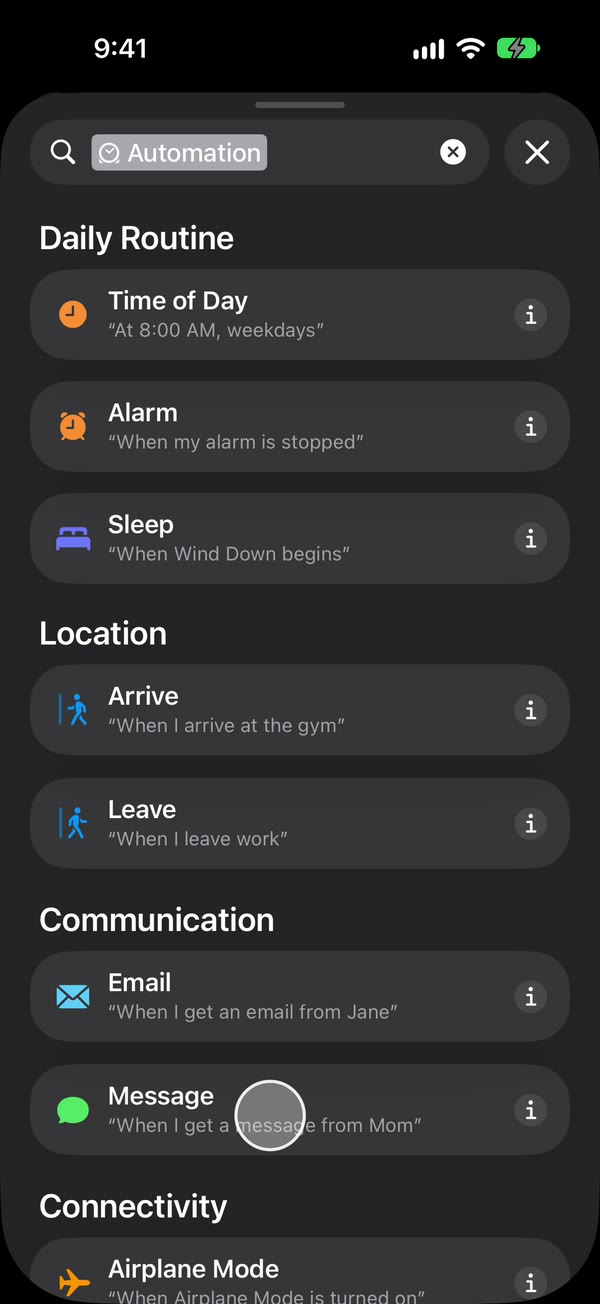
Choose which texts to forward. Type a single space to forward any text with a space in it, which covers most code texts. Then make it run without asking: on iOS 27, tap the arrow beside the trigger and check Confirm Before Run is off, and under ⓘ, then Privacy, check Allow Running When Locked is on. On iOS 26, choose Run Immediately, then tap Next and Create New Shortcut.
Add Fwrd’s action. Search for Forward, add Forward Message to All Destinations, and set its Message field to Shortcut Input (on iOS 26, Shortcut Input, then Message). For another phone, email or WhatsApp, add Apple’s Send Message, Apple’s Send Email or WhatsApp’s Send Message below it, set its message to Fwrd’s output, and pick the recipient. Give Send Email a subject and turn off Show Compose Sheet. Tap back to save (Done on iOS 26).
That’s it. New texts to your Canadian number now reach you abroad on their own, with the spare iPhone unlocked or locked.
On Telegram, you can keep only the codes: open the destination in Fwrd, choose Which Texts, and pick texts that look like a verification code. For another phone, email or WhatsApp, the automation’s word decides what’s sent instead, so type code rather than a space. To see which bank sent each code, turn on Include Who Sent It in Fwrd’s Settings and choose Sender on Fwrd’s action. The automation guide shows every tap.
Where should the spare iPhone live?
In Canada is the usual choice, because the SIM is always on its home network there. Carrying it works too, wherever the SIM gets service.
| Spare iPhone in Canada | Spare iPhone with you | |
|---|---|---|
| Receives codes | On its home network | Only where the SIM gets service |
| Needs someone there | Yes, to unlock it now and then | No |
| Forwarding needs | Wi-Fi at the Canadian address | Internet where you are |
Keep the number active
A deactivated number gets no codes, so keep a monthly plan on autopay with a card that works abroad, or keep enough funds on a prepaid account. Providers set their own deadlines. Lucky Mobile, for example, says your service is suspended if your funds don’t cover the monthly charge, and that non-payment for over 120 days results in account deactivation and phone number release (Lucky Mobile, read October 26, 2026). On Rogers, Bell, Telus, Koodo or another provider, read your plan’s own terms.
Keep the spare iPhone working
- Someone has to unlock it every few days. An iPhone that isn’t unlocked for three days restarts itself, and after any restart Fwrd can’t forward until someone unlocks it once.
- Turn off automatic iOS updates and the SIM PIN. An update restarts the phone, and a SIM PIN leaves it off the network after a restart until someone types it.
- Leave it with someone you trust. Whoever unlocks it can read its texts, so forward codes only to a chat or inbox that only you can read.
Fwrd is free for 15 forwards a month as of October 2026, which bank, CRA and shop codes together can pass. Fwrd Pro removes the limit for $4.99 a month or $29.99 a year in the US; set it up before you leave.
What this can’t do
- It can’t reply as your Canadian number. Fwrd only forwards. Replies still come from the spare iPhone.
- It can’t forward voice codes or pictures, only text. Where a bank offers a text or a call, choose text.
- It can’t keep the number alive. If the plan lapses or the number is released, nothing arrives to forward.
- It isn’t banking or tax advice. Whether you can keep a Canadian account while living abroad is up to your bank.
Questions about keeping a Canadian number abroad
Will my bank’s codes still arrive abroad?
Yes, if the number stays active and the spare iPhone stays in Canada with its SIM. Codes arrive as they did before you left, and Fwrd forwards them on.
Can I keep my Canadian number if I move to the U.S.?
Yes, the same way. The spare iPhone stays in Canada, or comes with you if the SIM gets service where you live, and Fwrd forwards its codes to the app you read.
Does the spare iPhone need mobile data?
No, Wi-Fi is enough for forwarding. It does need its SIM and normal signal, because that’s how texts reach it.
What happens if the spare iPhone restarts while I’m away?
Forwarding stops until someone unlocks it once. That happens after updates, power cuts, and on its own after three days without an unlock.
Get your Canadian number’s codes wherever you live
Leave your Canadian SIM in a spare iPhone, and Fwrd forwards each new code text to Telegram or any of its eight destinations; for email and WhatsApp it hands the text to your shortcut’s send step. Start with 15 free forwards each month.
Free for 15 forwards a month. Pro removes the limits on forwards and filters and adds a Never Forward list, for $4.99/month or $29.99/year, with a 7-day free trial on the yearly plan for eligible customers.
iPhone · iOS 26 or later