

How to Turn Off the Shortcuts Automation Notification
By Fwrd ·
Most of the time the notification is your automation asking permission to run, and it stops when you set the automation to run without asking: on iOS 26 choose Run Immediately, and on iOS 27 turn Confirm Before Run off. Apple says an automation set to run without asking won’t notify you when it’s triggered.
What you need: an iPhone with the Shortcuts app, which is already on your phone, and the automation that keeps notifying you.
Which notification are you seeing?
Three different banners get called “the automation notification”. They have three different fixes.
| What the banner says | Why it appears | What stops it |
|---|---|---|
| Asks you to run the automation, and nothing happens until you tap | The automation is set to ask first | Set it to run without asking (steps below) |
| “Automation failed” | A step in the automation stopped with an error | Fix the step that fails |
| A message you wrote, such as “Done” | The shortcut has a Show Notification action | Remove that action |
Apple’s guide to automation shortcuts (read November 18, 2026) says that when the event happens “you’ll receive a notification asking you to run the automation,” unless you set it to run without asking. Its page on the Show Notification action says the action creates a system notification and runs on to the next action straight away.
How to stop the “run it?” notification on iOS 27
On iOS 27 an automation is a shortcut, and the setting sits on its trigger.
Open the automation. Open Shortcuts, tap Library, then Automation, and tap the one that notifies you. Tap Edit if you see a summary instead of the steps.
Open the trigger. Tap the arrow beside the trigger, the first step.
Turn Confirm Before Run off. Leave Automation on.
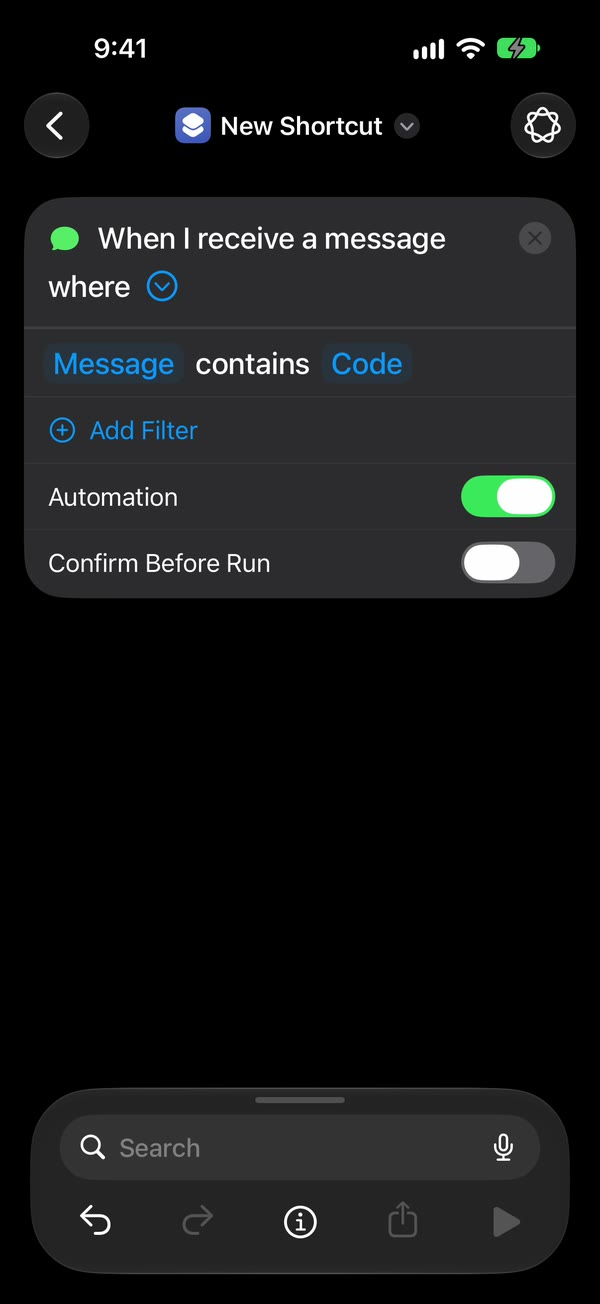
Check the locked-phone switch. Tap ⓘ at the bottom, then Privacy, and check that Allow Running When Locked is on. Apple’s Add automations page names it for automations that run without asking.
Save. Tap back.
If you can’t find your automations, Where is the Automation tab in Shortcuts? shows where iOS 27 put them.
How to stop it on iOS 26
On iOS 26 the automations still have their own tab.
- Open the automation. Open Shortcuts, tap Automation at the bottom, and tap the automation.
- Choose Run Immediately. Run After Confirmation is the choice that sends the notification.
- Turn off Notify When Run if you see it. Apple added a way to turn off notifications for automations in Shortcuts 15.4, and its page says it applies when Ask Before Running is off. The iOS 26.5 screen I checked in October has no Notify When Run switch, so it only appears on some builds.
- Save. Tap Done.
Run Immediately vs Run After Confirmation explains the difference between the two choices.
Can I switch the automation off instead?
Yes, but then it stops running too. Apple’s enable or disable an automation page says a disabled automation “will not notify you or run automatically.” On iOS 26 that’s Don’t Run in the automation’s options. On iOS 27 it’s the Automation switch under the trigger’s arrow, the same one shown beside each automation in Library, then Automation.
How to remove a banner you added yourself
A Show Notification action posts its banner every time it runs, even when the automation runs without asking. Open the automation (on iOS 27, tap Edit first), find the Show Notification step, and delete it. The steps after it keep running.
What these steps can’t do
- Silence “Automation failed.” That banner means a step stopped. “Automation Failed” in Shortcuts? What Each Error Means shows how to find the step.
- Make every trigger run without asking. Apple lists Before I Commute as the one trigger that can’t run automatically. Message is on the list that can.
- Cover every banner. On the iOS 26.5 and iOS 27.0 screens I checked, the only switches are the ones above, and I found no Apple page that describes another. If a different banner still appears, I can’t give you a switch for it, and it may depend on the trigger and your iOS version.
- Skip actions that ask on their own. Send Message and Send Email have Show Compose Sheet, which opens the text and waits for you.
If your automation forwards texts
Run without asking is the setting a forwarding automation needs, so the banner you’re trying to get rid of is also the reason texts don’t move on their own. A forwarding automation that asks first only forwards the texts you tap.
I made Fwrd for this. Its action goes in a Message automation that runs without asking, and it posts matching new texts to Slack, Discord, Telegram, Microsoft Teams or your own webhook itself, straight from the iPhone. For email or another phone, Apple’s Send Email or Send Message runs after Fwrd’s, so turn its Show Compose Sheet off too. For WhatsApp, WhatsApp’s own Send Message does the sending. There’s no account to make, and Fwrd needs iOS 26 or later. The automation guide shows every tap on iOS 26 and iOS 27.
Questions people ask next
Why does my Shortcuts automation keep sending me a notification?
It’s set to ask before it runs, so each trigger sends a notification and waits for your tap. On iOS 26, choose Run Immediately. On iOS 27, tap the arrow beside the trigger and turn Confirm Before Run off.
Will the automation still run if I turn the notification off?
Yes, when you do it by setting the automation to run without asking: the actions start on their own. If you instead switch the automation off, with Don’t Run on iOS 26 or the Automation switch on iOS 27, it stops running.
How do I stop the “Automation failed” notification?
Fix the step that fails, and the notification stops with it. Run the automation’s shortcut by hand to see where it stops.
Does Fwrd cost anything?
Fwrd has a free plan with a monthly limit, and a text counts once however many places it goes. Fwrd Pro removes the limit.
Forwarding texts from a Message automation?
Add Fwrd’s action to a Message automation that runs without asking, and matching new texts go to Slack, email, Discord and more. Start free.
Free up to a monthly limit. Pro removes the limits on forwards and filters and adds a Never Forward list, with a free trial on the yearly plan for eligible customers.
iPhone · iOS 26 or later