
Tasker for iPhone? Automate Your Texts With Shortcuts
By Fwrd · · Updated
There’s no Tasker for iPhone: Tasker is an Android app, and iOS doesn’t let any app watch your texts in the background. The closest thing is Apple’s own Shortcuts app, whose Message automation runs actions whenever a matching text arrives. Add Fwrd’s action to it and that automation forwards each matching text to Telegram, Slack, Discord, Teams or a webhook, or hands it to Apple’s or WhatsApp’s own action for email, another phone or WhatsApp, much like a Tasker profile did.
What you need: an iPhone on iOS 26 or later, the Shortcuts app (it’s already on your phone), and somewhere to send the texts, such as a Telegram bot, a Slack channel or an email address.
Is there a Tasker app for iPhone?
No, Tasker isn’t available for iPhone: its own site describes it as an application for Android, and it isn’t on the App Store. MacroDroid, the other app people switch from, is Android-only too.
On 2026-10-16, a US App Store search for “tasker” returned Tasker by Taskrabbit, an app for people offering odd-job services to find local clients, not an automation app. A search for “macrodroid” returned Apple’s Shortcuts first. Shortcuts is the iPhone’s built-in automation app, and its automations are the nearest thing to Tasker’s profiles.
How Tasker ideas map to Shortcuts
Most of what you built in Tasker has a Shortcuts name. Tasker’s user guide describes a Received Text event that can match a sender and the text’s content, and Shortcuts’ Message trigger works the same way.
| In Tasker | On iPhone |
|---|---|
| A profile | An automation in Shortcuts |
| The Received Text event | The Message trigger |
| Its Sender and Content fields | Sender (Contacts only) and Message Contains |
| A task (a list of actions) | The actions under the trigger |
| %SMSRB, the text’s body | Shortcut Input |
| %SMSRF, the sender’s number | The Sender detail of Shortcut Input |
| Send SMS | Apple’s Send Message action |
Where the texts go is the other half. Apple’s actions cover another phone and email, WhatsApp’s own action covers WhatsApp, and an app such as Fwrd covers Slack, Discord, Telegram, Teams and webhooks.
How to forward texts on iPhone like a Tasker profile
These steps send each matching text to Telegram, a common Tasker job. The automation is the same whichever destination you pick.
Add a destination in Fwrd. Open Fwrd, tap +, and choose Telegram. Paste your bot token and chat ID, tap Send Test Message, then save with the tick. Forwarding SMS to Telegram covers the bot and chat ID.
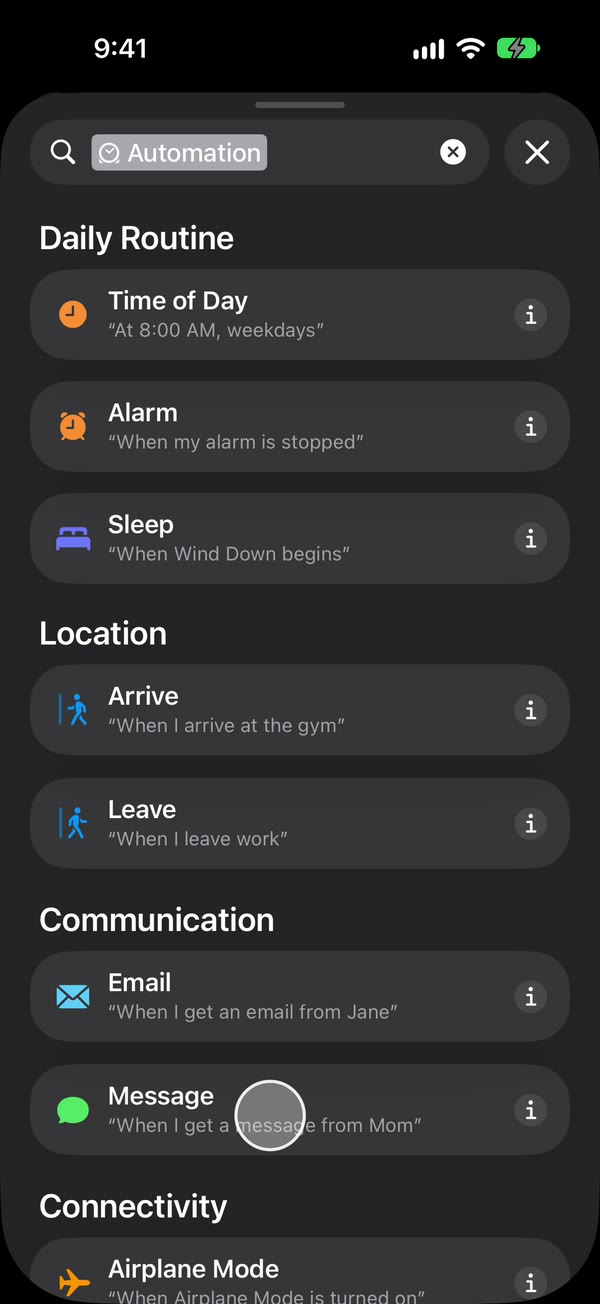
Create a Message automation. On iOS 27, open Shortcuts, tap Library, then Automation, then +. If you see Describe a shortcut, tap Edit. Tap Automation, then Message. On iOS 26, open the Automation tab, tap +, and choose Message.
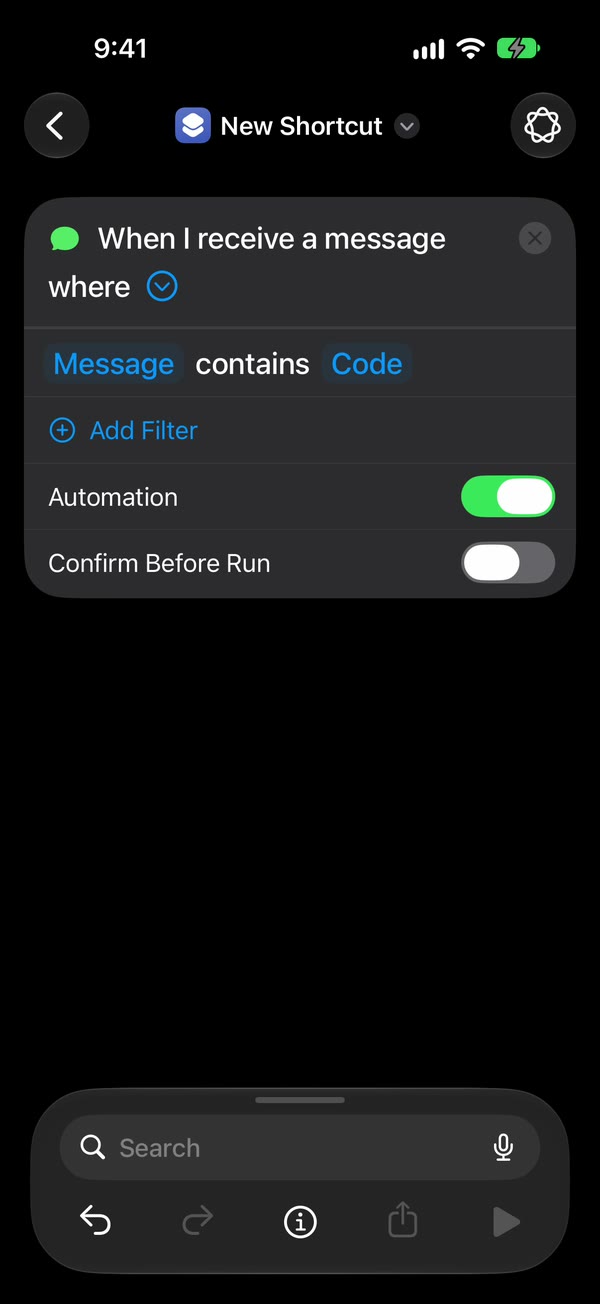
Set the rule, like Tasker’s Content field. Choose Message Contains (on iOS 27, change Sender to Message), then type a word your texts contain, such as code. To forward any text with a space in it, type a single space instead.
Make it run without asking. On iOS 27, tap the arrow beside the trigger and check that Confirm Before Run is off. Under ⓘ, then Privacy, check that Allow Running When Locked is on. On iOS 26, choose Run Immediately, then tap Next and Create New Shortcut.
Add Fwrd’s action. Search for Forward and add Fwrd’s Forward Message to All Destinations. Tap its Message field and choose Shortcut Input (on iOS 26, Shortcut Input, then Message). Tap back to save (Done on iOS 26).
That’s it. New texts that contain your word now go to your Telegram chat on their own, with the iPhone unlocked or locked.
The automation guide shows every screen on iOS 26 and iOS 27. For email, another phone or WhatsApp, add Apple’s or WhatsApp’s own send action below Fwrd’s and give it Fwrd’s output.
What can’t iPhone automations do that Tasker can?
Shortcuts can’t run without a rule, reach old texts, or script the phone in the background the way Tasker can. Plan around these:
- No app reads your texts on its own. The Message automation hands each text over, which is why you set it up once yourself.
- A rule is required. Shortcuts matches a word in the text or a sender from your Contacts. A single space catches any text with a space in it, so a one-word reply or a bare link won’t match.
- New texts only. It can’t go back through your message history.
- No background scripting. Shortcuts runs only on Apple’s triggers, such as a text, a time or a place, and actions that open a screen wait for a tap, so turn off any compose sheet or confirmation.
- The phone has to be on and online. Chat destinations need Wi-Fi or mobile data when the text arrives.
- After a restart, unlock it once. Fwrd keeps your destinations behind the same lock as saved passwords, so forwarding waits until the first unlock. An iPhone that isn’t unlocked for three days restarts itself, too.
- Text only. Fwrd forwards text only, and replies still come from the iPhone.
Where Fwrd fits
Fwrd is the closest fit when you want Tasker-style forwarding to chat apps on iPhone, because it builds each destination’s request for you:
- No account. There’s no sign-up, and texts are processed on the iPhone and sent straight to your destinations.
- Eight destinations. Telegram, Slack, Discord, Microsoft Teams, your own webhook (which also works with Zapier, Make and n8n), email, another phone or iMessage, and WhatsApp.
- Conditions, like Tasker’s. Each destination can keep only texts with words you choose, texts that look like a verification code, or texts that arrive at certain hours. Email, another phone and WhatsApp need one extra step: put the send action inside an If in the shortcut.
- One action, many places. It posts to every active Slack, Discord, Telegram, Teams and webhook destination in the format each expects, and hands the text to the Email, Messages or WhatsApp action after it.
Questions people ask next
Can I install Tasker on an iPhone?
No. Tasker is built for Android, and Android apps don’t run on iPhone. Use a Shortcuts Message automation instead, with Fwrd’s action for chat apps and webhooks.
Does the automation run when my iPhone is locked?
Yes, as long as it runs without asking and any send action after Fwrd’s doesn’t stop to ask. Right after a restart, forwarding starts again once you’ve unlocked the phone one time.
Can I forward texts from one person, like a Tasker Sender filter?
Yes, the Message trigger’s Sender rule forwards texts from one person you pick from your Contacts. Short numbers, such as banks and code senders, aren’t in Contacts, so match a word in their texts instead.
Does it cost anything?
Fwrd is free for 15 forwards a month, and a text counts once however many places it goes. Fwrd Pro removes the limit for $4.99 a month or $29.99 a year in the US.
Moved from Tasker? Forward your texts again
Fwrd adds one action to Shortcuts that sends matching new texts to Telegram, Slack, Discord, Teams and more, and hands them to email or WhatsApp, straight from your iPhone. Start with 15 free forwards each month.
Free for 15 forwards a month. Pro removes the limits on forwards and filters and adds a Never Forward list, for $4.99/month or $29.99/year, with a 7-day free trial on the yearly plan for eligible customers.
iPhone · iOS 26 or later