
How to Receive Thai Bank OTPs While Abroad
By Fwrd ·
To receive Thai bank OTPs while living abroad, keep your Thai SIM active in a spare iPhone at a relative’s home in Thailand, and let Fwrd forward each OTP text to Telegram or any of its eight destinations (for email, another phone and WhatsApp, it hands the text to your shortcut’s send step). That covers the codes KBank, SCB and Bangkok Bank still send by SMS, such as the K PLUS new-phone OTP and card OTPs for online payments. Face scans and other in-app approvals send no text, so there’s nothing to forward.
What you need: your Thai SIM, registered in your own name, with validity left; a spare iPhone on iOS 26 or later; a place for it in Thailand with power and Wi-Fi, with someone who can unlock it every two or three days and after a restart; Fwrd; and an app you read abroad.
How can I receive OTP abroad from my Thai number?
Keep the Thai number your banks know in a spare iPhone at home. It gets codes on the Thai network as if you’d never left, and Fwrd forwards each one to you over the internet.
Which Thai bank codes still come by SMS?
Codes for new phones, new payees and online card payments can. Approvals for large transfers don’t.
- The Bank of Thailand says banks must not send SMS with links, limit each customer to one mobile banking user on one device, and require a face scan for transfers of 50,000 baht or more (Bank of Thailand, read November 3, 2026).
- KBank says moving K PLUS to a new phone or number starts with an OTP received via SMS, and may also need an ID check at a K-ATM (KBank, read November 3, 2026).
- SCB sends OTPs for online card payments to the latest secure phone number it has, and you change that number at a branch (SCB, read November 3, 2026).
- Bangkok Bank sends an OTP by SMS to your registered number when you add a payee in Bualuang iBanking, and changing that number takes a form signed at a branch (Bangkok Bank, read November 3, 2026).
Why isn’t my bank OTP arriving abroad?
Usually because your Thai SIM can’t receive texts where it is. A travel SIM or eSIM gives you data abroad, but your bank still texts your Thai number. In a spare iPhone in Thailand, the SIM gets those texts.
Can I receive OTP abroad on AIS, True or dtac?
Yes, if the SIM stays active in the spare iPhone in Thailand, where Fwrd forwards its codes over Wi-Fi. Whether texts reach your Thai SIM abroad by roaming or Wi-Fi Calling, and what that costs, is up to your carrier and plan. This setup needs neither.
How to forward Thai bank OTPs to your phone abroad
Pick where the codes should go. Telegram, WhatsApp and email work anywhere you have internet. Another Phone texts the phone you carry; check what your plan charges to text abroad. For Telegram, the Telegram post shows how to make the bot.
Add it in Fwrd on the spare iPhone. Open Fwrd, tap +, choose the destination, and fill in its details in the Configuration field. Tap Send Test Message, then save with the tick.
Create a Message automation. On iOS 27, open Shortcuts, tap Library, then Automation, then +. If you see Describe a shortcut, tap Edit. Tap Automation, then Message, and change Sender to Message. On iOS 26, open the Automation tab, tap +, and choose Message.
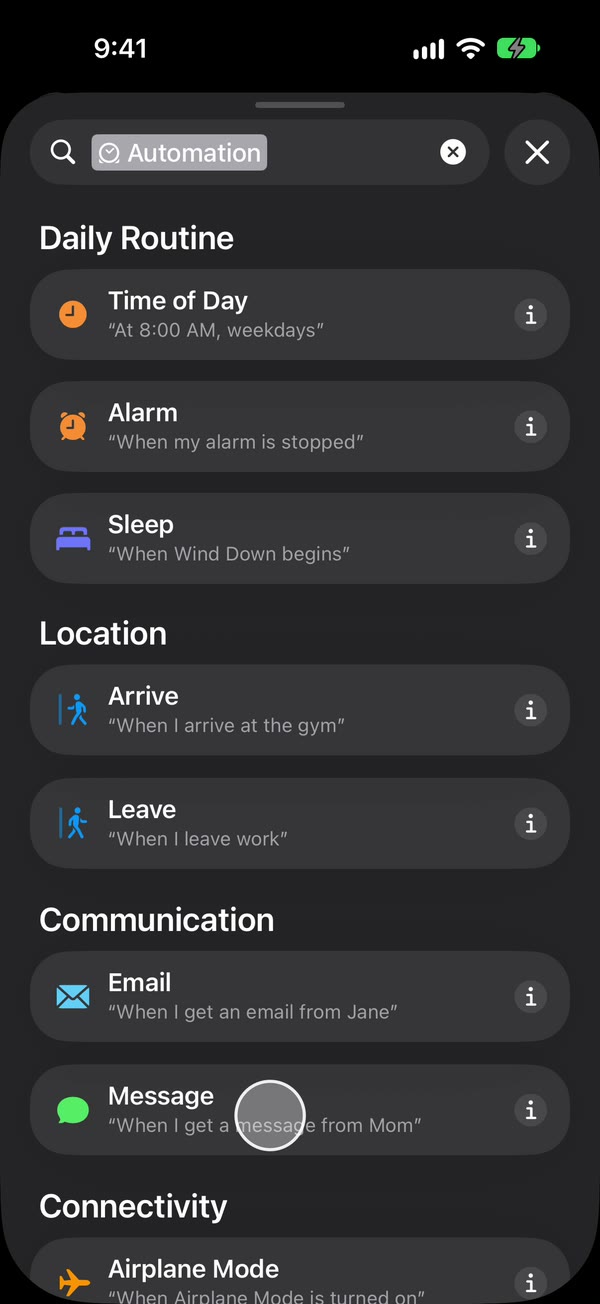
Type OTP, then make it run without asking. Type OTP, or another word your bank’s code texts contain. Bank texts often come from lettered sender names the Sender picker can’t offer, so match on the words in the text. Then, on iOS 27, tap the arrow beside the trigger and check Confirm Before Run is off, and under ⓘ, then Privacy, check Allow Running When Locked is on. On iOS 26, choose Run Immediately, then tap Next and Create New Shortcut.
Add Fwrd’s action. Search for Forward, add Forward Message to All Destinations, and set its Message field to Shortcut Input. For another phone, email or WhatsApp, add Apple’s Send Message, Apple’s Send Email or WhatsApp’s Send Message below it, set its message to Fwrd’s output, and pick the recipient. Give Send Email a subject and turn off Show Compose Sheet. Tap back to save (Done on iOS 26).
That’s it. New OTP texts to your Thai number now reach you abroad on their own, with the spare iPhone unlocked or locked.
Does the Thai SIM have to be in my name?
Yes, for mobile banking. KBank and Bangkok Bank check that the SIM’s owner is the person using the app.
- KBank said customers whose SIM owner name didn’t match their mobile banking name by April 30, 2025 would have mobile banking suspended by July 15, 2025, foreigners included (KBank, read November 3, 2026).
- Bangkok Bank says the SIM holder, account holder and Mobile Banking user must be the same person (Bangkok Bank, read November 3, 2026).
So keep your own SIM in the spare iPhone, not a relative’s.
How do I keep my Thai number active while abroad?
Keep validity and some balance on it.
- Top up before you leave. dtac says a top-up of 1,000 baht or more gives 150 days, and validity can build up to 365 days (dtac, read November 3, 2026).
- Leave a balance as a safety net. Since May 14, 2026, under NBTC rules, an AIS or True prepaid number whose validity runs out with money left is kept for 3 baht per 30 days for up to 180 days (True, AIS, read November 3, 2026).
- Someone unlocks it every few days. An iPhone that isn’t unlocked for three days restarts itself, and after any restart Fwrd can’t forward until someone unlocks it once.
- Turn off automatic iOS updates and the SIM PIN. An update restarts the phone, and a SIM PIN keeps it off the network after a restart until someone types it.
The codes are yours. Forward OTPs only to a chat or inbox only you can read, never to the family group chat. Some banks’ terms forbid sharing OTPs, so check yours.
Fwrd is free for 15 forwards a month as of November 2026. Fwrd Pro removes the limit; set it up before you leave.
What forwarding can’t do
- It can’t do in-app or in-person steps. A face scan, a K-ATM ID check or a branch visit still needs you.
- It can’t put the SIM in your banking phone. Bangkok Bank asks users to keep the app’s number matching the SIM card they use with the app. If your bank’s app wants the Thai SIM inside the phone it runs on, forwarding can’t change that.
- It isn’t banking advice. What your bank allows from abroad is up to your bank.
Questions about Thai OTPs abroad
Can I get Thai bank OTPs abroad without carrying my Thai SIM?
Yes. Leave the SIM in a spare iPhone with family in Thailand, and Fwrd forwards its OTP texts to an app you read over the internet.
I’m a foreigner who left Thailand. Does this work for me?
Yes, if the Thai number is registered in your own name and someone you trust in Thailand keeps the spare iPhone.
What happens if the spare iPhone restarts?
Forwarding stops until someone unlocks it once. That happens after updates, power cuts, and on its own after three days without an unlock.
Get your Thai number’s OTPs wherever you live
Leave your Thai SIM in a spare iPhone, and Fwrd forwards each new OTP text to Telegram or any of its eight destinations; for email, another phone and WhatsApp it hands the text to your shortcut’s send step. Start with 15 free forwards each month.
Free for 15 forwards a month. Pro removes the limits on forwards and filters and adds a Never Forward list, with a free trial on the yearly plan for eligible customers.
iPhone · iOS 26 or later