
How to Receive GCash and Philippine Bank OTPs Abroad
By Fwrd ·
To receive GCash and Philippine bank OTPs while abroad, keep your registered Philippine SIM active in a spare iPhone, with family in the Philippines or with you, and let Fwrd forward each OTP text to Telegram or any of its eight destinations (for email, another phone and WhatsApp, it hands them to your shortcut’s send step). Banks and e-wallets are moving approvals into their apps, but some codes, such as GCash login OTPs and Maya’s new-device OTP, still go to your registered number.
What you need: your Philippine SIM, registered and loaded; a spare iPhone on iOS 26 or later; a place for it with power and Wi-Fi, such as a relative’s home in the Philippines, with someone who can unlock it every two or three days; Fwrd; and an app you read abroad.
How can I receive GCash and bank OTPs outside the Philippines?
Keep the Philippine number your GCash, Maya and bank accounts already use in a spare iPhone, and forward its OTP texts over the internet. Left with family in the Philippines, the SIM receives codes on its home network, and Fwrd passes each one on to you.
Which OTPs still come by text?
Fewer than before, but signing in and setting up still lean on your registered number.
- The BSP told banks and e-wallets to limit authentication that can be intercepted, such as OTPs sent by SMS and email, and gave them a year to comply (BSP, Circular No. 1213, read October 26, 2026).
- GCash says you can’t receive OTPs by email for logins, and that it sends Send Money OTPs as in-app notifications instead of SMS (GCash, read October 26, 2026).
- Maya says that to log in from a new device, you enter an OTP sent directly to your registered number (Maya, read October 26, 2026).
- BPI says turning on its Mobile Key includes entering an OTP sent to your registered mobile number (BPI, read October 26, 2026).
Where your bank or e-wallet offers approval in its app, use it.
How to forward Philippine OTPs to your phone abroad
Pick where the codes should go. Telegram, WhatsApp and email work anywhere you have internet. Another Phone texts the phone you carry; check what your load charges to text abroad. For Telegram, the Telegram post shows how to make the bot.
Add it in Fwrd on the spare iPhone. Open Fwrd, tap +, choose the destination, and fill in its details in the Configuration field. Tap Send Test Message, then save with the tick.
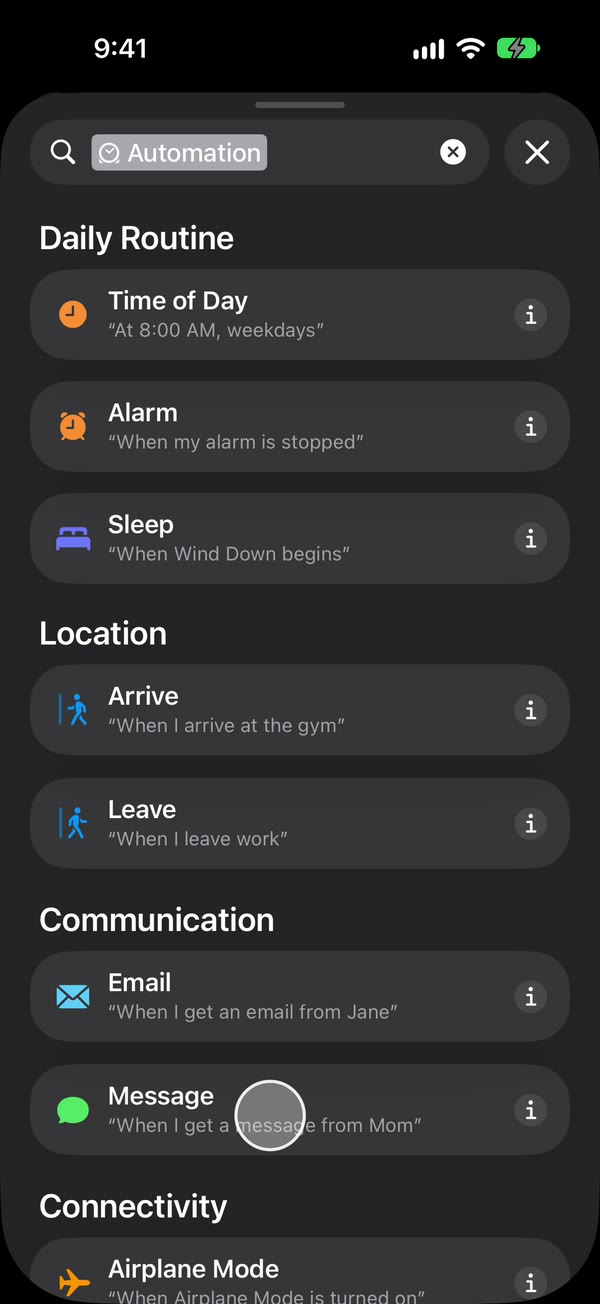
Create a Message automation. On iOS 27, open Shortcuts, tap Library, then Automation, then +. If you see Describe a shortcut, tap Edit. Tap Automation, then Message, and change Sender to Message. On iOS 26, open the Automation tab, tap +, and choose Message.
Type OTP, then make it run without asking. Type OTP, or another word your code texts contain, such as code. Codes often come from lettered sender names the Sender picker can’t offer, so match on the words in the text. Then, on iOS 27, tap the arrow beside the trigger and check Confirm Before Run is off, and under ⓘ, then Privacy, check Allow Running When Locked is on. On iOS 26, choose Run Immediately, then tap Next and Create New Shortcut.
Add Fwrd’s action. Search for Forward, add Forward Message to All Destinations, and set its Message field to Shortcut Input (on iOS 26, Shortcut Input, then Message). For another phone, email or WhatsApp, add Apple’s Send Message, Apple’s Send Email or WhatsApp’s Send Message below it, set its message to Fwrd’s output, and pick the recipient. Give Send Email a subject and turn off Show Compose Sheet. Tap back to save (Done on iOS 26).
That’s it. New OTP texts to your Philippine number now reach you abroad on their own, with the spare iPhone unlocked or locked.
On Telegram, you can catch more codes by typing a single space as the automation’s word, then opening the destination in Fwrd, choosing Which Texts, and keeping only texts that look like a verification code, so promo texts stay behind. To see who sent each code, turn on Include Who Sent It in Fwrd’s Settings and choose Sender on Fwrd’s action. The automation guide shows every tap.
Family reading codes out, or forwarding?
Forwarding takes your family out of each code. They only keep the iPhone charged and unlock it now and then.
| Family reads you the code | Spare iPhone with Fwrd | |
|---|---|---|
| Who has to act | Family, for every code | Someone unlocks the iPhone every few days |
| When you get the code | When they see your message | On its own, once it reaches the SIM |
| Who sees the code | Whoever reads it out | You, and anyone who unlocks the iPhone |
Keep the Philippine SIM working
- Keep it registered in your name. The SIM Registration Act makes registration a condition for a SIM to be activated (RA 11934, read October 26, 2026).
- Keep it loaded. Smart says reloading regularly, even with small top-ups, is the most effective way to keep a Smart Prepaid SIM active, and that once a SIM is deactivated, it can no longer be reactivated (Smart, read October 26, 2026). On Globe or DITO, follow your network’s own rules.
- Someone unlocks it every few days. An iPhone that isn’t unlocked for three days restarts itself, and after any restart Fwrd can’t forward until someone unlocks it once.
- Turn off automatic iOS updates and the SIM PIN. An update restarts the phone, and a SIM PIN keeps it off the network after a restart until someone types it.
The codes are yours. Forward OTPs only to a chat or inbox only you can read, never to the family group chat. The BSP lists avoiding disclosure of OTPs among customers’ responsibilities, and some banks’ terms forbid sharing them, so check yours.
Fwrd is free for 15 forwards a month as of October 2026, and a text a filter skips doesn’t use one up. Fwrd Pro removes the limit for $4.99 a month or $29.99 a year in the US; set it up before you leave.
What forwarding can’t do
- It can’t keep the SIM alive. If it runs out of load or loses its registration, nothing arrives to forward.
- It can’t reply from your Philippine number. Fwrd only forwards. Replies still come from the spare iPhone.
- It can’t forward in-app approvals, voice OTPs or pictures, only texts.
- It isn’t banking advice. What your bank allows from abroad is up to your bank.
Questions about Philippine OTPs abroad
Can I get GCash OTPs abroad without carrying my Philippine SIM?
Yes. Leave the SIM in a spare iPhone with family in the Philippines. GCash’s OTP texts arrive there, and Fwrd forwards them to an app you read over the internet.
Do codes from short numbers and named senders get forwarded?
Yes. The automation looks at what a text says, not who sent it, so codes from short numbers and senders shown by name forward like any other text with your word in it.
Will BPI, BDO and Maya OTPs be forwarded too?
Yes, if they arrive as texts on the Philippine SIM and contain your automation’s word. Fwrd forwards any matching text, whoever sent it. Approvals inside a bank’s app don’t come by text, so they stay in the app.
What happens if the spare iPhone restarts?
Forwarding stops until someone unlocks it once. That happens after updates, power cuts, and on its own after three days without an unlock.
Get your Philippine number’s OTPs wherever you work
Leave your Philippine SIM in a spare iPhone, and Fwrd forwards each new OTP text to Telegram or any of its eight destinations; for email and WhatsApp it hands the text to your shortcut’s send step. Start with 15 free forwards each month.
Free for 15 forwards a month. Pro removes the limits on forwards and filters and adds a Never Forward list, for $4.99/month or $29.99/year, with a 7-day free trial on the yearly plan for eligible customers.
iPhone · iOS 26 or later