
IFTTT SMS Trigger on iPhone? What Works Instead
By Fwrd · · Updated
No, there’s no IFTTT trigger for incoming texts on iPhone: IFTTT’s text triggers belong to its Android SMS service, which needs the IFTTT app for Android, and iOS doesn’t let any app read your Messages. The iPhone’s trigger is Apple’s Shortcuts app, whose Message automation runs whenever a matching text arrives. Add Fwrd’s action and it sends each text to Telegram, Slack, Discord, Teams or a webhook, or hands it to Apple’s or WhatsApp’s own action for email, another phone or WhatsApp.
What you need: an iPhone on iOS 26 or later, the Shortcuts app (it’s already on your phone), and somewhere to send the texts, such as a Telegram bot, a Slack channel or an email address. No IFTTT account is needed.
Is there an IFTTT SMS trigger for iPhone?
No. Every IFTTT trigger that fires on a text you receive is Android-only. Here’s what IFTTT’s own pages said on 2026-10-17:
- Android SMS has the triggers people search for, such as “Any new SMS received” and “New SMS received matches search”. The page says the service “requires the IFTTT app for Android”.
- SMS is a different service. Its triggers fire when you send a text to your IFTTT phone number, not when someone texts you, and each one carries IFTTT’s Pro badge.
So an applet like “forward SMS to email” or “SMS to Telegram” only works with an Android phone receiving the texts. On iPhone, the trigger has to come from Shortcuts.
What works instead on iPhone?
A Shortcuts Message automation with Fwrd’s action. You can still send into IFTTT behind it.
| Option | Works on iPhone for texts you receive? |
|---|---|
| IFTTT Android SMS | No, it needs IFTTT’s Android app |
| IFTTT SMS service | No, only texts you send to IFTTT |
| Shortcuts with Fwrd | Yes, to eight destinations |
| Fwrd’s webhook into IFTTT | Yes, then into IFTTT’s services |
Most IFTTT text applets people look for (to email, Telegram or WhatsApp) work on iPhone with Fwrd’s action and nothing else.
How to replace an IFTTT SMS applet on iPhone
These steps send each matching text to Telegram, one of the most searched IFTTT text applets. The automation is the same whichever destination you pick.
Add a destination in Fwrd. Open Fwrd, tap +, and choose Telegram. Paste your bot token and chat ID, tap Send Test Message, then save with the tick. Forwarding SMS to Telegram covers the bot and chat ID.
Create a Message automation. On iOS 27, open Shortcuts, tap Library, then Automation, then +. If you see Describe a shortcut, tap Edit. Tap Automation, then Message. On iOS 26, open the Automation tab, tap +, and choose Message.
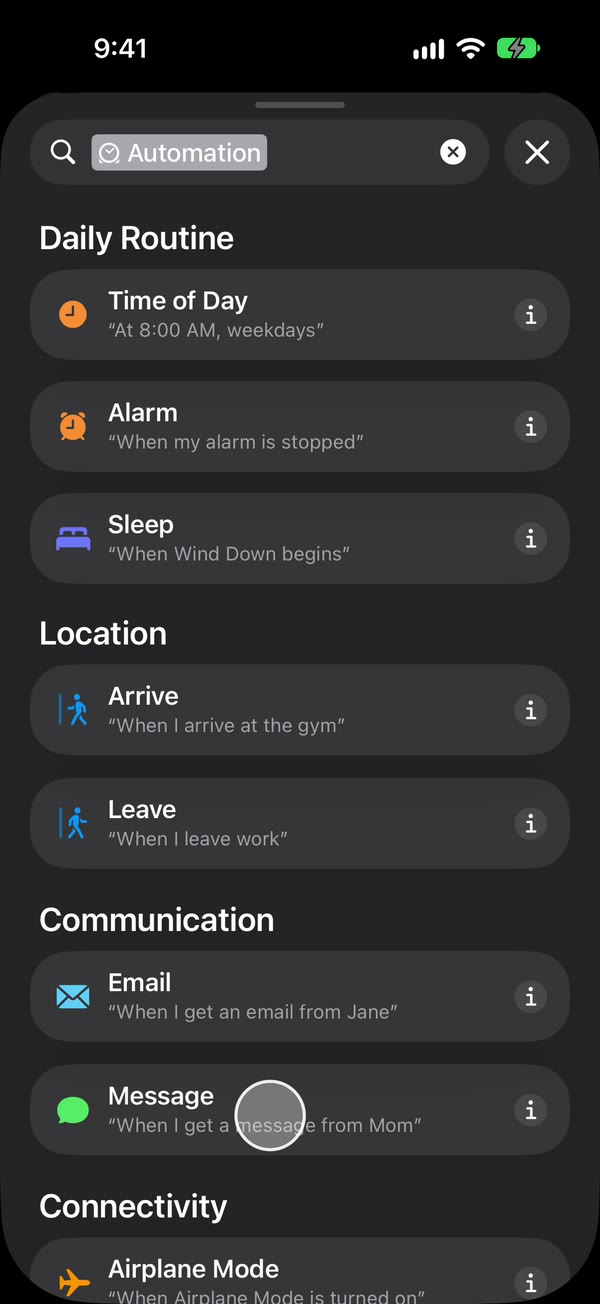
Set the rule, like IFTTT’s “matches search”. Choose Message Contains (on iOS 27, change Sender to Message), then type a word your texts contain, such as code. To forward any text with a space in it, type a single space instead.
Make it run without asking. On iOS 27, tap the arrow beside the trigger and check that Confirm Before Run is off. Under ⓘ, then Privacy, check that Allow Running When Locked is on. On iOS 26, choose Run Immediately, then tap Next and Create New Shortcut.
Add Fwrd’s action. Search for Forward (on iOS 26, tap Add Action first) and add Fwrd’s Forward Message to All Destinations. Tap its Message field and choose Shortcut Input (on iOS 26, Shortcut Input, then Message). Tap back to save (Done on iOS 26).
That’s it. New texts with your word now go to your Telegram chat on their own, with the iPhone unlocked or locked.
The automation guide shows every screen on iOS 26 and iOS 27. For email, another phone or WhatsApp, add Apple’s or WhatsApp’s own send action below Fwrd’s and give it Fwrd’s output; that action does the sending.
Can you still send iPhone texts into IFTTT?
Yes, through IFTTT’s Webhooks service, whose “Receive a web request with a JSON payload” trigger carried a Pro badge on IFTTT’s Webhooks page on 2026-10-17. Fwrd’s Webhook destination posts each text as JSON, {"content": "…", "text": "…"}, to a public HTTPS address, adding a sender field only when Include Who Sent It is on.
Fwrd sends no login header, so the address has to carry everything IFTTT needs. IFTTT’s webhook URL includes your key, and the Webhooks page says to find it under Documentation. That’s worth it when IFTTT already runs something you want the text to reach, like a smart-home device. For Zapier, Make or n8n, see sending iPhone texts to automation tools.
Why choose Fwrd over an IFTTT applet for texts?
Because on iPhone it does the step IFTTT can’t, which is catching the incoming text. We make Fwrd, so here’s our case; each point is on its App Store listing or this site:
- It works with the iPhone’s own trigger. Shortcuts hands each matching text to Fwrd’s action, so nothing has to read your Messages.
- No account. There’s no Fwrd sign-up and no Fwrd server. Texts are processed on the iPhone and sent straight to your destinations.
- Eight destinations from one action. Telegram, Slack, Discord, Microsoft Teams, your own webhook, Email, another phone or iMessage, and WhatsApp.
- Filters like IFTTT’s search. Each destination can keep only texts with your words, ones that look like a verification code, or ones that arrive at certain hours. Email, another phone and WhatsApp need their send action inside an If first; until then they get every text the automation passes on. The free plan allows one condition per destination.
- The price. 15 free forwards a month, and a text counts once however many places it goes.
If a text needs to reach a service only IFTTT connects to, Fwrd’s webhook can feed it, as above.
What an iPhone automation can’t do
- No app reads your texts on its own. The Message automation hands each text over, which is why you set it up once yourself.
- A rule is required. A single space catches any text with a space in it, so a one-word reply or a bare link won’t match.
- New texts only. It can’t go back through old messages.
- The phone has to be on and online. After a restart, unlock it once before forwarding starts again.
- Text only, one way. Pictures don’t forward, and replies still come from the iPhone.
Questions people ask next
Why is my IFTTT SMS trigger not working on iPhone?
Because IFTTT’s triggers for texts you receive come from its Android SMS service, which needs the IFTTT app for Android. Build the trigger in Shortcuts instead, with a Message automation.
Can I forward iPhone texts to email without IFTTT?
Yes. Add an Email destination in Fwrd, then add Apple’s Send Email below Fwrd’s action, give it Fwrd’s output and a subject, and turn off Show Compose Sheet.
Does the automation run when my iPhone is locked?
Yes, as long as it runs without asking and any send action after Fwrd’s doesn’t stop to ask. Right after a restart, forwarding starts again once you’ve unlocked the phone one time.
Does it cost anything?
Fwrd is free for 15 forwards a month, and a text counts once however many places it goes. Fwrd Pro removes the limit for $4.99 a month or $29.99 a year in the US.
Missing IFTTT’s SMS trigger on iPhone?
Fwrd adds one action to Shortcuts that sends matching new texts to Telegram, Slack, Discord, Teams or a webhook, and hands them to email, another phone or WhatsApp. Start with 15 free forwards each month.
Free for 15 forwards a month. Pro removes the limits on forwards and filters and adds a Never Forward list, for $4.99/month or $29.99/year, with a 7-day free trial on the yearly plan for eligible customers.
iPhone · iOS 26 or later