
Can ChatGPT, Claude or Gemini Read Your iPhone Texts?
By Fwrd · · Updated
Not on the iPhone itself. ChatGPT can read your Messages only through its Mac desktop app, Claude on iPhone writes new messages but doesn’t read old ones, and Google says Gemini can’t read or summarize your messages. From an iPhone, a Shortcuts Message automation can hand any of them just the texts you choose.
What you need: an iPhone on iOS 26 or later, the Shortcuts app, and somewhere to send the texts, such as an n8n, Make or Zapier workflow with an AI step.
Can ChatGPT read your text messages?
On a Mac, yes, when you install its Messages plugin and ask it to. On an iPhone, no: no app can read Messages, ChatGPT included.
OpenAI’s plugin page (checked October 18, 2026) says the Apple Messages plugin in the ChatGPT desktop app for Apple silicon Macs can read and search “iMessage, SMS, and RCS chats on your Mac” and send messages, asking you to approve the message and recipients first by default. It works in Codex and ChatGPT Work chats, and isn’t directly available in ChatGPT on the web or mobile.
It can read and search your Mac’s chats when asked, so decide before granting the macOS permissions it asks for. On the iPhone, iOS keeps every app out of Messages; can apps read your texts? explains why.
Can Claude read your iMessages?
Not on the iPhone. Anthropic’s iOS apps guide says the Claude app can draft a message and open it in Messages for you to send, but “does not read existing messages or emails, only creates new content”.
On a Mac, Anthropic’s Claude Desktop page says you can browse verified extensions inside the app, “including options like filesystem access and iMessage” (both checked October 18, 2026). For new iPhone texts, use Claude as the AI step in the webhook route below. Here’s how the options compare:
| Approach | What the AI sees | Privacy note |
|---|---|---|
| ChatGPT’s Messages plugin (Mac) | Your Mac’s message history, when you ask | Sends only after you approve, by default |
| Shortcuts with Fwrd and a webhook | Each matching new text | Your workflow tool and AI provider each process it |
How do you send iPhone texts to an AI agent?
Point Fwrd’s Webhook destination at a workflow with an AI step. Fwrd posts each matching text from the iPhone as JSON, and your workflow passes it to ChatGPT, Claude, Gemini or another model and posts the result wherever you like.
Build the workflow. In n8n, add a Webhook node set to POST; in Make, a Custom webhook; in Zapier, a Catch Hook. Add an AI step that reads the
contentfield, then a step that posts its answer, say to Telegram or Slack. In n8n, copy the production URL and publish the workflow, or it won’t answer.Add a webhook in Fwrd. Open Fwrd, tap +, and choose Webhook. Paste the whole HTTPS address, tap Send Test Message so your workflow sees the fields, then save with the tick.
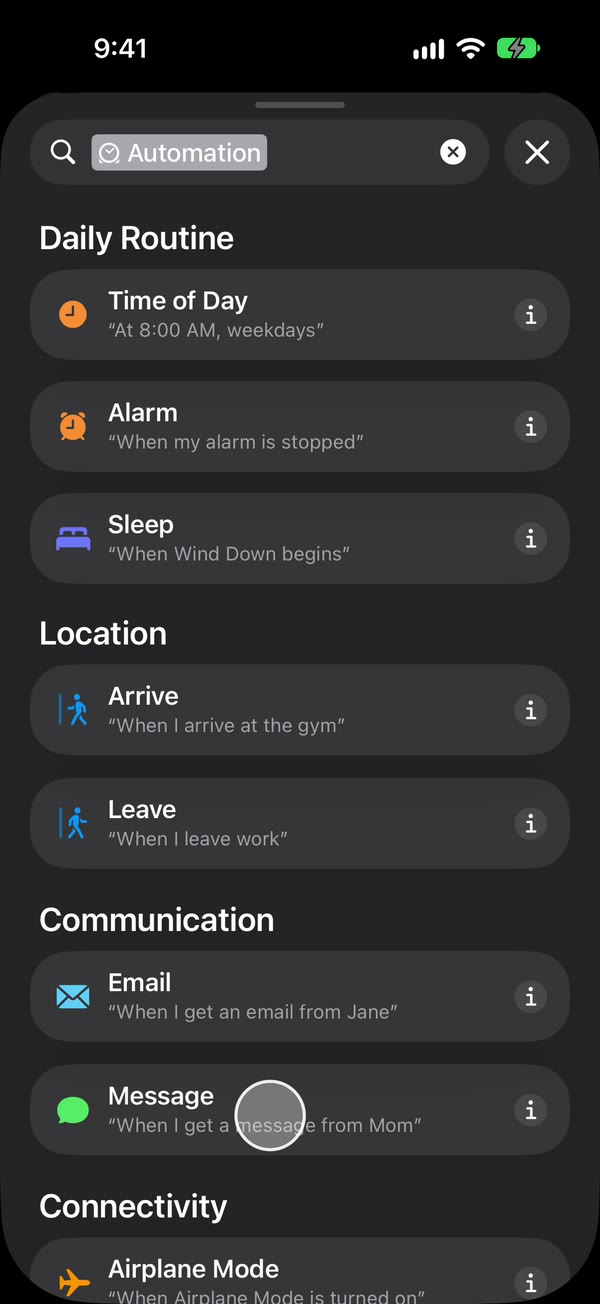
Create a Message automation. On iOS 27, open Shortcuts, tap Library, then Automation, then +. If you see Describe a shortcut, tap Edit. Tap Automation, then Message. On iOS 26, open the Automation tab, tap +, and choose Message.
Choose which texts to send. Choose Message Contains (on iOS 27, change Sender to Message), then type a word your texts contain, such as order or delivery.
Make it run without asking. On iOS 27, tap the arrow beside the trigger and check that Confirm Before Run is off. Under ⓘ, then Privacy, check that Allow Running When Locked is on. On iOS 26, choose Run Immediately, then tap Next and Create New Shortcut.
Add Fwrd’s action. Search for Forward (on iOS 26, tap Add Action first) and add Fwrd’s Forward Message to All Destinations. Tap its Message field and choose Shortcut Input (on iOS 26, Shortcut Input, then Message). Tap back to save (Done on iOS 26).
That’s it. New texts with your word now reach your AI workflow on their own, with the iPhone unlocked or locked.
Your workflow receives {"content": "…", "text": "…"}, both holding the message exactly as it arrived. It gets a sender field only if you turn on Include Who Sent It in Fwrd’s Settings and choose Sender on Fwrd’s action. The Zapier, Make and n8n page has tips for each tool, and the webhook guide covers the endpoint side.
Why use Fwrd for this?
It sends only the texts you choose, straight from your iPhone, with no account. We make Fwrd, so here’s our case:
- Only the texts you choose. The automation hands over new texts that match your word, never your history. Each webhook can also keep only texts with certain words, codes, or certain hours.
- No account and no Fwrd server. Each text goes from your iPhone straight to your webhook, and the address stays in the iPhone’s Keychain.
- Eight destinations from one action. The same action also reaches Slack, Discord, Telegram and Microsoft Teams, and hands the text to Apple’s or WhatsApp’s own action for Email, another phone or iMessage, and WhatsApp.
The limits to know: what the AI keeps
The AI sees whatever you send it, under that service’s rules. Fwrd keeps a log of recent forwards, text included, on your iPhone for up to 30 days and has no server, as its privacy policy says, but once a text reaches your workflow, your automation tool and AI provider each process and may store it.
- Leave codes out unless you need them. Use a word that matches the texts you want analyzed, not a single space that catches everything.
- Endpoints need public HTTPS. Fwrd sends no login header, so a webhook that needs a secret has to take it in the address.
- Receive-only. Fwrd can’t send a reply text for the AI; you still reply from the iPhone.
Questions people ask next
Can Gemini read my text messages?
Not from your messaging app. Google’s Gemini messaging guide says Gemini on an Android phone or tablet can send texts, but can’t “read or summarize your messages directly from your messaging app” (checked October 18, 2026). On an iPhone, Fwrd can send new texts to a workflow with a Gemini step.
Can ChatGPT reply to my texts?
On a Mac, the plugin can send through Messages, after you approve each message by default. Fwrd’s route is one way: texts go out to your AI, and nothing is sent back as a text.
Do iMessages count?
Yes. The Message automation runs for messages that arrive in the Messages app, iMessages included, so a matching iMessage reaches your workflow the same way an SMS does.
What does it cost?
Fwrd is free for 15 forwards a month, and a text counts once however many places it goes. Fwrd Pro removes the limit for $4.99 a month or $29.99 a year in the US. Your automation tool and AI provider may charge for their own runs.
Send only the texts you choose to your AI
Fwrd posts each matching text from your iPhone to your own webhook, ready for an AI step, with no account and no Fwrd server. Start with 15 free forwards each month.
Free for 15 forwards a month. Pro removes the limits on forwards and filters and adds a Never Forward list, for $4.99/month or $29.99/year, with a 7-day free trial on the yearly plan for eligible customers.
iPhone · iOS 26 or later