
Xfinity Mobile Text to Email: Get iPhone Texts in Email
By Fwrd ·
To get the texts your Xfinity Mobile iPhone receives into your inbox, make a Message automation in Apple’s Shortcuts app with Fwrd’s action and Apple’s Send Email after it. Mail sends each text from the account on your iPhone, so it works on Xfinity Mobile the same way it does on any other carrier.
What you need: the iPhone that gets the texts, on iOS 26 or later, a Mail account on it that can send, and the address that should get them, such as Gmail, Outlook or iCloud.
Does Xfinity Mobile have text to email?
The Xfinity page I found is about the other direction. Its support article, Blocking email-to-text messages (read November 4, 2026), explains: “Email-to-text is the ability to send a text message or image to a mobile device through email by using the mobile phone number as the email address.” It adds that it is “often used to send spam text messages from random or unknown email addresses.”
That is an email arriving on a phone as a text. The page doesn’t describe a way to send the texts your iPhone receives on to an email address, and I didn’t find another Xfinity page that does. It doesn’t say email-to-text is ending either, so I’m not saying it has.
What is email to text on Xfinity Mobile, and can I turn it off?
According to the same page, you can switch it off from your phone: “You can turn off email-to-text by texting Off to 4040.” Texting On to 4040 turns it back on, and texting Status to 4040 shows which one you have.
The page warns about a side effect. Most messages sent this way are spam, but “some businesses and organizations may use this functionality to deliver communications,” so you may miss a message from one that does. Blocking email-to-text only stops emails from reaching your phone as texts. It has no effect on the shortcut on this page, which starts when a text arrives on your iPhone and sends it out through Mail.
How do I get my Xfinity Mobile texts in email automatically?
Let your iPhone do the sending. A Shortcuts Message automation runs each time a text arrives, Fwrd’s action passes the text on, and Apple’s Send Email mails it to your inbox. Nothing goes through Xfinity’s email-to-text service, so it works the same on Xfinity Mobile as on any other carrier.
What this gives you:
- Every matching text, as it arrives. The automation runs on your iPhone when a text arrives, and Mail sends the email from your own account.
- You choose which texts. A word in the automation, such as code, decides which texts are emailed.
- It can say who sent it. Turn on Include Who Sent It in Fwrd’s Settings and choose Sender on Fwrd’s action, and each email starts with a From: line.
- It can go further than email. The same action can also post each text to any chat app or webhook you add in Fwrd.
How to send iPhone texts to email, step by step
Add Email in Fwrd. Open Fwrd, tap +, and choose Email Address. Under Recipient Reference, type the address that should get your texts and tap + to add it, then save with the tick.
Create a Message automation. On iOS 27, open Shortcuts, tap Library, then Automation, then +. If you see Describe a shortcut, tap Edit. Tap Automation, then Message. On iOS 26, open the Automation tab, tap + (or New Automation if it’s your first), and choose Message.
Choose which texts to email. Choose Message Contains (on iOS 27, change Sender to Message) and type a word those texts include, such as code. To email any text with a space in it, type a single space instead.
Let it run without asking. On iOS 27, tap the arrow beside the trigger and turn off Confirm Before Run. Under ⓘ, then Privacy, turn on Allow Running When Locked. On iOS 26, choose Run Immediately (if you see Notify When Run, turn it off), then tap Next and Create New Shortcut.
Add Fwrd’s action. (On iOS 26, tap Add Action first.) Search for Forward, add Fwrd’s Forward Message to All Destinations, and set its Message to Shortcut Input.
Add Apple’s Send Email below it. Search for Send Email and pick Apple’s. Tap its Message field and choose Forward Message to All Destinations in the bar above the keyboard. Under Recipients, add the address you saved in Fwrd.
Type a subject. Tap Subject and type one, such as Forwarded text. If you leave it blank, Shortcuts stops and asks for a subject every time, and nothing is sent while the iPhone is locked.
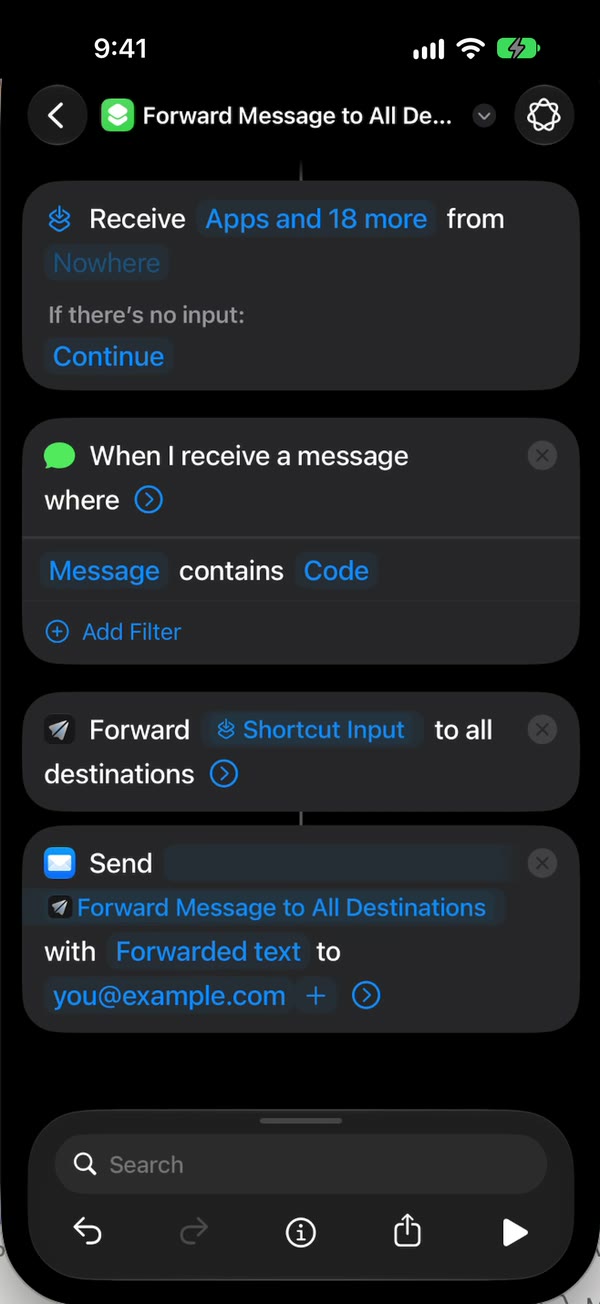
Turn off the compose sheet. Tap the arrow at the end of Send Email and turn off Show Compose Sheet, so Mail sends without waiting for you. Tap back to save (Done on iOS 26).
That’s it. New texts with your word now land in your inbox on their own, with the iPhone unlocked or locked.
The email setup guide has a video of every tap.
What this can’t do
- It can’t text an email address for you. Fwrd forwards texts your iPhone receives. It doesn’t send the texts you write in Messages to an email address.
- It can’t turn emails into texts. Fwrd works in one direction, from the iPhone to your inbox.
- It can’t forward texts you already have. Only texts that arrive after the automation is on are emailed.
- The iPhone has to stay on and online. Mail sends each email from the iPhone, over Wi-Fi or mobile data.
- After a restart, unlock it once. Forwarding waits until the first unlock. An iPhone left locked for three days restarts, so don’t leave it in a drawer.
- Text only, one way. Pictures don’t forward, and replying to the email doesn’t reach the person who texted you.
- Handing a text to Email counts as a forward, since Fwrd can’t see whether Mail’s send arrived.
Questions about Xfinity Mobile text to email
Does Xfinity Mobile text to email still work?
The Xfinity page I read, on November 4, 2026, describes email-to-text and how to block it, and says nothing about ending it. It doesn’t cover sending a phone’s texts to an email address, so it can’t tell you what that does. The shortcut on this page doesn’t depend on either.
Will blocking email-to-text on Xfinity Mobile stop this?
No. Texting Off to 4040 only stops emails from arriving on your phone as texts. The automation runs when a text arrives and Mail sends the email from your own account, so it keeps working.
Does Fwrd send the email itself?
No. Fwrd hands each text to Apple’s Send Email action in your shortcut, and Mail sends it from the account on your iPhone. I built Fwrd with no email server, account or relay, so your texts never pass through one of mine.
How much does it cost?
Fwrd is free for 15 forwards a month, and a text counts once however many places it goes. Fwrd Pro removes the limit, and the app shows its price before you buy.
Get your iPhone texts in your inbox
Fwrd hands each matching new text to Apple’s Send Email, so it lands in your inbox on Xfinity Mobile or any carrier, with no account. Start with 15 free forwards each month.
Free for 15 forwards a month. Pro removes the limits on forwards and filters and adds a Never Forward list, with a free trial on the yearly plan for eligible customers.
iPhone · iOS 26 or later