
How to Forward Texts on iPhone Duo
By Fwrd ·
You forward texts on iPhone Duo the same way as on any iPhone on iOS 27: a Message automation in Apple’s Shortcuts app runs when a matching text arrives and hands it to Fwrd, which sends it on to email, another phone, WhatsApp, Slack, Discord, Microsoft Teams, Telegram or your own webhook. There’s no forwarding switch in Settings, and nothing on iPhone Duo works differently for it.
What you need: an iPhone Duo (it comes with iOS 27.1), the Shortcuts app (it’s already on the phone), Fwrd, and somewhere to send the texts, such as a chat channel or an email address.
How do you forward texts on iPhone Duo?
With one Shortcuts automation and Fwrd’s action. iPhone Duo is an iPhone running iOS 27.1, and Fwrd runs on any iPhone with iOS 26 or later, so the setup is the same one Fwrd’s automation guide shows for every iPhone.
Apple’s iPhone Duo announcement (read October 26, 2026) says iPhone Duo went on sale on October 23, 2026 in the US and more than 70 other countries and regions, and in 28 more from October 30. Apple doesn’t describe any change to Shortcuts or Message automations for it.
How to set up text forwarding on iPhone Duo
Make the destination in Fwrd first, then the automation. You can do every step on the outer display or the inner one, folded or open.
Add a destination in Fwrd. Open Fwrd, tap +, and choose where texts should go. Paste the address it asks for into the Configuration field, such as a Slack or Discord webhook URL, or a Telegram bot token and chat ID. Tap Send Test Message, then save with the tick.
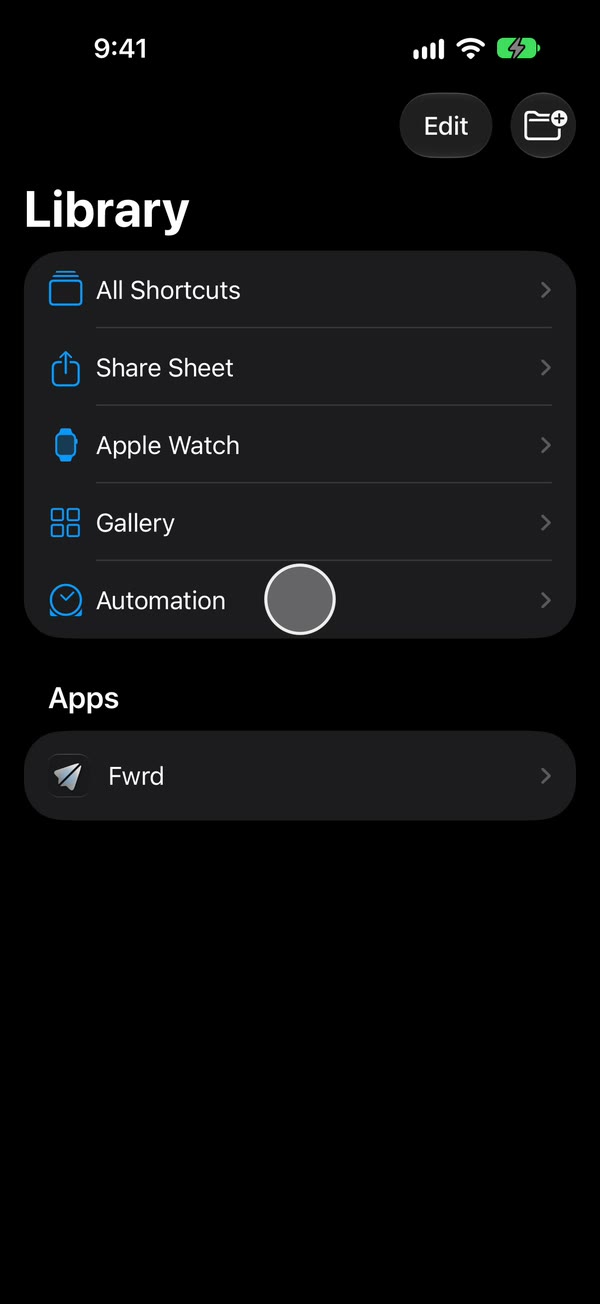
Open the automation list. Open Shortcuts and tap Library, then Automation. On iOS 27, automations are saved as shortcuts, and this is where they’re listed.
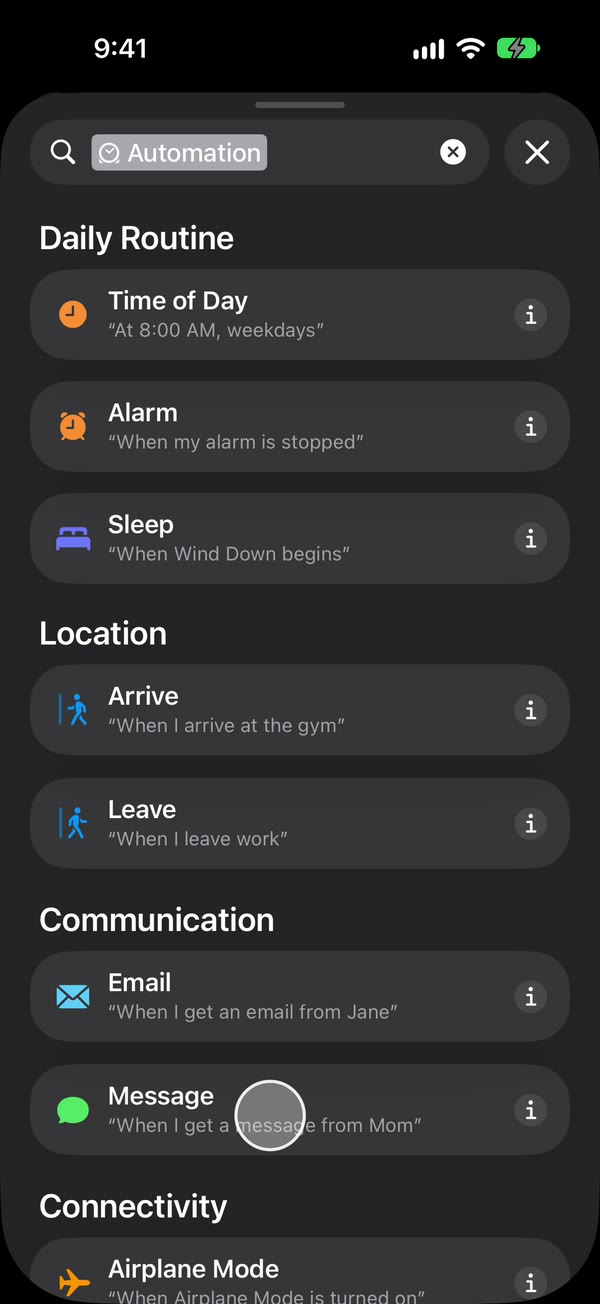
Start a new automation. Tap +. If it opens on Describe a shortcut, tap Edit to see the steps instead. Tap Automation, then Message.
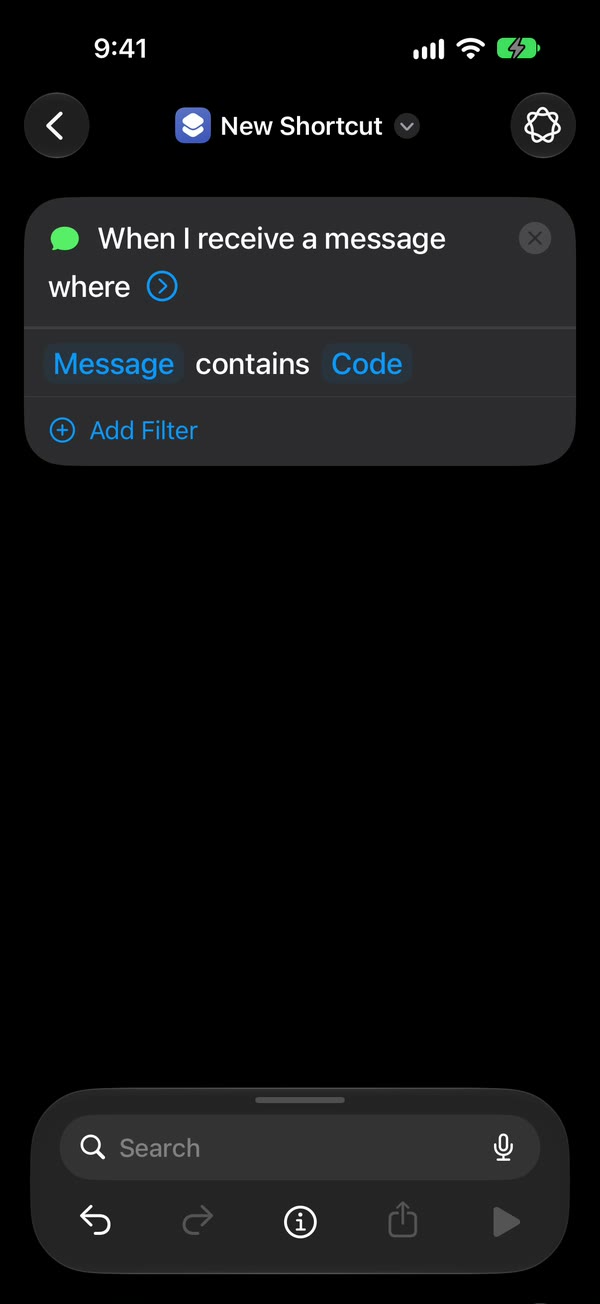
Choose which texts to forward. Change Sender to Message and type a word your texts contain, such as code. To forward any text with a space in it, type a single space instead.
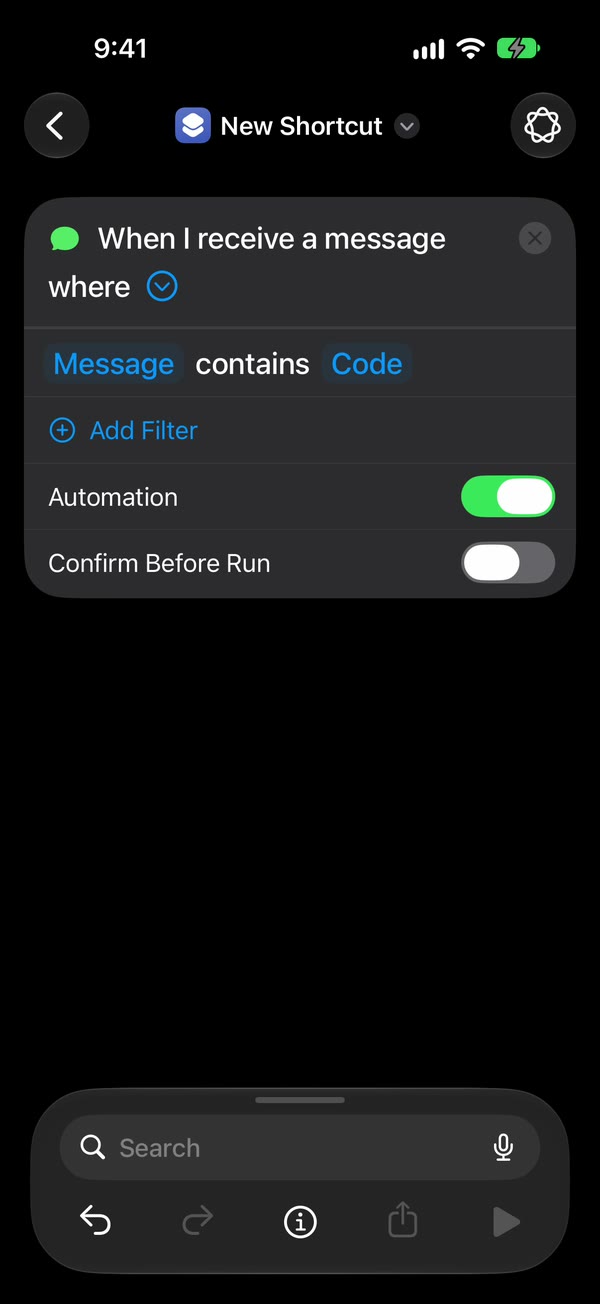
Make it run without asking. Tap the arrow beside the trigger. Leave Automation on and Confirm Before Run off. Then tap ⓘ, then Privacy, and make sure Allow Running When Locked is on. It’s on to begin with.
Add Fwrd’s action. Search for Forward and add Forward Message to All Destinations below the trigger. Tap Message in it, tap Select Variable, and choose Shortcut Input. Tap back to save.
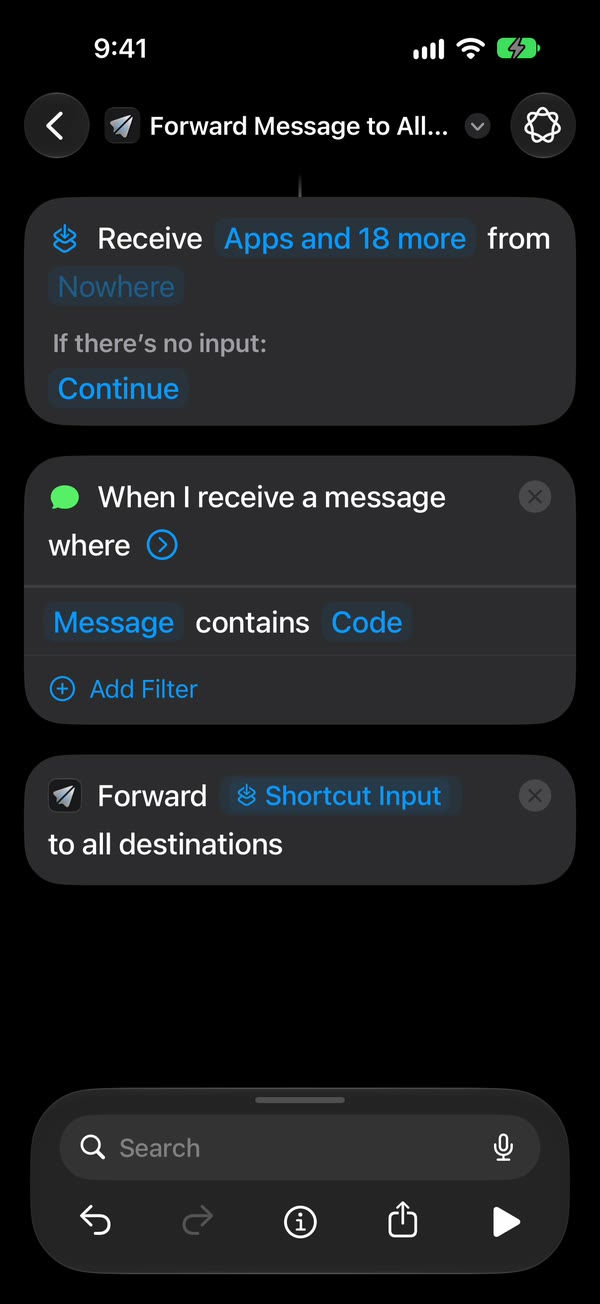
That’s it. New texts with your word now go to your destinations on their own, with iPhone Duo closed or open, unlocked or locked.
For email, another phone or WhatsApp, add Apple’s or WhatsApp’s own send action below Fwrd’s and give it Fwrd’s output; that action does the sending. Fwrd’s setup videos show every tap.
Does it matter whether iPhone Duo is folded?
No. The automation starts when a text arrives, not when you open the phone, so it runs the same with iPhone Duo closed, open or locked. What changes is only how the screens look. Apple’s guide for iPhone Duo apps (read October 26, 2026) says the outer display shows an app’s tab bar and toolbars in a column at the side when the phone is closed, so in Shortcuts, Library may sit at the side rather than along the bottom. Does text forwarding work when iPhone Duo is closed? goes through each position.
Where can iPhone Duo texts go?
Fwrd forwards to eight places. Five are sent by Fwrd itself; three go through a send action you add after Fwrd’s.
| Destination | Who sends it |
|---|---|
| Slack, Discord, Telegram, Microsoft Teams, your own webhook | Fwrd, straight from the iPhone |
| Apple’s Send Email action, after Fwrd’s | |
| Another phone or iMessage | Apple’s Send Message action, after Fwrd’s |
| WhatsApp’s own Send Message action, after Fwrd’s |
One automation reaches every destination you’ve switched on, and each destination can keep only some texts: ones with words you choose, ones that look like a verification code, or ones that arrive at certain hours. There’s no account and no Fwrd server; texts go from the iPhone to the apps you choose, and webhook addresses and bot tokens stay in the iPhone’s Keychain.
What forwarding on iPhone Duo can’t do
These are the same limits as on any iPhone.
- It can’t forward texts that arrived earlier. The automation starts with the next matching text.
- It needs a rule. Shortcuts acts on texts that contain your word. A single space catches any text with a space in it, so a one-word reply won’t match.
- The phone has to stay on and online. Wi-Fi or mobile data both work.
- After a restart, unlock it once. Fwrd keeps your destinations behind the iPhone’s lock, so forwarding waits until the first unlock.
- Text only, and one way. Pictures don’t forward, and replies still come from iPhone Duo itself.
Questions about forwarding texts on iPhone Duo
Does Fwrd work on iPhone Duo?
Yes. Fwrd needs iOS 26 or later, and iPhone Duo comes with iOS 27.1. You install it from the App Store and set it up with the same steps as on any iPhone.
Do I have to set it up again after I fold or unfold the phone?
No. You set the automation up once. Folding or unfolding iPhone Duo doesn’t switch it off or change which texts it forwards.
Can I forward texts from iPhone Duo to an Android phone?
Yes. Add an Another Phone destination in Fwrd, then Apple’s Send Message action below Fwrd’s with the Android phone’s number. You can also forward to a Telegram, Discord or Slack chat and read it on any phone.
What does it cost?
As of October 2026, Fwrd is free for 15 forwards a month, and a text counts once however many places it goes. Fwrd Pro removes the limit for $4.99 a month or $29.99 a year in the US.
Forward texts from your iPhone Duo
Fwrd adds one action to a Shortcuts Message automation that sends matching new texts to any of eight destinations, with no account. Start with 15 free forwards each month.
Free for 15 forwards a month. Pro removes the limits on forwards and filters and adds a Never Forward list, for $4.99/month or $29.99/year, with a 7-day free trial on the yearly plan for eligible customers.
iPhone · iOS 26 or later