
Free SMS Forwarder for iPhone: What Fwrd’s Free Plan Gives
By Fwrd · · Updated
Fwrd is a free SMS forwarder for iPhone: its free plan gives you 15 forwards a month to any of its eight destinations (email, another phone or iMessage, WhatsApp, Slack, Discord, Microsoft Teams, Telegram and your own webhook), with no account to make. A Shortcuts automation hands each matching new text to Fwrd, and Fwrd passes it on. Fwrd Pro removes the monthly limit.
What you need: the iPhone that gets the texts, and the Shortcuts app, which comes with it. Fwrd needs iOS 26 or later, and there’s no account to make.
What does Fwrd’s free plan include?
Everything you need to forward texts, with a monthly allowance instead of a trial that runs out:
- 15 forwards a month, no daily cap. The count resets at the start of each calendar month and is kept on your iPhone.
- Any of the eight destinations. Free doesn’t mean one destination: email, another phone or iMessage, WhatsApp, Slack, Discord, Microsoft Teams, Telegram and your own webhook are all open.
- Several places, one forward. One text counts once, even when it goes to several destinations, so a text that lands in Slack, your inbox and WhatsApp uses one of the 15.
- A filter on every destination. Keep just texts with your words, verification codes or certain hours: one condition per destination on the free plan, as many as you like with Pro. A text a filter skips doesn’t use a forward.
- Who sent it, if you want it. Switch on Include Who Sent It in Fwrd’s Settings and choose Sender on Fwrd’s action, and each forward starts with a From: line.
- No account, and no Fwrd server. Texts are processed on the iPhone and go straight to the places you pick.
How to start with Fwrd’s free plan
The automation guide walks through every step on iOS 26 and 27.
Add a destination in Fwrd. Open Fwrd, tap +, and choose where texts should go. Follow the prompts for that destination, such as a webhook URL for Slack or Discord, or an address for Email, then save with the tick.
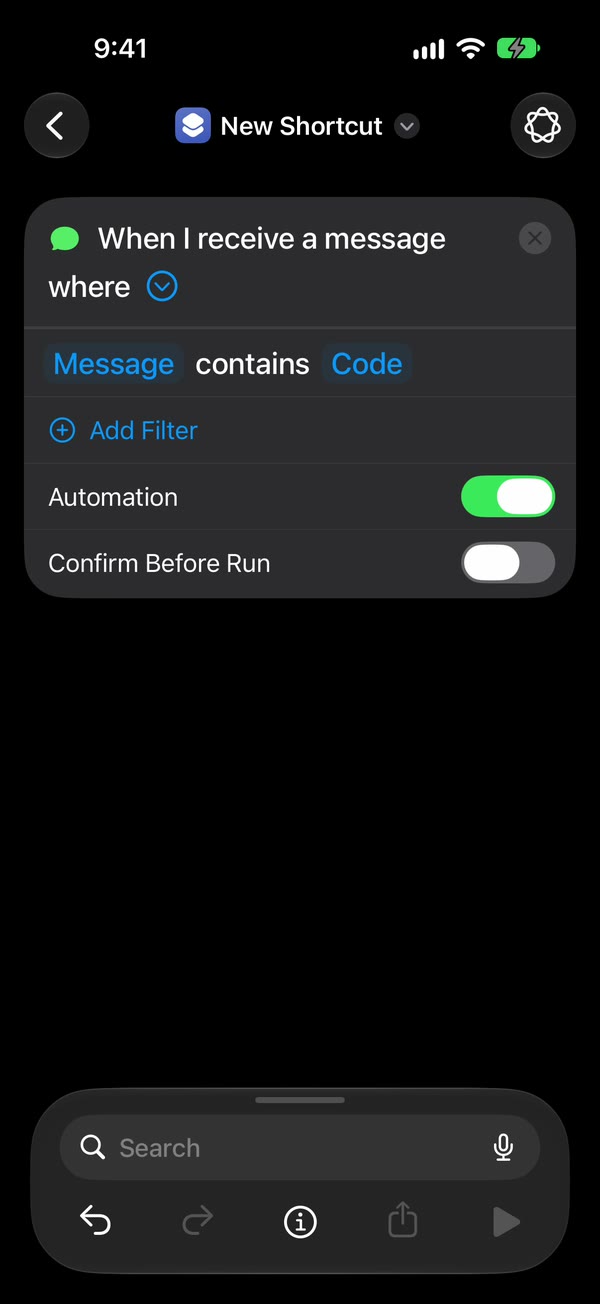
Create a Message automation. On iOS 27, open Shortcuts, tap Library, then Automation, then +. If you see Describe a shortcut, tap Edit. Tap Automation, then Message. On iOS 26, open the Automation tab, tap + (or New Automation if it’s your first), and choose Message.
Choose which texts to forward. Choose Message Contains (on iOS 27, change Sender to Message) and type a word your texts share, such as code. A single space catches any text with a space in it, but on the free plan a specific word makes 15 forwards last much longer.
Make it run without asking. On iOS 27, tap the arrow beside the trigger and check that Confirm Before Run is off. Under ⓘ, then Privacy, check that Allow Running When Locked is on. On iOS 26, choose Run Immediately, then tap Next and Create New Shortcut.
Add Fwrd’s action. Search for Forward and add Fwrd’s Forward Message to All Destinations, with its Message set to Shortcut Input (on iOS 26, Shortcut Input, then Message). Tap back to save (Done on iOS 26).
For email, another phone or WhatsApp, add the send action. Apple’s Send Email, Apple’s Send Message or WhatsApp’s own Send Message goes below Fwrd’s action, with Fwrd’s output as its message, and does the sending. Turn Show Compose Sheet off.
That’s it. New texts with your word now go to your destinations on their own, with the iPhone unlocked or locked.
How does Fwrd compare with other forwarder apps?
Other iPhone forwarders send to a different number of places. This is what each developer lists on its App Store page or site, checked October 15, 2026:
| App | Where it sends |
|---|---|
| Fwrd | Eight: email, another phone or iMessage, WhatsApp, Slack, Discord, Teams, Telegram, webhook |
| autoforward | Email; its site adds another phone number |
| Re:Text | 10 listed, including Google Chat and Mattermost |
| SMS Forwarder (Alexey Sakharov) | 8 listed |
| Forwardly | 7 listed |
| SMS Forwarder: Forward SMS (TSUBASA) | 7 listed |
We make Fwrd, so check each listing yourself. For ratings, minimum iOS versions and where each app sends your texts, see the comparison of iPhone SMS forwarding apps.
When does Fwrd Pro make sense?
When 15 forwards a month isn’t enough, or you want more than one filter condition per destination. Pro is $4.99 a month or $29.99 a year in the US, with a 7-day free trial on the yearly plan for eligible customers. A specific rule such as a word or a verification-code filter keeps the free plan going longer, because a skipped text uses nothing. Fwrd’s pricing shows what Pro adds.
The limits to know
- No app can read your texts on its own. The Shortcuts automation hands each text over, and it needs a rule. A single space misses texts with no spaces, like a bare link.
- The iPhone has to stay on and online, over Wi-Fi or mobile data.
- Unlock the iPhone once after a restart. Fwrd keeps your destinations behind the iPhone’s lock until then.
- New texts only, and text only. An automation can’t forward texts you already have, and pictures don’t forward through Fwrd.
- Email, phone and WhatsApp forwards don’t show in Fwrd’s Activity, because Mail, Messages and WhatsApp send them. Their filters need the send action inside an If; until then they get every text.
Questions about Fwrd’s free plan
Is Fwrd really free to start with?
Yes. The free plan has 15 forwards a month to any of the eight destinations, with no account to make. The count resets each calendar month, and Fwrd Pro removes the limit.
Does Fwrd’s free plan include filters?
Yes, one per destination. On the free plan, each of the eight destinations can filter by one condition, such as your words, verification codes or certain hours. Fwrd Pro allows as many conditions as you like.
When do Fwrd’s free forwards reset?
At the start of each calendar month. The count is kept on your iPhone, and forwards to email, another phone and WhatsApp count too.
How much is Fwrd Pro?
$4.99 a month or $29.99 a year in the US. Pro removes the monthly limit and the one-condition limit on filters, and Apple handles the subscription through your Apple Account.
Start with 15 free forwards a month
Fwrd forwards matching new texts to any of its eight destinations from one Shortcuts automation. No account, and one text counts once however many places it goes.
Free for 15 forwards a month. Pro removes the limits on forwards and filters and adds a Never Forward list, for $4.99/month or $29.99/year, with a 7-day free trial on the yearly plan for eligible customers.
iPhone · iOS 26 or later