
How to forward iPhone text messages to Discord
By Fwrd ·
To forward iPhone texts to Discord automatically, create a webhook for a Discord channel, paste it into Fwrd on your iPhone, and add a Message automation in Apple’s Shortcuts app. From then on, every text that matches your rule posts to that channel straight from your iPhone, without you opening anything. iPhone can’t do this on its own, because no setting sends texts to another app.
What you need: a Discord server where you have the Manage Webhooks permission (server owners have it), a channel for the texts, a computer for the Discord part, and an iPhone on iOS 26.2 or later with Fwrd.
How to forward iPhone texts to Discord, step by step
Create a webhook for the channel. Use Discord on a computer, in the app or at discord.com, because Discord’s iPhone app may not offer webhooks. Click the server name, choose Server Settings, then Integrations, then Create Webhook. Open the new webhook and pick the channel that should get your texts.
Copy the webhook URL. Choose Copy Webhook URL and get it to your iPhone somewhere only you can see, such as a note to yourself. Anyone who has this URL can post to the channel, so treat it like a password.
Add Discord in Fwrd. Open Fwrd, tap +, and choose Discord. Paste the whole URL into the Configuration field, then tap Send Test Message and check it lands in the channel. Save with the tick. If iOS offers to save a password, tap Not Now; Fwrd keeps the URL in the iPhone’s Keychain itself.
Create a Message automation. On iOS 27, open Shortcuts, tap Library, then Automation, then +. If you see Describe a shortcut, tap Edit. Tap Automation, then Message. On iOS 26, open the Automation tab, tap +, and choose Message.
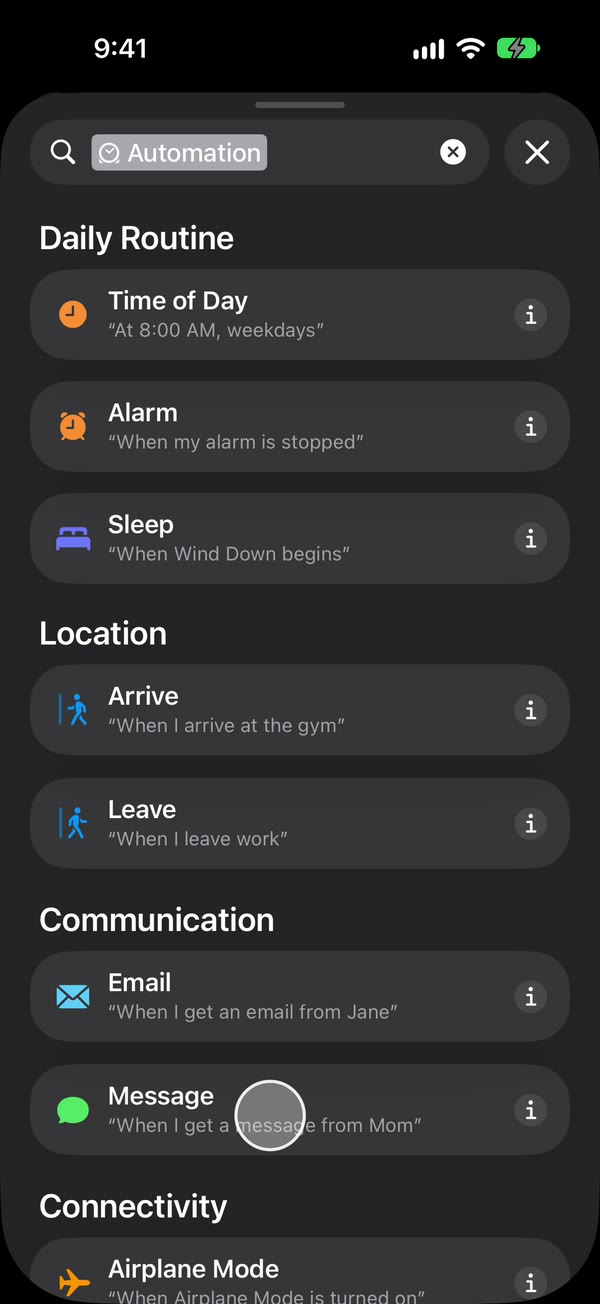
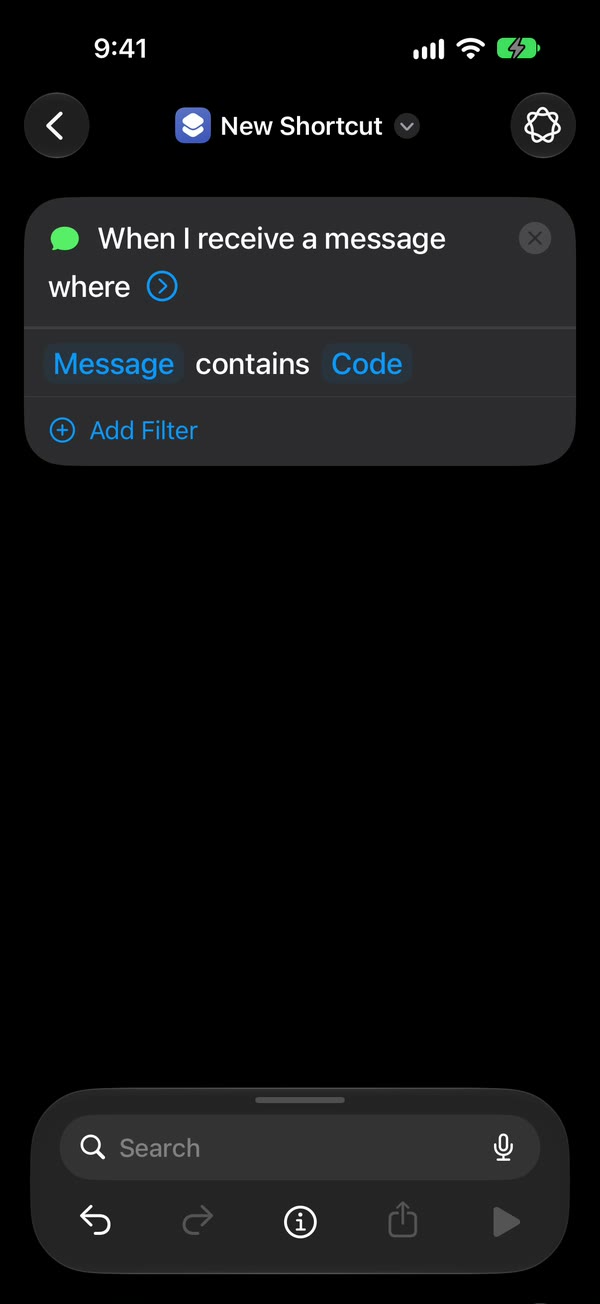
Pick which texts go to Discord. Choose Message Contains (on iOS 27, change Sender to Message) and type a word those texts include, such as code or delivery. To forward any text with a space in it, type a single space instead.
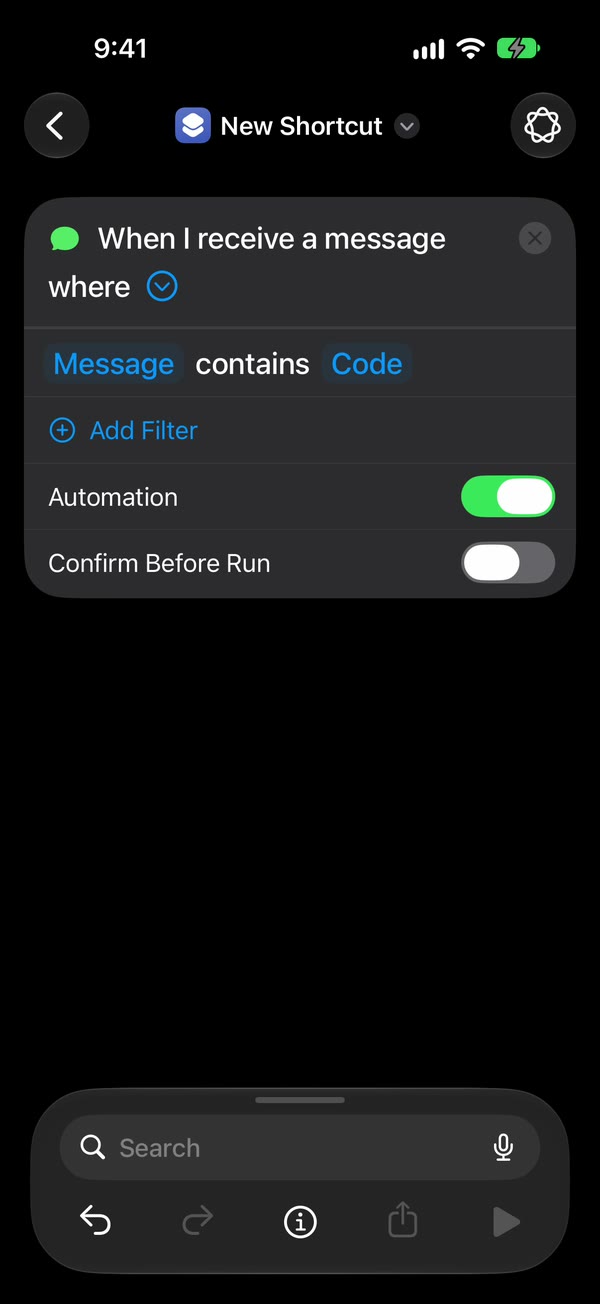
Let it run without asking. On iOS 27, tap the arrow beside the trigger and check that Confirm Before Run is off. On iOS 26, choose Run Immediately and turn off Notify When Run.
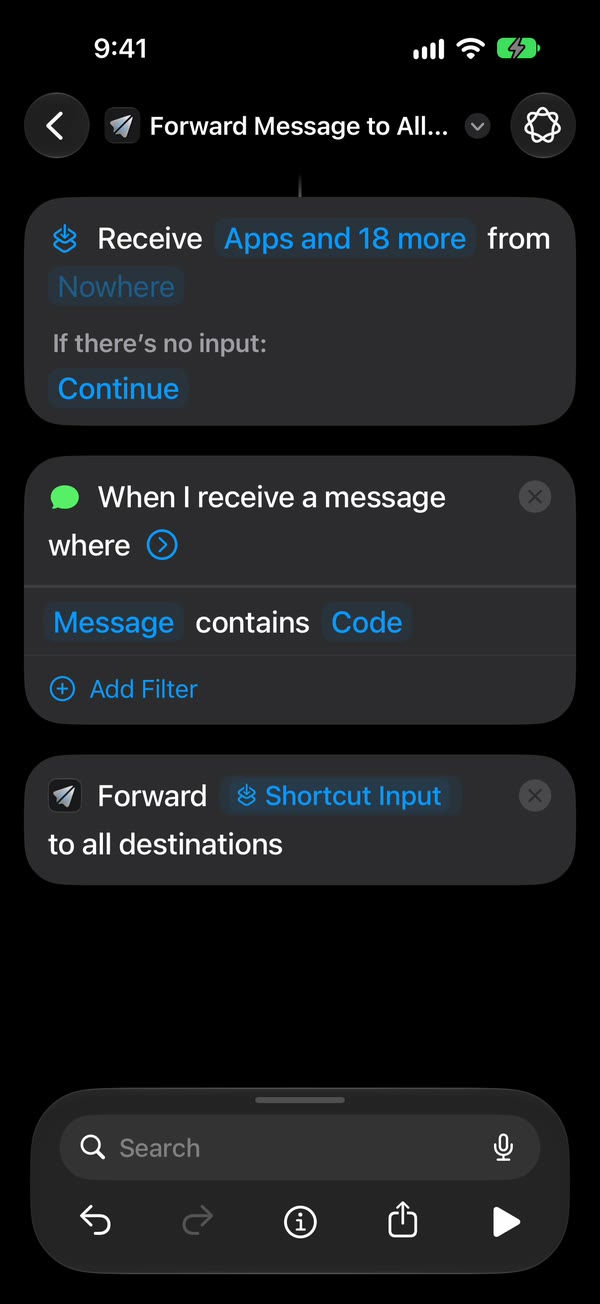
Add Fwrd’s action and test. Search for Forward, add Fwrd’s Forward Message to All Destinations, and set its Message field to Shortcut Input (on iOS 26, Shortcut Input, then Message). Then text the iPhone from another phone, once unlocked and once locked, and watch the channel.
The Discord setup guide has a video of every tap if you get stuck.
Choosing the channel
Anyone who can see the channel can read every text that lands in it. So:
- For codes and anything personal, make a channel only you can view.
- For a team, use a channel limited to the people who need those texts.
- Each webhook posts to one channel. To send texts to a second channel, make a second webhook and add it in Fwrd as another destination. Fwrd’s action sends each matching text to every active destination.
Doing it without Fwrd
You can post to a Discord webhook with Shortcuts alone. End the same automation with Apple’s Get Contents of URL action instead of Fwrd’s: paste the webhook URL, set the method to POST, and send a JSON body with a content field holding the Shortcut Input. It’s free, and it works.
What Fwrd adds:
- It builds the message Discord expects, so there’s no JSON to type or fix.
- The webhook URL sits in the iPhone’s Keychain rather than in plain sight inside a shortcut.
- If Discord doesn’t answer in time, or is busy or briefly down, Fwrd tries again, up to twice.
- A history on the phone lists each forward and whether it was delivered, which helps when a text seems to go missing.
- One action covers every destination, so adding Telegram or Slack later doesn’t mean another shortcut.
What it can’t do
- It can’t forward texts you already have. Only texts that arrive after the automation is on are forwarded.
- It needs a rule. Shortcuts acts on texts containing a word you choose, or from people in your Contacts. The Sender picker only offers your Contacts, so codes from short numbers need the Message Contains rule. A single space catches any text with a space in it, so a text with no spaces, like a one-word reply or a bare link, won’t match.
- The iPhone has to stay on and online. It’s the phone that sends each text to Discord, over Wi-Fi or mobile data.
- After a restart, unlock it once. Fwrd keeps the webhook behind the iPhone’s lock, so forwarding waits until the first unlock. An iPhone that isn’t unlocked for three days restarts itself, too.
- Text only, one way. Pictures don’t forward, the sender’s number isn’t included, and you can’t reply from Discord.
Questions about forwarding to Discord
Can I create the webhook on my iPhone?
Maybe not. Discord’s iPhone app may not show webhooks in Server Settings, so use Discord on a computer or at discord.com in a browser. You only need the computer once, to copy the URL.
Does it work when my iPhone is locked?
Yes. We’ve tested Discord end to end on a physical iPhone, unlocked and locked. The exception is right after a restart, until you unlock the phone once.
Fwrd won’t accept my webhook URL. Why?
Fwrd only takes Discord channel webhook URLs, which start with https://discord.com/api/webhooks/ (older discordapp.com links work too). Copy it again with Copy Webhook URL rather than typing it, and make sure nothing got cut off.
My texts stopped arriving in Discord. What happened?
Usually the webhook or its channel was deleted. Create a new webhook and paste it into Fwrd. If the channel still exists, check that the iPhone is on, online and has been unlocked since it last restarted.
Forward your texts with Fwrd
Fwrd sends the texts you choose from your iPhone to Discord, Telegram or Slack. No account, and no Fwrd server in the middle.
Free for 15 forwards a month. Pro removes the limit for $3.99/month or $29.99/year, with a 7-day free trial on the yearly plan for eligible customers.
iPhone · iOS 26.2 or later