
Apple Business Manager 2FA: Admin Codes in Teams or Slack
By Fwrd ·
Apple Business Manager (now called Apple Business) asks every admin for a six-digit verification code, sent by text or phone call to a number on their account. When that number is one person’s phone, the rest of the IT team waits for them. The fix that keeps everyone on their own login: add an office number as an extra verification number on each admin’s account, keep that SIM in an iPhone at the office, and let Fwrd post each code text to a private Microsoft Teams or Slack channel the admins already watch.
What you need: a spare iPhone on iOS 26 or later; a mobile carrier SIM the company owns, on a plan that receives texts; power and Wi-Fi at the office; a private Teams or Slack channel for the admins; and Fwrd.
How does two-factor authentication work in Apple Business Manager?
Apple’s guide says any user whose role can sign in to the Apple Business web portal needs a six-digit verification code, sent to a phone number on that user’s account (Apple, published April 14, 2026, read November 4, 2026). The code comes as a text message or a phone call, whichever was chosen when the number was added.
The same page says users whose role manages people, devices, apps and books, or brands may want more than one verification number. That’s the opening for a team: each admin keeps their own Managed Apple Account and password, and the office number is one of the numbers on every account.
How do I add a second verification phone number?
Apple’s steps, from the same guide:
- Go to the Apple Account website and sign in with your Managed Apple Account.
- In the Security section, select Edit.
- Select “Add a trusted phone number”, enter the office number, choose Text Message, then select Continue.
- Enter the six-digit code sent to that number, then select Verify.
Choose Text Message, not Phone Call: Fwrd forwards texts and can’t hear a call. Have the office iPhone nearby, or set up Fwrd first so the code arrives in the channel.
How do I change the 2FA phone number for another admin?
Apple’s guide says to sign in to Apple Business as a user whose role can create, edit and delete Managed Apple Accounts, then go to People, then Users, select the user, and select Reset. The next time that user signs in, they’re asked for a new phone number. That’s the moment to give the office number, or to add it as a second one.
How to send Apple Business Manager codes to Teams or Slack
Make the channel’s address. In Teams, choose the private channel’s More options (•••), then Workflows, then the template “Send webhook alerts to a channel”, and copy its URL. In Slack, create an app at api.slack.com/apps, switch on Incoming Webhooks, add one for the private channel and copy its URL.
Add the channel in Fwrd on the office iPhone. Open Fwrd, tap +, choose Microsoft Teams or Slack, and paste the URL into the Configuration field. Tap Send Test Message, then save with the tick.
Create a Message automation. On iOS 27, open Shortcuts, tap Library, then Automation, then +. If you see Describe a shortcut, tap Edit. Tap Automation, then Message, change Sender to Message, and type code. On iOS 26, open the Automation tab, tap +, choose Message, and type code.
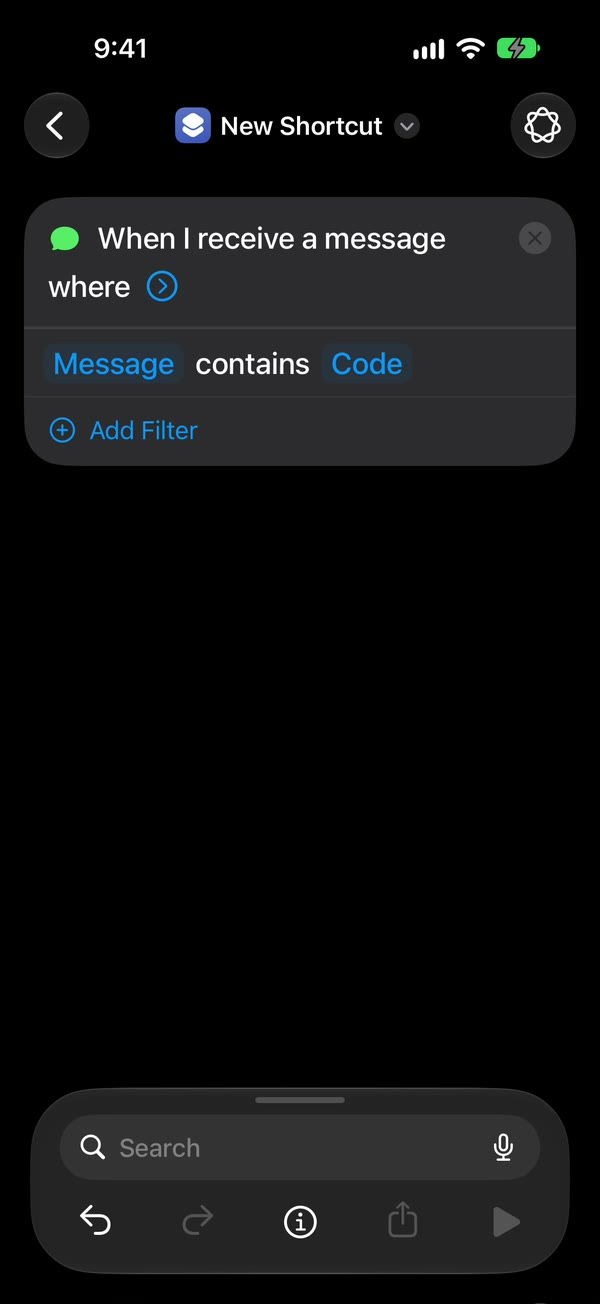
Let it run without asking. On iOS 27, tap the arrow beside the trigger and check Confirm Before Run is off, then under ⓘ, then Privacy, check Allow Running When Locked is on. On iOS 26, choose Run Immediately, then tap Next and Create New Shortcut.
Add Fwrd’s action. Search for Forward, add Forward Message to All Destinations, and set its Message field to Shortcut Input. Tap back to save (Done on iOS 26).
Add the office number to each admin’s account with the steps above. Its verification code is the first one that posts to the channel.
The word code matches Apple’s verification texts. If the office line also gets other texts with that word, set the channel’s filter in Fwrd to texts that look like a verification code. The office 2FA phone guide covers running one iPhone for many vendor logins.
IT firms with many client accounts
An IT firm or MSP that runs Apple Business for several clients can use one office iPhone for all of them. Add one destination per client channel, each with a word filter, or keep one private channel for the firm’s admins. Each technician still signs in with their own Managed Apple Account in each client’s organization, so nobody shares a password and removing someone stays a one-account job.
Apple School Manager
School and district IT has the same setup. Apple’s Apple School Manager guide says Administrator, Manager, Staff and Instructor accounts need a six-digit verification code with their Managed Apple Account password, and that Administrators and Managers may want more than one verification number (Apple, read November 4, 2026). Put a department-owned number on the admins’ accounts and post its codes to the IT team’s private channel.
Is this allowed where you work?
Your own policy decides, so read it first. Some organizations require a code to stay with one person. Fwrd doesn’t change any Apple setting; it only forwards the texts the office iPhone receives. Who can read a code is decided by who is in the channel, so keep it private and small, and remove people the day they leave.
Keep the office iPhone running
- Someone unlocks it at least every three days. An iPhone that isn’t unlocked for three days restarts itself, and after any restart Fwrd can’t forward until someone unlocks it once. A long weekend is enough, so put it on someone’s list.
- Give it power, Wi-Fi and a label. Write on it what it’s for and who to call.
- Turn off automatic iOS updates and any SIM PIN. Both can restart it or keep it off the network.
- Pay the line from a company card on autopay. A lapsed line stops receiving codes without warning.
A team that signs in to client portals every day passes 15 forwards a month quickly. Fwrd Pro removes the limit, with a free trial on the yearly plan for eligible customers, bought once on the office iPhone.
What this can’t do
- It can’t hear a phone call. Choose Text Message when you add the number.
- It doesn’t replace each admin’s own sign-in. Every admin keeps their own Managed Apple Account and password.
- It only goes one way. Nobody can reply from the channel, and only the text is posted.
- It needs power, signal and Wi-Fi. Codes wait until they’re back.
Questions about Apple Business Manager 2FA
Can more than one person get Apple Business Manager verification codes?
Yes. Apple lets admins add more than one verification phone number. Put an office number on each admin’s account and have Fwrd post that number’s code texts to a private Teams or Slack channel, so any admin in the channel can read the code.
Can I turn off two-factor authentication in Apple Business Manager?
Apple’s guide says every user whose role can sign in to the portal needs a verification code, and it doesn’t describe a way to turn that off. Sharing the codes with your team is the way to stop waiting on one phone.
Does every admin need Fwrd?
No. Only the office iPhone needs Fwrd and the automation. Everyone else reads the channel on whatever device they already use.
Get Apple Business Manager codes where your team works
Fwrd posts each new code text from an office iPhone to a private Microsoft Teams or Slack channel, with no account and no Fwrd server. Start with 15 free forwards each month.
Free for 15 forwards a month. Pro removes the limits on forwards and filters and adds a Never Forward list, with a free trial on the yearly plan for eligible customers.
iPhone · iOS 26 or later
Team plan
$19.99 a shared iPhone a month
Pro already forwards everything from one shared iPhone. The team plan adds what a business needs:
- An invoice in your company’s name
- Several shared iPhones on one bill
- Help from me with the setup
The button opens an email to me at support@fwrdsms.com. An iPhone nobody unlocks for three days restarts itself, and texts that arrive before someone unlocks it again aren’t forwarded, so plan for long weekends.